
Wayback Machinekoobas.hobune.stream
May JUN Jul
Previous capture 13 Next capture
2021 2022 2023
1 capture
13 Jun 22 - 13 Jun 22
sparklines
Close Help
  • Products
  • Solutions
  • Made with Unity
  • Learning
  • Support & Services
  • Community
  • Asset Store
  • Get Unity

UNITY ACCOUNT

You need a Unity Account to shop in the Online and Asset Stores, participate in the Unity Community and manage your license portfolio. Login Create account
  • Blog
  • Forums
  • Answers
  • Evangelists
  • User Groups
  • Beta Program
  • Advisory Panel

Navigation

  • Home
  • Products
  • Solutions
  • Made with Unity
  • Learning
  • Support & Services
  • Community
    • Blog
    • Forums
    • Answers
    • Evangelists
    • User Groups
    • Beta Program
    • Advisory Panel

Unity account

You need a Unity Account to shop in the Online and Asset Stores, participate in the Unity Community and manage your license portfolio. Login Create account

Language

  • Chinese
  • Spanish
  • Japanese
  • Korean
  • Portuguese
  • Ask a question
  • Spaces
    • Default
    • Help Room
    • META
    • Moderators
    • Topics
    • Questions
    • Users
    • Badges
  • Home /
avatar image
3
Question by adde210 · Sep 22, 2014 at 09:07 PM · terrainblendchunksslice

Blend edges between multi terrains?

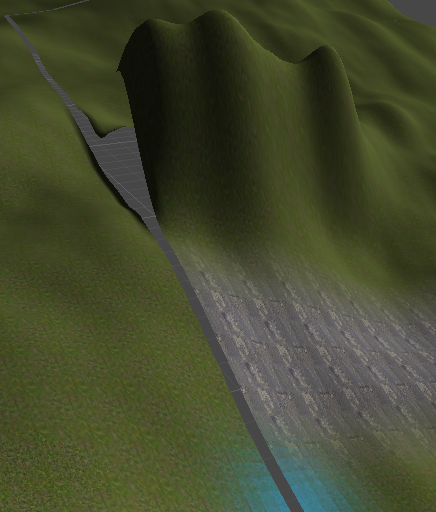
Hey i don't know how it's called but what i mean is that i have a terrain a big one and i have slice it to 32 x 32 pieces,and what everyone may have got to that's how do i blend between the terrains ? i am that kind of person that can buy solutions from the (assets store) so i don't mind to get links to the (Assets Store). what i mean with blend between them is that if i paint in the terrain 1 and go over to the terrain 2 i want the pain going to paint in the terrain 2 as well. and the same with the (Raise/lower Terrain) tool (what i am doing on the terrain 1 can affect the terrains around the terrain 1) like what you can see in this Picture. how to blend this chunks edges together but they still are two different terrains or whatever i think you understand how i mean they are still individual parts. i need to have the terrain sliced so i don't want to do them to be one big terrain i hope you understand.
alt text

I don't want the gap between them but i still want to work with the terrain easier said.
thanks you for the help, I appreciate your answers and links to Asset Store.

terrainpic.png (360.9 kB)
Comment
Add comment
10 |3000 characters needed characters left characters exceeded
▼
  • Viewable by all users
  • Viewable by moderators
  • Viewable by moderators and the original poster
  • Advanced visibility
Viewable by all users

2 Replies

· Add your reply
  • Sort: 
avatar image
3
Best Answer

Answer by Eric5h5 · Sep 22, 2014 at 09:45 PM

Stitchscape (asset store link).

Comment
Add comment · Show 2 · Share
10 |3000 characters needed characters left characters exceeded
▼
  • Viewable by all users
  • Viewable by moderators
  • Viewable by moderators and the original poster
  • Advanced visibility
Viewable by all users
avatar image adde210 · Sep 22, 2014 at 10:24 PM 1
Share

thx do you have videos or something about this assets thx :)

avatar image Eric5h5 · Sep 22, 2014 at 10:41 PM 1
Share

No video, sorry...there's not much to see, you click a button and the terrains are stitched. ;) The before/after pics on my site (click the first link in my answer) are about as exciting as it gets, visually.

avatar image
2

Answer by Bunny83 · Sep 22, 2014 at 09:49 PM

Well, you should match the edges of both terrains... It's possible to smooth-merge the terrain edges, but there's no general valid approach for this as it depends on how large the smoothing area should be and how much smoothing should be allowed.

Have you already set the neighbors of your terrain? If not that should be the first thing.

Comment
Add comment · Show 2 · Share
10 |3000 characters needed characters left characters exceeded
▼
  • Viewable by all users
  • Viewable by moderators
  • Viewable by moderators and the original poster
  • Advanced visibility
Viewable by all users
avatar image adde210 · Sep 22, 2014 at 10:25 PM 0
Share

thx o gonna look that up :)

avatar image adde210 · Sep 22, 2014 at 10:36 PM 1
Share

i will say this is also a accepted answer as correct (Y) but i am lazy and like to buy stuff that helps me more easier. but still this is correct too :) thx

Your answer

Hint: You can notify a user about this post by typing @username

Up to 2 attachments (including images) can be used with a maximum of 524.3 kB each and 1.0 MB total.

Follow this Question

Answers Answers and Comments

25 People are following this question.

avatar image avatar image avatar image avatar image avatar image avatar image avatar image avatar image avatar image avatar image avatar image avatar image avatar image avatar image avatar image avatar image avatar image avatar image avatar image avatar image avatar image avatar image avatar image avatar image avatar image

Related Questions

Stupid Question of mine-Please take it seriously 1 Answer

Perlin noise for (sort of Minecraft) terrain generator 2 Answers

Terrain Menu is gone in the MenuBar. 3 Answers

How to push the limits of Unity3D and run mass terrains? 1 Answer

MissingMethodException: What the heck is this? 0 Answers


Enterprise
Social Q&A

Social
Subscribe on YouTube social-youtube Follow on LinkedIn social-linkedin Follow on Twitter social-twitter Follow on Facebook social-facebook Follow on Instagram social-instagram

Footer

  • Purchase
    • Products
    • Subscription
    • Asset Store
    • Unity Gear
    • Resellers
  • Education
    • Students
    • Educators
    • Certification
    • Learn
    • Center of Excellence
  • Download
    • Unity
    • Beta Program
  • Unity Labs
    • Labs
    • Publications
  • Resources
    • Learn platform
    • Community
    • Documentation
    • Unity QA
    • FAQ
    • Services Status
    • Connect
  • About Unity
    • About Us
    • Blog
    • Events
    • Careers
    • Contact
    • Press
    • Partners
    • Affiliates
    • Security
Copyright © 2020 Unity Technologies
  • Legal
  • Privacy Policy
  • Cookies
  • Do Not Sell My Personal Information
  • Cookies Settings
"Unity", Unity logos, and other Unity trademarks are trademarks or registered trademarks of Unity Technologies or its affiliates in the U.S. and elsewhere (more info here). Other names or brands are trademarks of their respective owners.
  • Anonymous
  • Sign in
  • Create
  • Ask a question
  • Spaces
  • Default
  • Help Room
  • META
  • Moderators
  • Explore
  • Topics
  • Questions
  • Users
  • Badges
