Wayback Machinekoobas.hobune.stream
May JUN Jul
Previous capture 13 Next capture
2021 2022 2023
1 capture
13 Jun 22 - 13 Jun 22
sparklines
Close Help
  • Products
  • Solutions
  • Made with Unity
  • Learning
  • Support & Services
  • Community
  • Asset Store
  • Get Unity

UNITY ACCOUNT

You need a Unity Account to shop in the Online and Asset Stores, participate in the Unity Community and manage your license portfolio. Login Create account
  • Blog
  • Forums
  • Answers
  • Evangelists
  • User Groups
  • Beta Program
  • Advisory Panel

Navigation

  • Home
  • Products
  • Solutions
  • Made with Unity
  • Learning
  • Support & Services
  • Community
    • Blog
    • Forums
    • Answers
    • Evangelists
    • User Groups
    • Beta Program
    • Advisory Panel

Unity account

You need a Unity Account to shop in the Online and Asset Stores, participate in the Unity Community and manage your license portfolio. Login Create account

Language

  • Chinese
  • Spanish
  • Japanese
  • Korean
  • Portuguese
  • Ask a question
  • Spaces
    • Default
    • Help Room
    • META
    • Moderators
    • Topics
    • Questions
    • Users
    • Badges
  • Home /
This question was closed May 18, 2013 at 01:47 PM by fafase for the following reason:

The question is answered, right answer was accepted

avatar image
0
Question by crusherxman · May 04, 2013 at 02:50 PM · scenepickupkeydoors

Pickable item to unlock doors (Being able to proceed next scene)

Hi everyone, I'm currently working on a horror game and after hours of building my scene, I got stuck with one little thing: Picking up an key and being able to unlock a door to change scene, and if I don't have a key, I want to restrict the action of changing scenes.

For now on, my key already has a Sphere collider with the "Is Triggered" checked.

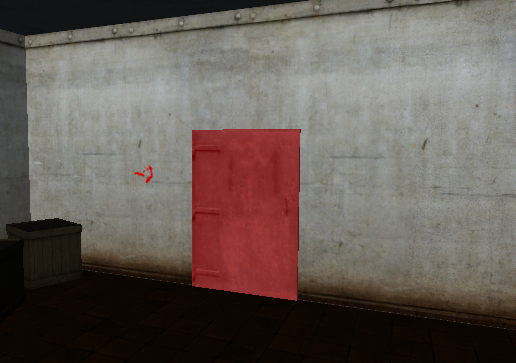
Here's a 2 screenshots of my Key and the door:

Key:
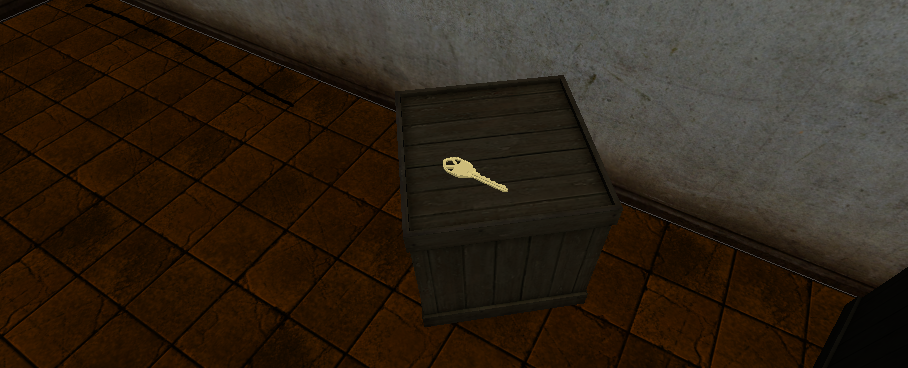
alt text

Door:

alt text

If you guys have a good way to solve this question or if you need more info, please post them below! I will reply your answers/comments quick and fast.

Thanks!

~crusherxman

key.png (493.0 kB)
door_finish.png (338.7 kB)
Comment
Add comment · Show 3
10 |3000 characters needed characters left characters exceeded
▼
  • Viewable by all users
  • Viewable by moderators
  • Viewable by moderators and the original poster
  • Advanced visibility
Viewable by all users
avatar image ExTheSea · May 07, 2013 at 07:10 PM 0
Share

Did it work? Is your question solved?

avatar image VeeBeeMee · May 18, 2013 at 12:43 AM 0
Share

I was looking for a simple key code, this worked perfect :-)

avatar image crusherxman · May 18, 2013 at 12:57 PM 0
Share

You're welcome VeeBee$$anonymous$$ee! :)

2 Replies

  • Sort: 
avatar image
0
Best Answer

Answer by ExTheSea · May 04, 2013 at 03:11 PM

I will try to make an example code which hopefully will work in your case:

 var hasKey = false;
 
 function Update(){
 if(Input.GetKeyDown(KeyCode.E)){ //If E is pressed
   var hit : RaycastHit;
   if (Physics.Raycast (transform.position, transform.forward, hit, 50)) { // Sends out a raycast to check if something is in front of you
     if(hit.transform.tag == "Key"){ // If the object in front of you has the tag Key
       Destroy(hit.transform.gameobject);//Destroy Key Object
       hasKey = true;
     }else if(hit.transform.tag == "Door"){ //Checks if the gameobject you're looking at has the tag Door
       if(hasKey)
         hit.transform.SendMessage("Unlock"); //Calls the function Unlock on the door
     }
   }
 }
 }

Add this script to your camera, Add a function Unlock to the door which actually opens the door or removes a lock, .... and add the tag Door to the door and Key to the key. Or you change the code to match your case.

Hope it works for you if not let me know.

Comment
Add comment · Show 13 · Share
10 |3000 characters needed characters left characters exceeded
▼
  • Viewable by all users
  • Viewable by moderators
  • Viewable by moderators and the original poster
  • Advanced visibility
Viewable by all users
avatar image crusherxman · May 04, 2013 at 03:40 PM 0
Share

Have you checked if the script was valid? I came up with 5 errors...

avatar image ExTheSea · May 04, 2013 at 03:59 PM 0
Share

No i actualy did not i was writing it here and not inside unity. I will check.....Ok i forgot a bracket after Update() i corrected my code and also fixed a bug in the raycast. The only thing was that i didn't get the Destroy line to work for some reason but maybe it works in your case.

avatar image crusherxman · May 04, 2013 at 07:25 PM 0
Share

Doesn't work, although what you mean about my door's function? Like changing scenes?

avatar image ExTheSea · May 05, 2013 at 12:06 PM 0
Share

Well my script calls a function called Unlock a script attached to the Door gameobject. So if you want to change the scene the second you unlock the door you have to put your level-change code inside an Unlock function and attach a script containing this function to the Door.

Did you get any other errors except maybe that the function Unlock wasn't found or something like this?

avatar image crusherxman · May 05, 2013 at 12:23 PM 0
Share

I haven't got errors but yes I'm missing a Unlock function...

Show more comments
avatar image
1

Answer by fafase · May 13, 2013 at 04:23 PM

So your key has a sphere collider set to IsTrigger.

On your player you have:

 var hasKey:boolean = false;;
 
 function OnTriggerEnter(other:Collider){
   if(other.collider.tag == "Key"){
     hasKey = true;
     Destroy(other.gameObject);
   }
 }
 
 function Update(){
   var hit :RaycastHit;
   if(Pyhsics.Raycast(transform.position, transform.forward, hit, 2)){
     if(hit.collider.tag == "Door" && hasKey && Input.GetKeyDown(KeyCode.Space)){
       Application.LoadLevel("nextLevel");
     }
   }
 }


Hopefully I did not miss anything...The idea is simple, if you collect the key you get the boolean and you need the boolean to open the door.

EDIT:

I actually, I realize I just reformulated the other answer already given...

Comment
Add comment · Show 14 · Share
10 |3000 characters needed characters left characters exceeded
▼
  • Viewable by all users
  • Viewable by moderators
  • Viewable by moderators and the original poster
  • Advanced visibility
Viewable by all users
avatar image crusherxman · May 16, 2013 at 09:00 PM 0
Share

Ok I'll try.

avatar image crusherxman · May 16, 2013 at 09:52 PM 0
Share

I'm getting this error:

Assets/Has$$anonymous$$ey_Script.js(1,7): BCE0044: expecting EOF, found 'has$$anonymous$$ey'.

I don't know if you actually did tried or tested it, but it just needs a few changes (I've tried myself and it didn't work)

avatar image fafase · May 17, 2013 at 04:27 AM 0
Share

Ooooh, the first bool should be var.

avatar image ExTheSea · May 17, 2013 at 03:55 PM 0
Share

@crusherxman : Did my answer not work? I mean fafase already said it. It's pretty much the same thing as my answer.

avatar image ExTheSea · May 18, 2013 at 08:56 AM 1
Share

I just put the necessary scripts in a new project and packed it in a zip file.

Load the TestPickup scene and start it. Then press E when looking at the right cube and then press E on the left cube. You should be transfered to a scene called Scenetoloadafterunlock.

If that works you can adapt the setup in your project.

https://dl.dropboxusercontent.com/u/83937500/TestPickup$$anonymous$$ey.zip

Show more comments

Follow this Question

Answers Answers and Comments

16 People are following this question.

avatar image avatar image avatar image avatar image avatar image avatar image avatar image avatar image avatar image avatar image avatar image avatar image avatar image avatar image avatar image avatar image

Related Questions

Door rotate on hinge 1 Answer

Playing animation when picking up an object. 2 Answers

The name 'Joystick' does not denote a valid type ('not found') 2 Answers

Endless DeathZone??!!? 4 Answers

Can anyone help me invert this simple script? 2 Answers


Enterprise
Social Q&A

Social
Subscribe on YouTube social-youtube Follow on LinkedIn social-linkedin Follow on Twitter social-twitter Follow on Facebook social-facebook Follow on Instagram social-instagram

Footer

  • Purchase
    • Products
    • Subscription
    • Asset Store
    • Unity Gear
    • Resellers
  • Education
    • Students
    • Educators
    • Certification
    • Learn
    • Center of Excellence
  • Download
    • Unity
    • Beta Program
  • Unity Labs
    • Labs
    • Publications
  • Resources
    • Learn platform
    • Community
    • Documentation
    • Unity QA
    • FAQ
    • Services Status
    • Connect
  • About Unity
    • About Us
    • Blog
    • Events
    • Careers
    • Contact
    • Press
    • Partners
    • Affiliates
    • Security
Copyright © 2020 Unity Technologies
  • Legal
  • Privacy Policy
  • Cookies
  • Do Not Sell My Personal Information
  • Cookies Settings
"Unity", Unity logos, and other Unity trademarks are trademarks or registered trademarks of Unity Technologies or its affiliates in the U.S. and elsewhere (more info here). Other names or brands are trademarks of their respective owners.
  • Anonymous
  • Sign in
  • Create
  • Ask a question
  • Spaces
  • Default
  • Help Room
  • META
  • Moderators
  • Explore
  • Topics
  • Questions
  • Users
  • Badges