
Wayback Machinekoobas.hobune.stream
May JUN Jul
Previous capture 13 Next capture
2021 2022 2023
1 capture
13 Jun 22 - 13 Jun 22
sparklines
Close Help
  • Products
  • Solutions
  • Made with Unity
  • Learning
  • Support & Services
  • Community
  • Asset Store
  • Get Unity

UNITY ACCOUNT

You need a Unity Account to shop in the Online and Asset Stores, participate in the Unity Community and manage your license portfolio. Login Create account
  • Blog
  • Forums
  • Answers
  • Evangelists
  • User Groups
  • Beta Program
  • Advisory Panel

Navigation

  • Home
  • Products
  • Solutions
  • Made with Unity
  • Learning
  • Support & Services
  • Community
    • Blog
    • Forums
    • Answers
    • Evangelists
    • User Groups
    • Beta Program
    • Advisory Panel

Unity account

You need a Unity Account to shop in the Online and Asset Stores, participate in the Unity Community and manage your license portfolio. Login Create account

Language

  • Chinese
  • Spanish
  • Japanese
  • Korean
  • Portuguese
  • Ask a question
  • Spaces
    • Default
    • Help Room
    • META
    • Moderators
    • Topics
    • Questions
    • Users
    • Badges
  • Home /
avatar image
2
Question by Rphysx · Sep 30, 2014 at 11:01 AM · 2drigidbodybugboxcolliderstuck

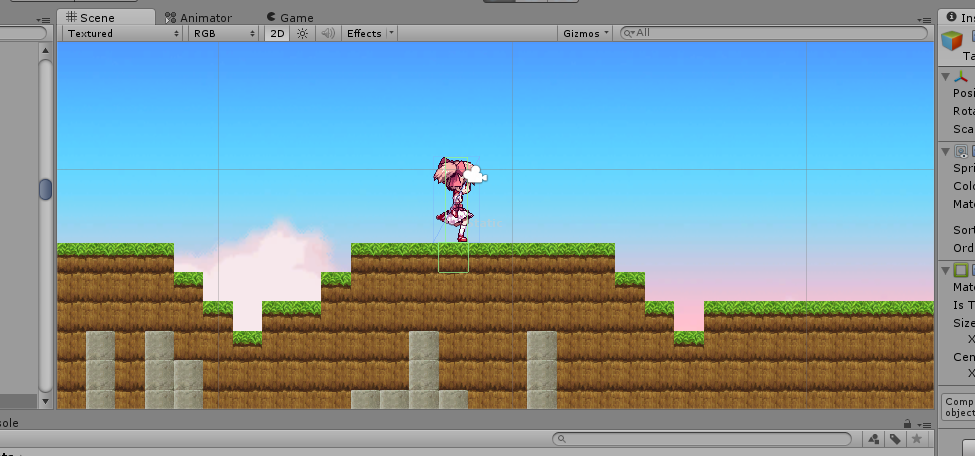
Player stuck between 2D boxcolliders
alt text

To create a terraria-clone, i'm procedurally instantiating multiple sprites/gameobjects with a boxcollider2d attached to them, so every cube has its own 2d boxcollider. The problem is that VERY randomly my character gets stuck between two boxcolliders, it really happens randomly but not that rarely, every 10/20/30 seconds or so of walking may happen

Player moves throught rigidbody.velocity.x and no gravityscale gets changed, here's the code for the "D" key used to move it right

 if(Input.GetKey(KeyCode.D))
             rigidbody2D.velocity = new Vector2(4f, rigidbody2D.velocity.y);
 
         if (Input.GetKeyDown(KeyCode.D))
         {
             if (transform.localScale.x < 0)  //used to change the direction that player is facing
                 transform.localScale = new Vector3(-transform.localScale.x, transform.localScale.y, transform.localScale.z);
                  //setting the animation to true
             PlayerAnim.SetBool("Running", true);
         }
         if (Input.GetKeyUp(KeyCode.D))
         {
             PlayerAnim.SetBool("Running", false);
                  //stopping the animation and setting the velocity to zero
             rigidbody2D.velocity = new Vector2(0f, rigidbody2D.velocity.y);
         }


Edit : yes, every square is instantiated in a pixel perfect fashion, 1f x 1f is the dimension of each one to keep better track of coordinates

Comment
Add comment
10 |3000 characters needed characters left characters exceeded
▼
  • Viewable by all users
  • Viewable by moderators
  • Viewable by moderators and the original poster
  • Advanced visibility
Viewable by all users

3 Replies

· Add your reply
  • Sort: 
avatar image
3
Best Answer

Answer by BlueSin · Sep 30, 2014 at 01:15 PM

I would agree with the first poster that you should add a circle collider to your player character. In addition, if you are building a Terraria style world you may wish to re-consider making every block with it's own individual box collider if you are creating large chunks of blocks at a time. It is alot for the Unity Engine and the user's PC to have to process as far as physics is concerned. A better option would be to go the mesh route, where chunks of blocks all share a mesh and a single collider. This would ease up the tension on the physics engine, while also speeding up your game. It's quite possible that the reason you are seeing this issue every 10 - 30 seconds is because there is so much physics processing going on that the Unity Engine needs time to catch up.

Comment
Add comment · Show 2 · Share
10 |3000 characters needed characters left characters exceeded
▼
  • Viewable by all users
  • Viewable by moderators
  • Viewable by moderators and the original poster
  • Advanced visibility
Viewable by all users
avatar image Rphysx · Sep 30, 2014 at 05:34 PM 0
Share

that seems a viable solution, would you please link to me some example of how to implement something like this ? i've personally never used shared meshes

avatar image BlueSin · Oct 01, 2014 at 12:58 PM 0
Share

The most common link you are going to find when building a block/voxel style game is this one: http://forum.unity3d.com/threads/tutorial-procedural-meshes-and-voxel-terrain-c.198651/. Having no idea where to start for our 2D Terraria-style game we used this tutorial as a basis for our learning. We then adapted the code used in the tutorial to suit our own needs. But the tutorial shows you how the mesh is built and gives you a great starting point. Just a little innovation and hard work from there and you will be well on your way, best of luck to you!

P.S. - We stopped the tutorial once the 3D tutorials started, but often looked into the 3D tutorials for guidance and ideas on the more advanced terrain generation concepts. The first half of the tutorials are however in 2D.

avatar image
2

Answer by stulleman · Sep 30, 2014 at 12:01 PM

Have you tried to use a Circle Collider on the bottom of your character?

Comment
Add comment · Show 2 · Share
10 |3000 characters needed characters left characters exceeded
▼
  • Viewable by all users
  • Viewable by moderators
  • Viewable by moderators and the original poster
  • Advanced visibility
Viewable by all users
avatar image Rphysx · Sep 30, 2014 at 05:35 PM 0
Share

already tried it solves the problem but cause rigidbody.velocity issues

avatar image stulleman · Sep 30, 2014 at 08:33 PM 0
Share

And what's the issue?

avatar image
0

Answer by Hanh · Aug 31, 2017 at 07:21 AM

Physics Material 2D worked for me.
- Create a Physics Meterial 2D.
- Set friction is zero
- Assign it into colliders (don't need for player)
- See it works
Happy coding

Comment
Add comment · Share
10 |3000 characters needed characters left characters exceeded
▼
  • Viewable by all users
  • Viewable by moderators
  • Viewable by moderators and the original poster
  • Advanced visibility
Viewable by all users

Your answer

Hint: You can notify a user about this post by typing @username

Up to 2 attachments (including images) can be used with a maximum of 524.3 kB each and 1.0 MB total.

Follow this Question

Answers Answers and Comments

29 People are following this question.

avatar image avatar image avatar image avatar image avatar image avatar image avatar image avatar image avatar image avatar image avatar image avatar image avatar image avatar image avatar image avatar image avatar image avatar image avatar image avatar image avatar image avatar image avatar image avatar image avatar image avatar image avatar image avatar image avatar image

Related Questions

I want to make it so when my player dashes they cant be hit 2 Answers

2D player stuck between BoxColliders 1 Answer

RigidBody2D - Ignoring other RigidBodies. 1 Answer

Weird Box Collider and Rigidbody error 1 Answer

RigidBody's Bug???How to solve it??? 0 Answers


Enterprise
Social Q&A

Social
Subscribe on YouTube social-youtube Follow on LinkedIn social-linkedin Follow on Twitter social-twitter Follow on Facebook social-facebook Follow on Instagram social-instagram

Footer

  • Purchase
    • Products
    • Subscription
    • Asset Store
    • Unity Gear
    • Resellers
  • Education
    • Students
    • Educators
    • Certification
    • Learn
    • Center of Excellence
  • Download
    • Unity
    • Beta Program
  • Unity Labs
    • Labs
    • Publications
  • Resources
    • Learn platform
    • Community
    • Documentation
    • Unity QA
    • FAQ
    • Services Status
    • Connect
  • About Unity
    • About Us
    • Blog
    • Events
    • Careers
    • Contact
    • Press
    • Partners
    • Affiliates
    • Security
Copyright © 2020 Unity Technologies
  • Legal
  • Privacy Policy
  • Cookies
  • Do Not Sell My Personal Information
  • Cookies Settings
"Unity", Unity logos, and other Unity trademarks are trademarks or registered trademarks of Unity Technologies or its affiliates in the U.S. and elsewhere (more info here). Other names or brands are trademarks of their respective owners.
  • Anonymous
  • Sign in
  • Create
  • Ask a question
  • Spaces
  • Default
  • Help Room
  • META
  • Moderators
  • Explore
  • Topics
  • Questions
  • Users
  • Badges
