
Wayback Machinekoobas.hobune.stream
May JUN Jul
Previous capture 13 Next capture
2021 2022 2023
1 capture
13 Jun 22 - 13 Jun 22
sparklines
Close Help
  • Products
  • Solutions
  • Made with Unity
  • Learning
  • Support & Services
  • Community
  • Asset Store
  • Get Unity

UNITY ACCOUNT

You need a Unity Account to shop in the Online and Asset Stores, participate in the Unity Community and manage your license portfolio. Login Create account
  • Blog
  • Forums
  • Answers
  • Evangelists
  • User Groups
  • Beta Program
  • Advisory Panel

Navigation

  • Home
  • Products
  • Solutions
  • Made with Unity
  • Learning
  • Support & Services
  • Community
    • Blog
    • Forums
    • Answers
    • Evangelists
    • User Groups
    • Beta Program
    • Advisory Panel

Unity account

You need a Unity Account to shop in the Online and Asset Stores, participate in the Unity Community and manage your license portfolio. Login Create account

Language

  • Chinese
  • Spanish
  • Japanese
  • Korean
  • Portuguese
  • Ask a question
  • Spaces
    • Default
    • Help Room
    • META
    • Moderators
    • Topics
    • Questions
    • Users
    • Badges
  • Home /
avatar image
1
Question by ozturkcompany · Apr 23, 2014 at 06:26 PM · textureongui

Drawing a continuous texture ONGUI, Need help

Hello,

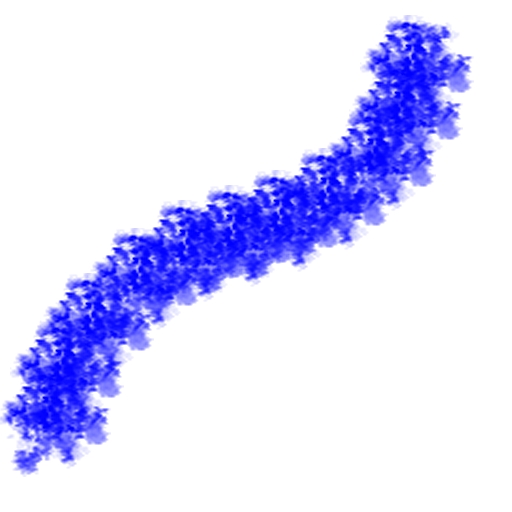
I am trying to draw a continuous texture with ONGUI.I have my script which does draw a texture depending on wherever i touch on the screen.While i keep moving my finger on the screen, texture follows it, like i am dragging it.But what i want to do is drawing a texture and leaving it there, while i keep moving my finger on screen a new texture has been drawn. This is what i want to achieve and i just cannot get the idea of doing it.Whatever i did, i just dragged it.

Any ideas so far?

Thank you!

Comment
Add comment · Show 2
10 |3000 characters needed characters left characters exceeded
▼
  • Viewable by all users
  • Viewable by moderators
  • Viewable by moderators and the original poster
  • Advanced visibility
Viewable by all users
avatar image Graham-Dunnett ♦♦ · Apr 23, 2014 at 08:09 PM 0
Share

Sorry, but I have no idea what you are asking. Do you have code you've written that doesn't work?

avatar image ozturkcompany · Apr 23, 2014 at 08:19 PM 0
Share

Oh i am sorry, of course, here is what i have for now.Of course this will just draw the texture wherever my touch is on the screen and when i move my finger around, the texture will follow.But what i want to do is sth like this;
alt text

 #pragma strict
 var image : Texture;
 
 function OnGUI ()
 {
     if(Input.touchCount > 0)
     {
         for(var t : Touch in Input.touches)
         {
             if(t.phase != TouchPhase.Ended)
             {
             GUI.DrawTexture(Rect(t.position.x, Screen.height - t.position.y, image.width, image.height), image, Scale$$anonymous$$ode.ScaleToFit, true, 0);
             }
         }
     }
 }


untitled 1.jpg (75.2 kB)

1 Reply

· Add your reply
  • Sort: 
avatar image
0

Answer by MikeNewall · Apr 24, 2014 at 11:14 AM

Using OnGUI one way to create a line would be to draw multiple textures. You can cache the touch position every few frames and for each position draw a texture. There would be a draw call for each texture though, and OnGUI is called multiple times a frame, so on mobile it's not a good idea for performance reasons. You can reduce the number of textures making up the line by increasing the interval between the recording of touch positions which will result in a line with less density (Imagine changing the flow property of a brush in photoshop) and thus fewer draw calls, although I think a better solution is to use meshes as they can be batched.

Saying that you might be able to get away with a single draw call if you could somehow combine the textures each time you add a new one using get and set pixels, but that seems over complicated.

Using the mesh approach you could use a line renderer which draws a mesh between points. If you convert the touch positions to world space you can use them as points for the line renderer.

What I think I would do though is use decals. If you create a prefab from a quad with a decal shader applied you can instantiate one at each new touch position. The decal mesh will be batched because it shares the same material so it's far better than using OnGUI. The only issue you might have is with Z fighting but this shader shows you how to solve that

http://wiki.unity3d.com/index.php?title=BlendedDecal

Hope that wasn't too long winded :p

Edit: When you convert the touch positions to world space the position of the decal/line renderer point wouldn't match the position of the uses finger on screen because of perspective applied by the camera. Rendering the decals with an orthographic camera would fix this.

Comment
Add comment · Share
10 |3000 characters needed characters left characters exceeded
▼
  • Viewable by all users
  • Viewable by moderators
  • Viewable by moderators and the original poster
  • Advanced visibility
Viewable by all users

Your answer

Hint: You can notify a user about this post by typing @username

Up to 2 attachments (including images) can be used with a maximum of 524.3 kB each and 1.0 MB total.

Follow this Question

Answers Answers and Comments

22 People are following this question.

avatar image avatar image avatar image avatar image avatar image avatar image avatar image avatar image avatar image avatar image avatar image avatar image avatar image avatar image avatar image avatar image avatar image avatar image avatar image avatar image avatar image avatar image

Related Questions

3d Prefab on 2d background (again) 0 Answers

Change GUI.Button Texture on runtime 1 Answer

Drawing a targeting reticule 1 Answer

Fade script working but I can't 'see' it working? (Solved) 1 Answer

Making a gui texture move with character on a world camera 1 Answer


Enterprise
Social Q&A

Social
Subscribe on YouTube social-youtube Follow on LinkedIn social-linkedin Follow on Twitter social-twitter Follow on Facebook social-facebook Follow on Instagram social-instagram

Footer

  • Purchase
    • Products
    • Subscription
    • Asset Store
    • Unity Gear
    • Resellers
  • Education
    • Students
    • Educators
    • Certification
    • Learn
    • Center of Excellence
  • Download
    • Unity
    • Beta Program
  • Unity Labs
    • Labs
    • Publications
  • Resources
    • Learn platform
    • Community
    • Documentation
    • Unity QA
    • FAQ
    • Services Status
    • Connect
  • About Unity
    • About Us
    • Blog
    • Events
    • Careers
    • Contact
    • Press
    • Partners
    • Affiliates
    • Security
Copyright © 2020 Unity Technologies
  • Legal
  • Privacy Policy
  • Cookies
  • Do Not Sell My Personal Information
  • Cookies Settings
"Unity", Unity logos, and other Unity trademarks are trademarks or registered trademarks of Unity Technologies or its affiliates in the U.S. and elsewhere (more info here). Other names or brands are trademarks of their respective owners.
  • Anonymous
  • Sign in
  • Create
  • Ask a question
  • Spaces
  • Default
  • Help Room
  • META
  • Moderators
  • Explore
  • Topics
  • Questions
  • Users
  • Badges
