 koobas.hobune.stream


Alternative to OnMouseDown()
I am making a shooting game where the mouse moves the aiming crosshair and the targets are using OnMouseDown() to detect when they are hit. I coded the crosshair movement for joysticks but of course OnMouseDown() will not work when using a joystick. Does anyone have any ideas that can help me get the hit detection working? I do not think raycast will work because I am using a perspective camera and the crosshair does not stay at the center of the camera, but maybe I am wrong with this assumption. (Similar games would be Lethal Enforcers, Virtua Cop, House of the Dead)
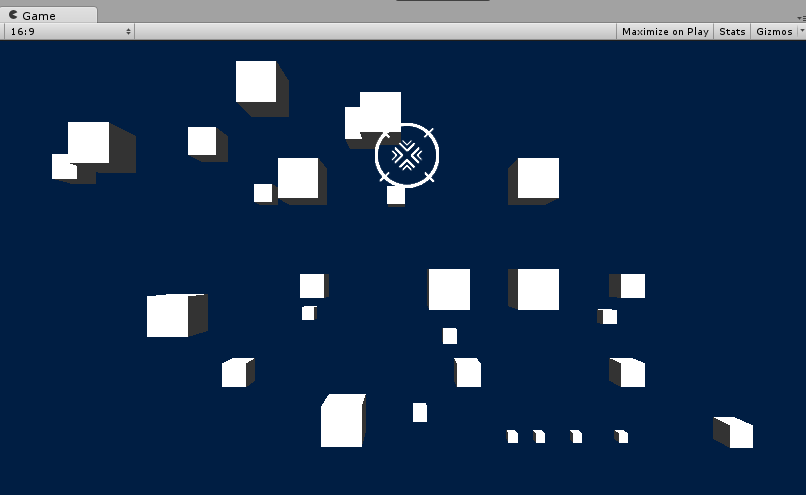
Screenshot: The white circle is the cross hair and the white boxes are the targets. The ray can hit the boxes near the center but not the boxes further away. Probably due to perspective.


I dont know if this will work because in my game the crosshair moves and can be anywhere on the screen.
Its not like a modern first person shooter where the camera moves and the crosshair stays centered. Its an on-rails shooter like Virtua Cop where the camera automatically moves through the level and the player moves the crosshair around the screen.

I tried Camera.ScreenPointToRay but it only reaches its targets when firing at the center of the camera. I believe firing further from the center does not work because it is distorted by perspective and the ray can not reach the targets. It must have something to do with the z position of Camera.ScreenPointToRay(new Vector3(x,y,z))
Thanks for trying though. I been attacking this problem for days now.

i use this for get component on target and use it function when i press joystick button 5,u may set condition in getkey to other.Destroy() ,hope this help.
 function Update () {

     var ray = Camera.main.ScreenPointToRay (Input.mousePosition);
     var hit : RaycastHit;
     if (Physics.Raycast (ray, hit, 100)) {
         if ( hit.collider.gameObject.tag == "tag" ){
         var other: scriptname;
         other = hit.collider.gameObject.GetComponent("scriptname");
         if(other == "null"){
             Debug.Log("null script");
         }
         if(other != "null"){
             if(Input.GetKeyDown(KeyCode.JoystickButton5)){
             Debug.Log("ok script");
              other.Fn_on_target_script();
              }
          }
         }
       }


 }

 *******************
 on target script

 function Destroy(){
   Destroy (gameObject);
 }



