 koobas.hobune.stream


Facebook SDK feed dialog wrong orientation.
I am using the official facebook sdk 6.0.0 for unity in order to post a highscore to the player's feed in my app for iOS. I am able to post successfully to the feed, however the dialog that appears is always portrait, with the top of the dialog on the home button side of my iPad.
I am posting with the FB.Feed() method and I can successfully add a link and picture to the dialog, it's just always the wrong way round.
I have the app set to landscape left in the player settings.
Is the feed dialog meant to automatically orientate to that of the app, or do I have to explicitly set it somewhere? I can't find anything relating to this in the facebook sdk reference.
I have an older app that includes the facebook sdk 5.1.0 which worked as expected in landscape mode on iOS 7, but since updating to iOS 8 the older app now has the same issue with the dialog being in the wrong orientation.
I am using Unity Pro 4.5.4 and Facebook sdk 6.0.0. I am also using Vuforia 3.0.9 in my app if that affects it in any way.
Any help would be greatly appreciated.


It appears the current beta SD$$anonymous$$ (for more than a month) is still using the 3.17 version of Android and iOS Sdk.
https://developers.facebook.com/docs/unity/downloads
Your best shot is either to wait for a new SD$$anonymous$$ Version or modifying the current SD$$anonymous$$. I didn't try but maybe changing the files in Facebook/Editor/iOS and Facebook/Editor/Android will work. I currently don't have time to try myself but will be glad to hear from this.

$$anonymous$$aybe I'm wrong but as far as I can tell the code you need to modify is contained within a library, so we don't have access to modify it.
I really wish they fixed this!!!!!
Hey @keysosaurus, I found the same - it's all wrapped up in FacebookSD$$anonymous$$.a (static lib) so I'm pretty sure changing this myself is off the cards :(
Seriously Facebook, you couldn't find the resources to fix your own sdk!!
It says on their sdk download page: "Please post feedback on Stack Overflow using the tag facebook-unity-sdk"
I've done so about a month ago but no reply from them yet! :-(

Hi,
I struggled a moment with this bug before realizing there was nothing to do but wait or modifying the Facebook SDK yourself.
This bug was fixed in the iOS SDK version 3.18
Didn't have time to update for now but should be fixed for all by now. https://developers.facebook.com/docs/unity/change-log
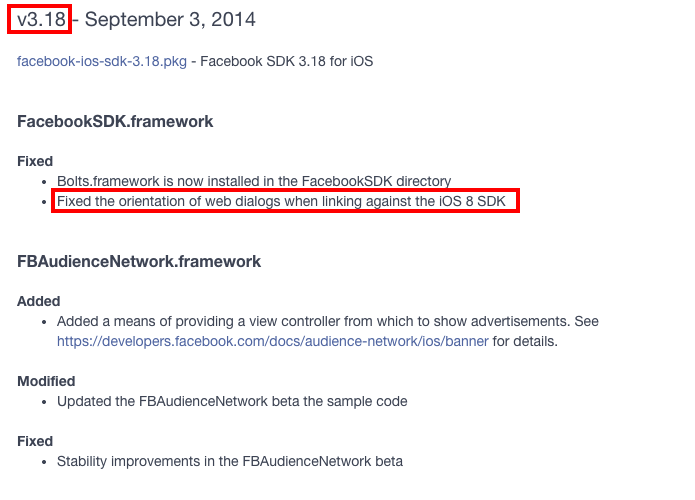
Unfortunately the current Unity Sdk does not include this version. Neither does the 6.1 (currently in Beta)

Your best option is to wait for a fix if you're not in a hurry. Otherwise you should just modify the code yourself.
Hope that helps.
EDIT: Should now be fixed.Turns out Facebook just released a new version (v6.2.1) of their SDK using this time version 3.2 of their mobile SDK.
Turns out Facebook just released a new version (v6.2.1) of their SD$$anonymous$$ using this time version 3.2 of their mobile SD$$anonymous$$.
Didn't have time to update for now but should be fixed for all by now. https://developers.facebook.com/docs/unity/change-log

I've found a workaround/fix for this, very dodgy, but seems to work with the limited testing I've done so far. Kudos go out to @ophilbert for pointing out where the fix is to be found.
Steps I took (I'm using a Linux box so your steps may vary):
Note: this relates to version 6.0 of the Facebook SDK for Unity.
Go to https://developers.facebook.com/docs/ios/downloads and download facebook-ios-sdk-3.18.pkg
Run
xar -x -f facebook-ios-sdk-3.18.pkgto extract the package
This will give you a folder called FacebookSDK.pkg
Change into the FacebookSDK.pkg folder
Run
cat Payload | gunzip -dc |cpio -icat Payload | gunzip -dc |cpio -icd to
Documents/FacebookSDK/FacebookSDK.framework/Versions/A/
Here you'll find a file FacebookSDK with no extension - copy this and name it FacebookSDK.a and copy it over the FacebookSDK.a in the Facebook/Editor/iOS/FacebookSDK/FacebookSDK.a file in your Unity project.
Fixed the issue for me.
You may be game and use an even newer version Facebook iOS SDK - it may work, it may not :)
Remember, I've only done rudimentary tests on this, but it's working for me, let me know if you find issues or have success!
Edit: If it helps here are the files I ripped out of that pkg (untouched):
(version 3.18): http://www.filedropper.com/facebooksdk
(version 3.21): http://www.filedropper.com/facebooksdk-321 (Note as mentioned by @Dave1138 below, there may be issues using this version.)
Any chance of a description for how to do it on a pc or mac?
Hey @keysosaurus, I've added a link to download the needed file.

I tried this workaround using the 3.21 file. Seemed good on recent devices but consistently crashes at startup on iOS 5.x devices that were fine before the change. $$anonymous$$aybe still viable if not supporting such old versions, thanks for the post.
Thanks for the feedback @Dave1138, I was concerned something like this may happen.
Have you tried the 3.18 workaround also? Was this more successful?

Hi, I had the same problem and solved updating the Facebook SDK as described. But I have another problem (I had to integrate a Unity game in landscape orientation inside another app in portrait orientation): now when the facebook login dialog appears, it's correctly oriented in landscape, but if I rotate the phone in vertical, the login dialog (and ONLY the dialog, not the underlying game) gets portrait dimensions (width smaller than height) NOT rotating and goes offscreen. Do you know if there is a way to "lock" the orientation for the facebook login dialog? Thanks, C.M.


