
Wayback Machinekoobas.hobune.stream
May JUN Jul
Previous capture 13 Next capture
2021 2022 2023
1 capture
13 Jun 22 - 13 Jun 22
sparklines
Close Help
  • Products
  • Solutions
  • Made with Unity
  • Learning
  • Support & Services
  • Community
  • Asset Store
  • Get Unity

UNITY ACCOUNT

You need a Unity Account to shop in the Online and Asset Stores, participate in the Unity Community and manage your license portfolio. Login Create account
  • Blog
  • Forums
  • Answers
  • Evangelists
  • User Groups
  • Beta Program
  • Advisory Panel

Navigation

  • Home
  • Products
  • Solutions
  • Made with Unity
  • Learning
  • Support & Services
  • Community
    • Blog
    • Forums
    • Answers
    • Evangelists
    • User Groups
    • Beta Program
    • Advisory Panel

Unity account

You need a Unity Account to shop in the Online and Asset Stores, participate in the Unity Community and manage your license portfolio. Login Create account

Language

  • Chinese
  • Spanish
  • Japanese
  • Korean
  • Portuguese
  • Ask a question
  • Spaces
    • Default
    • Help Room
    • META
    • Moderators
    • Topics
    • Questions
    • Users
    • Badges
  • Home /
avatar image
0
Question by Robsy128 · Sep 22, 2013 at 08:31 AM · terraincamera rotate

My camera changes/hides the terrain?

Hey all,

For some reason, whenever I turn the main first person controller camera, the edge of my terrain seemingly disappears. It was all working fine before adding the camera. I'm fairy new to Unity and still learning and I've tried Googling this but nothing has come up at all. Could anyone help with this? I've attached screenshots below!

Camera settings:

Field of View: 60 Clipping Near: 0.1 Clipping Far: 10000 I changed these settings from the preset just to see if it changed anything but no luck so far!
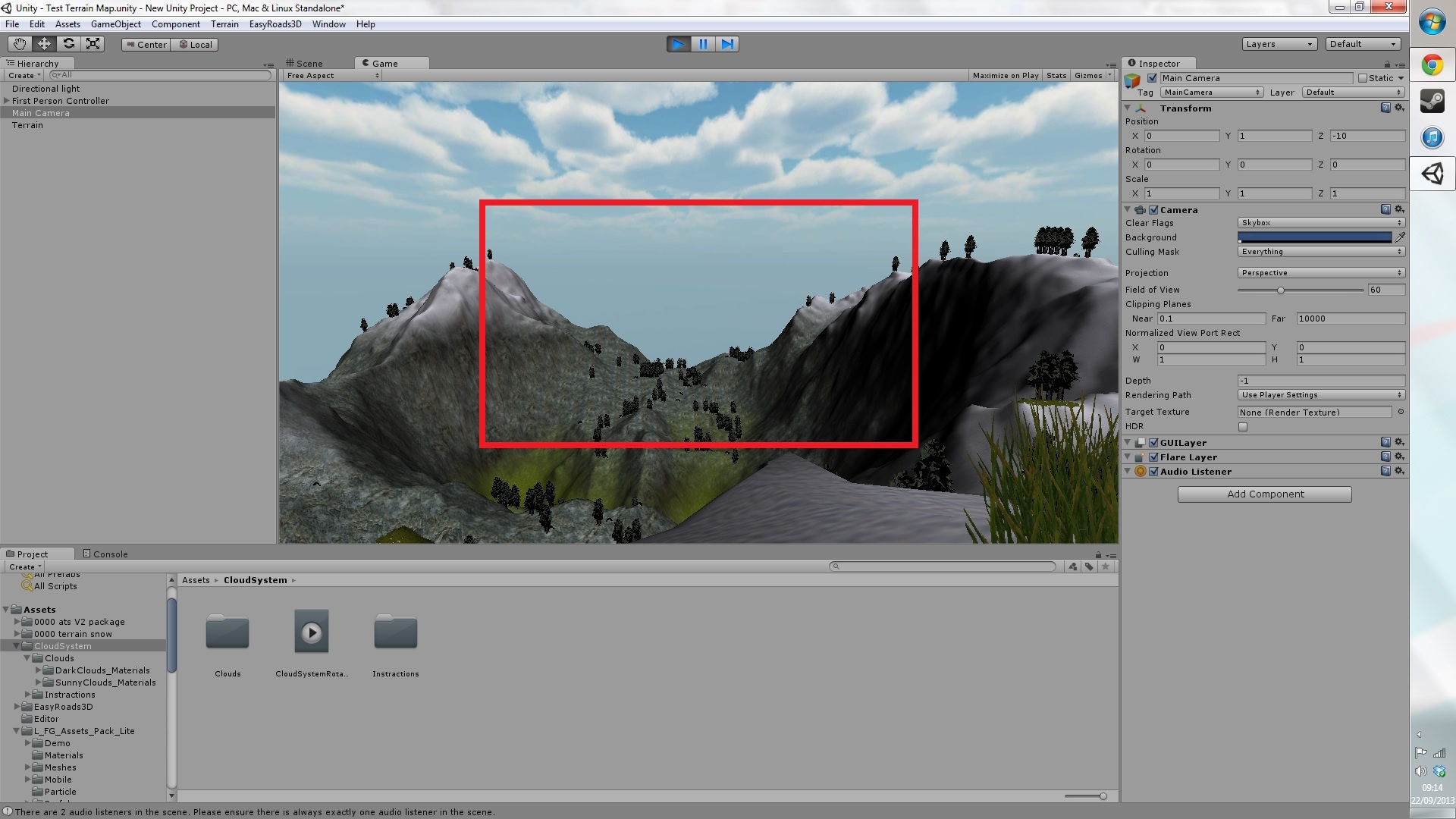
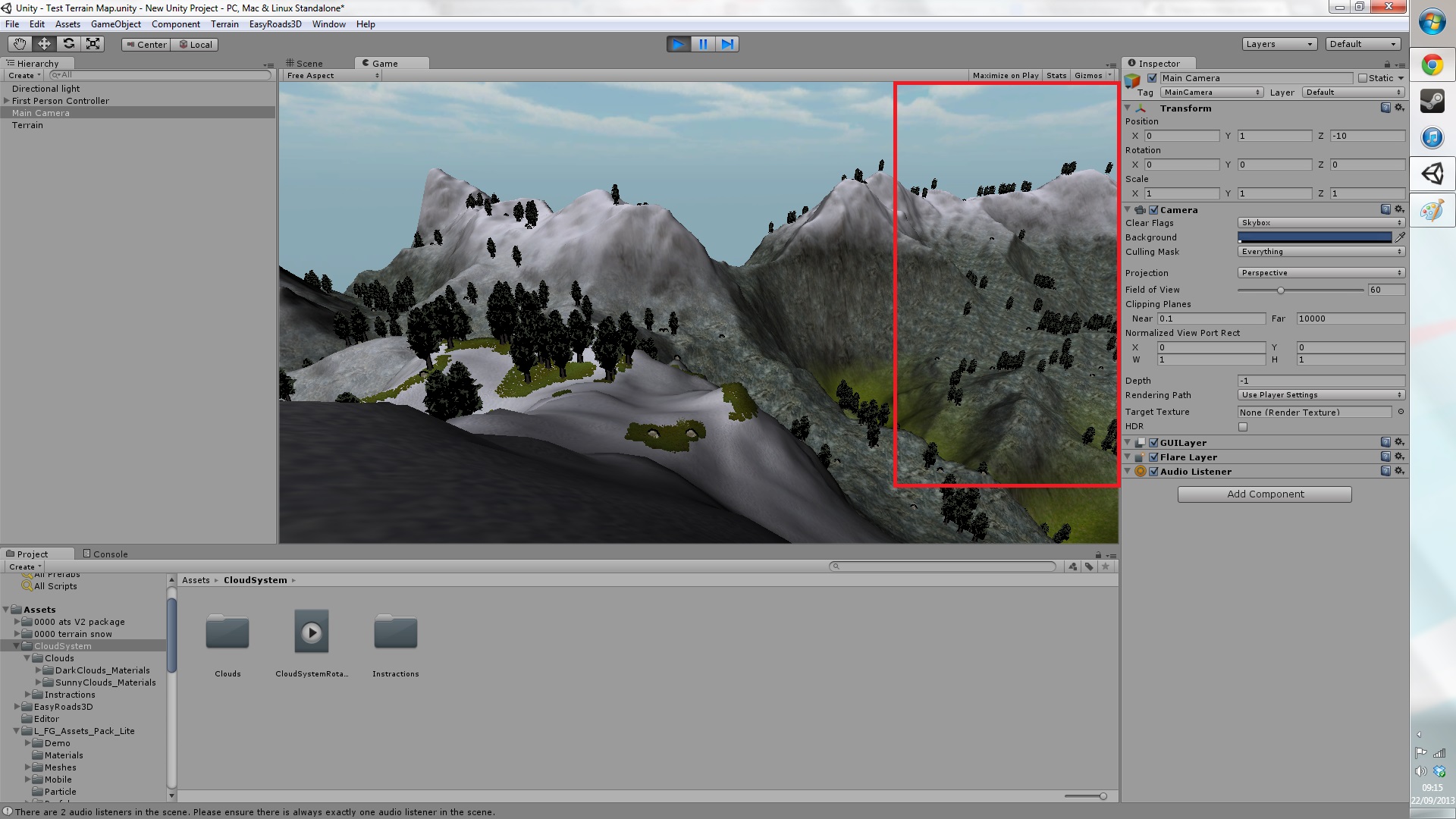
alt text

alt text

capture1.jpg (371.3 kB)
capture2.jpg (405.5 kB)
Comment
Add comment
10 |3000 characters needed characters left characters exceeded
▼
  • Viewable by all users
  • Viewable by moderators
  • Viewable by moderators and the original poster
  • Advanced visibility
Viewable by all users

1 Reply

· Add your reply
  • Sort: 
avatar image
0
Wiki

Answer by aeroson · Sep 22, 2013 at 11:09 AM

Assuming your terrain is over 7 square km, try to increase the Clipping Planes > Far value (currently 10 km)

1km = 1000 m = 1000 unity units

From wikipedia: Clipping planes are used in 3D computer graphics in order to prevent the renderer from calculating surfaces at an extreme distance from the viewer. The plane is perpendicular to the camera, a set distance away (the threshold), and occupies the entire viewport. Used in real-time rendering, clipping planes can help preserve processing for objects within clear sight.

Comment
Add comment · Show 3 · Share
10 |3000 characters needed characters left characters exceeded
▼
  • Viewable by all users
  • Viewable by moderators
  • Viewable by moderators and the original poster
  • Advanced visibility
Viewable by all users
avatar image Robsy128 · Sep 22, 2013 at 12:05 PM 0
Share

Thanks for the reply :D

I have no idea how large my terrain is. The resolution is 2000x2000 pixels. I've change the clipping plane far value to 100000000 but that hasn't really done anything to be honest.

avatar image Robsy128 · Sep 22, 2013 at 12:14 PM 0
Share

Never $$anonymous$$d - found out that the first person controller has a camera! I didn't see that until now. I was adjusting the Far Clipping value on the other main camera in the scene!

Thanks for the help :)

avatar image ArkaneX · Sep 22, 2013 at 12:51 PM 0
Share

@Robsy128 - if the answer helped, please accept it by using an icon at its top.

Your answer

Hint: You can notify a user about this post by typing @username

Up to 2 attachments (including images) can be used with a maximum of 524.3 kB each and 1.0 MB total.

Follow this Question

Answers Answers and Comments

17 People are following this question.

avatar image avatar image avatar image avatar image avatar image avatar image avatar image avatar image avatar image avatar image avatar image avatar image avatar image avatar image avatar image avatar image avatar image

Related Questions

Multiple Terrains and their Trees 0 Answers

Make a simple tree 1 Answer

blur problem with terrain 5 Answers

2D Efficient Realtime Terrain Generation 0 Answers

Implementing destructible terrain, deformable ground, or craters for an artillery game (think scorched earth!) 2 Answers


Enterprise
Social Q&A

Social
Subscribe on YouTube social-youtube Follow on LinkedIn social-linkedin Follow on Twitter social-twitter Follow on Facebook social-facebook Follow on Instagram social-instagram

Footer

  • Purchase
    • Products
    • Subscription
    • Asset Store
    • Unity Gear
    • Resellers
  • Education
    • Students
    • Educators
    • Certification
    • Learn
    • Center of Excellence
  • Download
    • Unity
    • Beta Program
  • Unity Labs
    • Labs
    • Publications
  • Resources
    • Learn platform
    • Community
    • Documentation
    • Unity QA
    • FAQ
    • Services Status
    • Connect
  • About Unity
    • About Us
    • Blog
    • Events
    • Careers
    • Contact
    • Press
    • Partners
    • Affiliates
    • Security
Copyright © 2020 Unity Technologies
  • Legal
  • Privacy Policy
  • Cookies
  • Do Not Sell My Personal Information
  • Cookies Settings
"Unity", Unity logos, and other Unity trademarks are trademarks or registered trademarks of Unity Technologies or its affiliates in the U.S. and elsewhere (more info here). Other names or brands are trademarks of their respective owners.
  • Anonymous
  • Sign in
  • Create
  • Ask a question
  • Spaces
  • Default
  • Help Room
  • META
  • Moderators
  • Explore
  • Topics
  • Questions
  • Users
  • Badges