
Wayback Machinekoobas.hobune.stream
May JUN Jul
Previous capture 13 Next capture
2021 2022 2023
1 capture
13 Jun 22 - 13 Jun 22
sparklines
Close Help
  • Products
  • Solutions
  • Made with Unity
  • Learning
  • Support & Services
  • Community
  • Asset Store
  • Get Unity

UNITY ACCOUNT

You need a Unity Account to shop in the Online and Asset Stores, participate in the Unity Community and manage your license portfolio. Login Create account
  • Blog
  • Forums
  • Answers
  • Evangelists
  • User Groups
  • Beta Program
  • Advisory Panel

Navigation

  • Home
  • Products
  • Solutions
  • Made with Unity
  • Learning
  • Support & Services
  • Community
    • Blog
    • Forums
    • Answers
    • Evangelists
    • User Groups
    • Beta Program
    • Advisory Panel

Unity account

You need a Unity Account to shop in the Online and Asset Stores, participate in the Unity Community and manage your license portfolio. Login Create account

Language

  • Chinese
  • Spanish
  • Japanese
  • Korean
  • Portuguese
  • Ask a question
  • Spaces
    • Default
    • Help Room
    • META
    • Moderators
    • Topics
    • Questions
    • Users
    • Badges
  • Home /
avatar image
0
Question by Suudsu2200 · Dec 30, 2012 at 04:30 AM · pixelsunits

Adjusting for pixels per unit

I'm trying to design the shell of an RTS and I'm working on the selection box. Basically, when I click and drag I'm using Open GL to draw a box from where the click began to where the mouse was released. This works fine, except for one case. When hovering the mouse around the sides of the screen, say the left side, the camera scrolls left. However, since the box-drawing is based on screen position and not on world locations, the box stays the same size throughout the scroll. What I would like is for when the screen scrolls left for the rightmost boundary of the box to move right, to compensate for the scrolling screen. I tried implementing a counterbalance into the scroll script that changed the position of the start-point (say, moves it right when the screen scrolls left) but ran into a problem. I'm moving the camera by unity units and would have to move the start-point by pixels. How would I make this conversion?

Comment
Add comment
10 |3000 characters needed characters left characters exceeded
▼
  • Viewable by all users
  • Viewable by moderators
  • Viewable by moderators and the original poster
  • Advanced visibility
Viewable by all users

2 Replies

· Add your reply
  • Sort: 
avatar image
2

Answer by Seth-Bergman · Dec 30, 2012 at 06:55 AM

Basically, the orthographic camera uses the size of 1/2 of its total VERTICAL size in units:

http://docs.unity3d.com/Documentation/ScriptReference/Camera-orthographicSize.html

in other words, let's say my camera has an orthographic size of 100 and the Screen.height is 1000. for every 1 unit I move my camera along the y-axis, that is equivalent to 5 pixels (because size is HALF, remember).

In other words

 desiredPixelDistanceVertical = (Screen.height / (camera.orthographicSize * 2)) * unityUnitsMoved_y;

At least I think that sounds right... for the VERTICAL. (note the horizontal distance would depend on the aspect ratio, so you would need to use that as well for horizontal)

EDIT:

I guess that would be like

 desiredPixelDistanceHorizontal = (Screen.height * aspectRatio / (camera.orthographicSize * 2)) * unitsMoved_x;

Comment
Add comment · Share
10 |3000 characters needed characters left characters exceeded
▼
  • Viewable by all users
  • Viewable by moderators
  • Viewable by moderators and the original poster
  • Advanced visibility
Viewable by all users
avatar image
0

Answer by Jozxyqk · Dec 30, 2012 at 06:19 AM

The way I would approach this is to store the initial and current mouse positions in world space (this is the intersection of the ScreenPointToRay ray and either the terrain or the Y=0 plane), then project those points back into screen space for drawing (using WorldToScreenPoint). This would account for a perspective camera and any rotations as well. Just be careful to account for the case when points move behind the camera, if that can indeed happen.

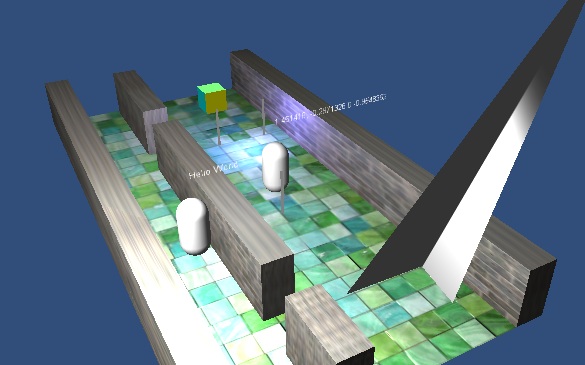
I had trouble implementing fast unit selection (slows for > 100 units), especially considering both units and the selection box are moving/animating. I had success dynamically creating a cube triangle mesh in "clip space" (divide mouse pos by screen size, scale by 2 and subtract 1 to give a -1 to 1 range) given by the selection area, projecting that into camera space (multiply vertices by camera.projectionMatrix.inverse) and creating a collider with it, parented to the camera. Using OnTriggerStay on the mesh object was slow but least buggy. Using physics layer masks is a must - if your characters have complex colliders you could create selection colliders in a separate layer.

Each frame units entering/exiting the selection can be found from the difference of the current selection set and a stored previous selection set.

Here's a screenshot of the selection mesh from a different camera angle:
alt text


selection.jpg (55.1 kB)
Comment
Add comment · Share
10 |3000 characters needed characters left characters exceeded
▼
  • Viewable by all users
  • Viewable by moderators
  • Viewable by moderators and the original poster
  • Advanced visibility
Viewable by all users

Your answer

Hint: You can notify a user about this post by typing @username

Up to 2 attachments (including images) can be used with a maximum of 524.3 kB each and 1.0 MB total.

Follow this Question

Answers Answers and Comments

10 People are following this question.

avatar image avatar image avatar image avatar image avatar image avatar image avatar image avatar image avatar image avatar image

Related Questions

Convert Units to Pixels and back 1 Answer

What is good practice to set Pixels to Units to and how does it actually work ? 1 Answer

GUIunity units (pixels?) 0 Answers

Spawned units disappear 2 Answers

How to get the width of a cube in "coordinate units" 1 Answer


Enterprise
Social Q&A

Social
Subscribe on YouTube social-youtube Follow on LinkedIn social-linkedin Follow on Twitter social-twitter Follow on Facebook social-facebook Follow on Instagram social-instagram

Footer

  • Purchase
    • Products
    • Subscription
    • Asset Store
    • Unity Gear
    • Resellers
  • Education
    • Students
    • Educators
    • Certification
    • Learn
    • Center of Excellence
  • Download
    • Unity
    • Beta Program
  • Unity Labs
    • Labs
    • Publications
  • Resources
    • Learn platform
    • Community
    • Documentation
    • Unity QA
    • FAQ
    • Services Status
    • Connect
  • About Unity
    • About Us
    • Blog
    • Events
    • Careers
    • Contact
    • Press
    • Partners
    • Affiliates
    • Security
Copyright © 2020 Unity Technologies
  • Legal
  • Privacy Policy
  • Cookies
  • Do Not Sell My Personal Information
  • Cookies Settings
"Unity", Unity logos, and other Unity trademarks are trademarks or registered trademarks of Unity Technologies or its affiliates in the U.S. and elsewhere (more info here). Other names or brands are trademarks of their respective owners.
  • Anonymous
  • Sign in
  • Create
  • Ask a question
  • Spaces
  • Default
  • Help Room
  • META
  • Moderators
  • Explore
  • Topics
  • Questions
  • Users
  • Badges
