 koobas.hobune.stream


Placing GUI on the right order
Hello, i encounter some silly(for me) problem that i really don't know how to fix.. so, i've been searching how to easily make a Shop Interface and i comes up with GUI.BeginGroup(); but at last, i found some disturbing thing that make me couldn't process..
So i want to simply make a shop that if i click, the money will increase after i buy one time..
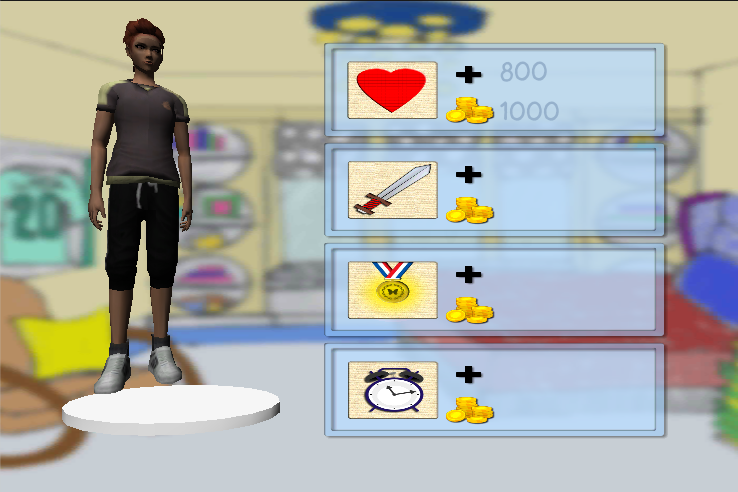
so if i click the blue button(yes,it is a button) the price and stats will increase, and so on.. but the problem is i couldn't get the text to be in the button! it always show up behind the button.. and here's my code..
 var atrbg : Rect = new Rect(300,20,400,400);
 var atrTexture : Texture;
 var tex : GUIStyle;
 function OnGUI(){


     GUI.BeginGroup(new Rect(atrbg.x, atrbg.y, atrbg.width, atrbg.height));
         //label

         GUI.Label(Rect(200,35,100,20),"800",tex);
         GUI.Label(Rect(200,75,100,20),"1000", tex);
         if(GUI.Button(new Rect(20,20,350,100)," ",buttonHealth)){
             print("a");
             ispopUp=true;
             print("b");
         }
         if(GUI.Button(new Rect(20,120,350,100)," ",buttonAttack)){

         }
         if(GUI.Button(new Rect(20,220,350,100)," ",buttonReward)){

         }
         if(GUI.Button(new Rect(20,320,350,100)," ",buttonTime)){

         }

     GUI.EndGroup();
     if(ispopUp){
             GUI.DrawTexture(Rect(Screen.width*0.3,Screen.height*0.3,Screen.width*0.5,Screen.height*0.5),popUp1);
             if(GUI.Button(new Rect(Screen.width*0.5,Screen.height*0.3,Screen.width*0.1,Screen.height*0.1)," ",buttonCancel)){
                 ispopUp=false;
             }
         }
 }
somebody could figure out how to make the text appear on the Button? i mean when i click the button, the text get the effect of button too.. because if i click the button, it using GUI style that when active it change the texture to the clicked one.. (i hope u understand what i say)



