
Wayback Machinekoobas.hobune.stream
May JUN Jul
Previous capture 13 Next capture
2021 2022 2023
1 capture
13 Jun 22 - 13 Jun 22
sparklines
Close Help
  • Products
  • Solutions
  • Made with Unity
  • Learning
  • Support & Services
  • Community
  • Asset Store
  • Get Unity

UNITY ACCOUNT

You need a Unity Account to shop in the Online and Asset Stores, participate in the Unity Community and manage your license portfolio. Login Create account
  • Blog
  • Forums
  • Answers
  • Evangelists
  • User Groups
  • Beta Program
  • Advisory Panel

Navigation

  • Home
  • Products
  • Solutions
  • Made with Unity
  • Learning
  • Support & Services
  • Community
    • Blog
    • Forums
    • Answers
    • Evangelists
    • User Groups
    • Beta Program
    • Advisory Panel

Unity account

You need a Unity Account to shop in the Online and Asset Stores, participate in the Unity Community and manage your license portfolio. Login Create account

Language

  • Chinese
  • Spanish
  • Japanese
  • Korean
  • Portuguese
  • Ask a question
  • Spaces
    • Default
    • Help Room
    • META
    • Moderators
    • Topics
    • Questions
    • Users
    • Badges
  • Home /
avatar image
0
Question by Enrothian_Empire · Jul 17, 2014 at 08:13 AM · terraintree

Why can't I mass place solid trees?

I've made a prefab of an existing tree and added a mesh collider. It works well when I drag and drop it into the world, but when I so much as try to paint it on to the terrain or mass place, they're tiny and you can walk through them.

I'd prefer to keep a mesh collider instead of a capsule or box collider (for that "close shave" kind of feel.)

Any suggestions? Also, any suggestions on how to make nice, sexy mountains would be appreciated.

Comment
Add comment · Show 2
10 |3000 characters needed characters left characters exceeded
▼
  • Viewable by all users
  • Viewable by moderators
  • Viewable by moderators and the original poster
  • Advanced visibility
Viewable by all users
avatar image Tony_T · Jul 21, 2014 at 05:16 PM 0
Share

Place the tree on the terrain and scale it, add collider and anything else you want to do. Then don't forget to rename it to something different. Like if you use the trees Unity has, change the name of the tree gameobject in the insepctor. Then drag and drop it into a folder of your choice. The idea is to save the game object as a copy but with different zise, colliders etc. Then you can use that gameobject on the terrain and mass place it. As for the "sexy mountains" there are some cool mountains in the assets store.

Link

avatar image AlucardJay · Jul 22, 2014 at 09:24 PM 0
Share

This has been covered many times before. You can only use a single capsule collider on a tree for trees painted on the terrain

http://docs.unity3d.com/$$anonymous$$anual/terrain-Trees.html

Using Colliders with Trees

You can add a Capsule Collider to a new tree asset by instantiating it in the scene, adding the collider (menu: Component > Physics > Capsule Collider) and creating a new prefab for the modified tree object. When you add the tree to the terrain for painting, make sure you select the prefab with the collider rather than the original object. You should also enable Create Tree Colliders in the terrain’s Terrain Collider component inspector to allow.

Note that the physics engine has a limit of 65536 colliders in a single scene. This is normally not an issue but when trees are used with colliders, you should make sure you don’t exceed this limit (also bear in $$anonymous$$d the colliders other than those on trees that you are using in the scene).


If you want to use mesh colliders, you'll have to write your own tree system with LOD/billboarding etc.

http://forum.unity3d.com/threads/using-tree-gameobjects-vs-unitys-built-in-system.183224/

3 Replies

· Add your reply
  • Sort: 
avatar image
0

Answer by A3tra3rpi · Jul 22, 2014 at 08:49 PM

Sounds like you dont have "add tree colliders" from terrain options selected. That button apply tree prefabs colliders to trees in terrain.
Comment
Add comment · Share
10 |3000 characters needed characters left characters exceeded
▼
  • Viewable by all users
  • Viewable by moderators
  • Viewable by moderators and the original poster
  • Advanced visibility
Viewable by all users
avatar image
0

Answer by Enrothian_Empire · Jul 24, 2014 at 08:04 AM

alt text

alt text

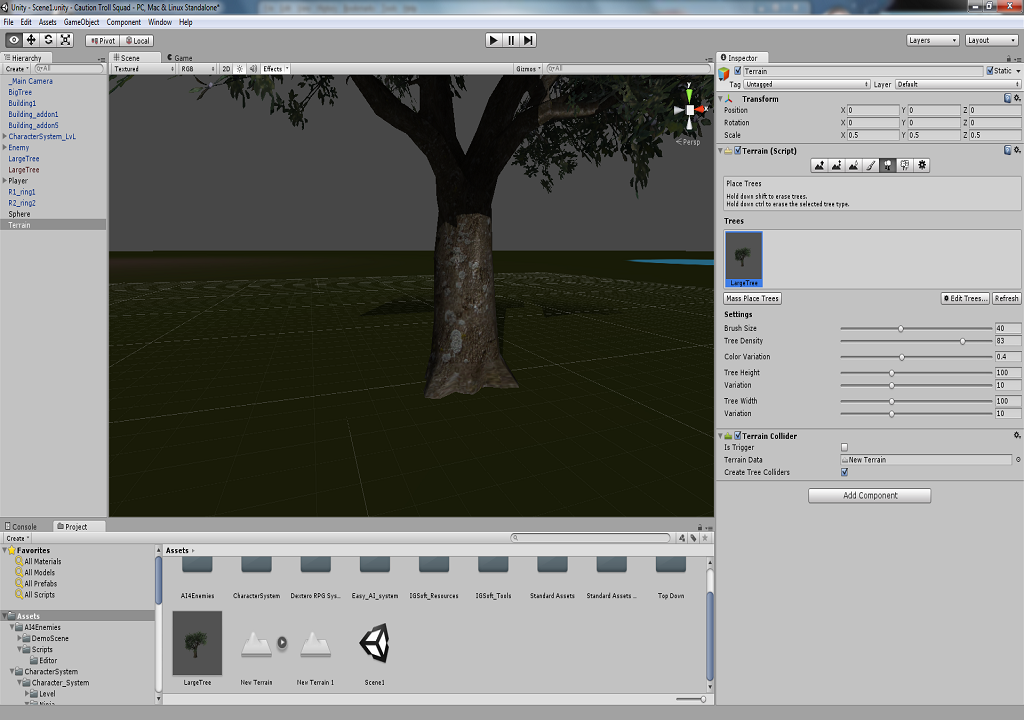
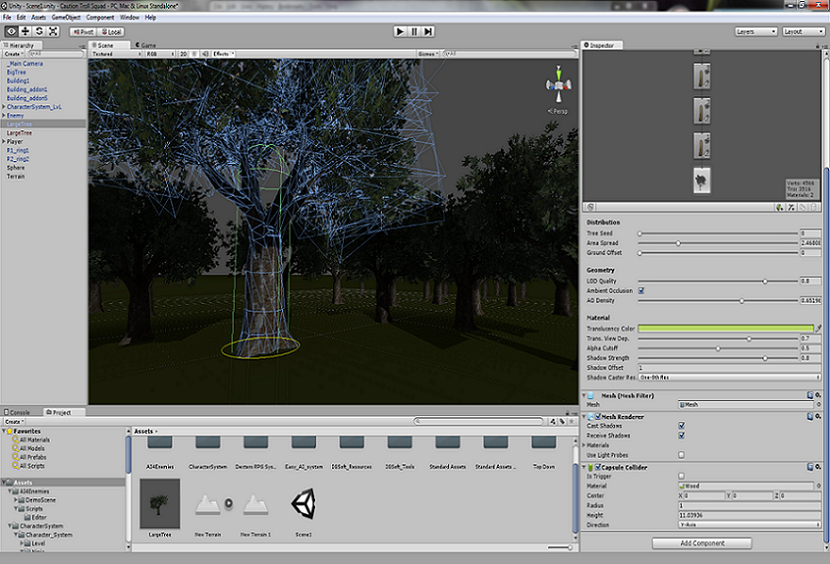
I have "Add tree colliders" in the terrain options selected. And I have a capsule collider and edited prefab of the tree. They're still not the right size and you can walk through them. You can see in the pictures below. I have not gone over the collider limit in the scene.


terrain.png (371.0 kB)
trees.png (517.6 kB)
Comment
Add comment · Show 1 · Share
10 |3000 characters needed characters left characters exceeded
▼
  • Viewable by all users
  • Viewable by moderators
  • Viewable by moderators and the original poster
  • Advanced visibility
Viewable by all users
avatar image A3tra3rpi · Jul 24, 2014 at 08:15 AM 0
Share

I dont know if that helps, but you can add collider to child of tree prefab and terrain editor will add them. I have 2 capsule collider in my trees and that works for me

avatar image
0

Answer by Oasis Hurler · Oct 14, 2014 at 04:17 PM

Dude Use a mesh collider, and then find the 3d mesh of your tree and drag it into the mesh collider on the tree in the scene. Mesh colliders become exactly the shape of the tree and fit it perfectly.

I think antony answered the other part of the question perfectly.

Comment
Add comment · Share
10 |3000 characters needed characters left characters exceeded
▼
  • Viewable by all users
  • Viewable by moderators
  • Viewable by moderators and the original poster
  • Advanced visibility
Viewable by all users

Your answer

Hint: You can notify a user about this post by typing @username

Up to 2 attachments (including images) can be used with a maximum of 524.3 kB each and 1.0 MB total.

Follow this Question

Answers Answers and Comments

6 People are following this question.

avatar image avatar image avatar image avatar image avatar image avatar image

Related Questions

Multiple Cars not working 1 Answer

Hide Grass and Trees applied to terrain? 2 Answers

How Do I Interact With Terrain Trees? 2 Answers

Terrain tools with personal model 1 Answer

Placed Trees in Terrain are white planes? 1 Answer


Enterprise
Social Q&A

Social
Subscribe on YouTube social-youtube Follow on LinkedIn social-linkedin Follow on Twitter social-twitter Follow on Facebook social-facebook Follow on Instagram social-instagram

Footer

  • Purchase
    • Products
    • Subscription
    • Asset Store
    • Unity Gear
    • Resellers
  • Education
    • Students
    • Educators
    • Certification
    • Learn
    • Center of Excellence
  • Download
    • Unity
    • Beta Program
  • Unity Labs
    • Labs
    • Publications
  • Resources
    • Learn platform
    • Community
    • Documentation
    • Unity QA
    • FAQ
    • Services Status
    • Connect
  • About Unity
    • About Us
    • Blog
    • Events
    • Careers
    • Contact
    • Press
    • Partners
    • Affiliates
    • Security
Copyright © 2020 Unity Technologies
  • Legal
  • Privacy Policy
  • Cookies
  • Do Not Sell My Personal Information
  • Cookies Settings
"Unity", Unity logos, and other Unity trademarks are trademarks or registered trademarks of Unity Technologies or its affiliates in the U.S. and elsewhere (more info here). Other names or brands are trademarks of their respective owners.
  • Anonymous
  • Sign in
  • Create
  • Ask a question
  • Spaces
  • Default
  • Help Room
  • META
  • Moderators
  • Explore
  • Topics
  • Questions
  • Users
  • Badges
