
Wayback Machinekoobas.hobune.stream
May JUN Jul
Previous capture 13 Next capture
2021 2022 2023
1 capture
13 Jun 22 - 13 Jun 22
sparklines
Close Help
  • Products
  • Solutions
  • Made with Unity
  • Learning
  • Support & Services
  • Community
  • Asset Store
  • Get Unity

UNITY ACCOUNT

You need a Unity Account to shop in the Online and Asset Stores, participate in the Unity Community and manage your license portfolio. Login Create account
  • Blog
  • Forums
  • Answers
  • Evangelists
  • User Groups
  • Beta Program
  • Advisory Panel

Navigation

  • Home
  • Products
  • Solutions
  • Made with Unity
  • Learning
  • Support & Services
  • Community
    • Blog
    • Forums
    • Answers
    • Evangelists
    • User Groups
    • Beta Program
    • Advisory Panel

Unity account

You need a Unity Account to shop in the Online and Asset Stores, participate in the Unity Community and manage your license portfolio. Login Create account

Language

  • Chinese
  • Spanish
  • Japanese
  • Korean
  • Portuguese
  • Ask a question
  • Spaces
    • Default
    • Help Room
    • META
    • Moderators
    • Topics
    • Questions
    • Users
    • Badges
  • Home /
avatar image
0
Question by Cognitive Dissonance · Mar 12, 2014 at 12:19 PM · 2dtexturedarkness

Applying transparent texture to mesh

Hello everyone. I have the following transparent png and i would like to apply it to a mesh without any tiling so that i get a darkness effect. To specify, the mesh is procedurally generated and is used for dynamic 2d shadows. If i set tiling to 0 i only get a black texture.

Any ideas/suggestions? Take care everyone :)
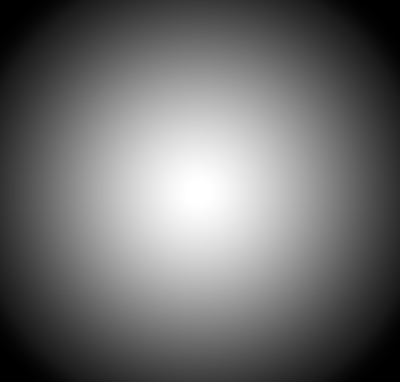
alt text

shade.jpg (54.3 kB)
Comment
Add comment · Show 4
10 |3000 characters needed characters left characters exceeded
▼
  • Viewable by all users
  • Viewable by moderators
  • Viewable by moderators and the original poster
  • Advanced visibility
Viewable by all users
avatar image livevlad · Mar 12, 2014 at 12:35 PM 0
Share

Hello, I do not understand your issue. I mean what is the point with "tilling".

If you need to use this texture on your mesh, create a material with a shader that manage transparency.

avatar image Cognitive Dissonance · Mar 17, 2014 at 01:35 PM 0
Share

I have phrased my question poorly. I do not know a lot about shaders and so on. What i need to do is be able to stretch this texture along a mesh that has the shape of a disk ( circular ).

So for example if i have a disk with radius 100 i want this texture to stretch out so that it's center is at the center of the disk. Same with any disk of any size. The problem is i have tried all shaders individually one by one ( since i dont know how they work ) and even though the texture i provide has some transparency, it is lost within the game and all i get is an 100% opaque black.

If this helps any i am trying to simulate some light source.

avatar image livevlad · Mar 17, 2014 at 01:44 PM 0
Share

If I understand well, you want to apply this texture on a plane and to make the black transparent.

If this is the case just tell me and I could provide you a very simple shader to do that. I don't know all the shaders provided by Unity and Transparent/Cutout won't do what you want.

avatar image Cognitive Dissonance · Mar 18, 2014 at 02:34 PM 0
Share

That is indeed the case. I apologise for draggint this out so much :C

2 Replies

· Add your reply
  • Sort: 
avatar image
1

Answer by ArkaneX · Mar 18, 2014 at 02:51 PM

To accomplish what you need, shader supporting transparency is a must, as stated in comments. But additionally, you have to set tiling back to 1, and have your mesh properly UV mapped.

Comment
Add comment · Share
10 |3000 characters needed characters left characters exceeded
▼
  • Viewable by all users
  • Viewable by moderators
  • Viewable by moderators and the original poster
  • Advanced visibility
Viewable by all users
avatar image
1

Answer by livevlad · Mar 18, 2014 at 06:12 PM

This the sahder you would need :

 Shader "Custom/Custom Transparency" {
     Properties {
         _MainTex ("Base (RGB)", 2D) = "white" {}
         _Color("Color",Color) = (1,1,1,1)
     }
     SubShader {
         Tags { "Queue"="Transparent" }
         CGPROGRAM
         #pragma surface surf Lambert alpha
         struct Input {
             float2 uv_MainTex;
         };
         
         uniform sampler2D _MainTex;
         uniform float4 _Color;
         
         void surf (Input IN, inout SurfaceOutput o) {
             float4 tex = tex2D (_MainTex, IN.uv_MainTex);
             
             tex.rgb *= _Color.rgb;
          
              o.Albedo = tex.rgb;
              o.Alpha = tex.a;
         }
         ENDCG
 

Use a texture with transparency or set Alpha from grayscale in texture import settings.

If you apply the material on plane created on Unity you will not need to create your own mesh. But as ArkaneX said if you want to apply it on a specific mesh, think about UV mapping.

Hope it helps !

Comment
Add comment · Share
10 |3000 characters needed characters left characters exceeded
▼
  • Viewable by all users
  • Viewable by moderators
  • Viewable by moderators and the original poster
  • Advanced visibility
Viewable by all users

Your answer

Hint: You can notify a user about this post by typing @username

Up to 2 attachments (including images) can be used with a maximum of 524.3 kB each and 1.0 MB total.

Follow this Question

Answers Answers and Comments

22 People are following this question.

avatar image avatar image avatar image avatar image avatar image avatar image avatar image avatar image avatar image avatar image avatar image avatar image avatar image avatar image avatar image avatar image avatar image avatar image avatar image avatar image avatar image avatar image

Related Questions

Assigning UV Map to model at runtime 0 Answers

2D Sprites Rendering Inconsistently Between Computers 0 Answers

RawImage flicker when changing from Texture2D to VideoPlayer texture 1 Answer

How to change the text in TextMeshPro 1 Answer

How change sprite animation texture?? 2 Answers


Enterprise
Social Q&A

Social
Subscribe on YouTube social-youtube Follow on LinkedIn social-linkedin Follow on Twitter social-twitter Follow on Facebook social-facebook Follow on Instagram social-instagram

Footer

  • Purchase
    • Products
    • Subscription
    • Asset Store
    • Unity Gear
    • Resellers
  • Education
    • Students
    • Educators
    • Certification
    • Learn
    • Center of Excellence
  • Download
    • Unity
    • Beta Program
  • Unity Labs
    • Labs
    • Publications
  • Resources
    • Learn platform
    • Community
    • Documentation
    • Unity QA
    • FAQ
    • Services Status
    • Connect
  • About Unity
    • About Us
    • Blog
    • Events
    • Careers
    • Contact
    • Press
    • Partners
    • Affiliates
    • Security
Copyright © 2020 Unity Technologies
  • Legal
  • Privacy Policy
  • Cookies
  • Do Not Sell My Personal Information
  • Cookies Settings
"Unity", Unity logos, and other Unity trademarks are trademarks or registered trademarks of Unity Technologies or its affiliates in the U.S. and elsewhere (more info here). Other names or brands are trademarks of their respective owners.
  • Anonymous
  • Sign in
  • Create
  • Ask a question
  • Spaces
  • Default
  • Help Room
  • META
  • Moderators
  • Explore
  • Topics
  • Questions
  • Users
  • Badges
