 koobas.hobune.stream


OnTriggerEnter Multiple Collisions Activating. I tried many variations, Please help (Java)
Well, I'm making a game where its different game types all in one. Its a massive team project for school and I am the only programmer,I literally learned Java in 5 weeks by myself scrounging through here However, I cant get my code to work properly. In the picture provided, I have two Colliders. What I want my script to do is when I press e and collied with one, it will switch me to one controller, when I collide with the other box,it will move me to the second character controller. However, when I collided with either, it just moves me to the same character controller and in addition, when I press play I can press play and my camera automatically switches. I have to move at least once before it limits the key press to the colliders. I tried seperate scripts, variables, so I tried to be as specific as I can with tags. My boolean doesnt seem to work properly, anyway to limit which collisions to specific names?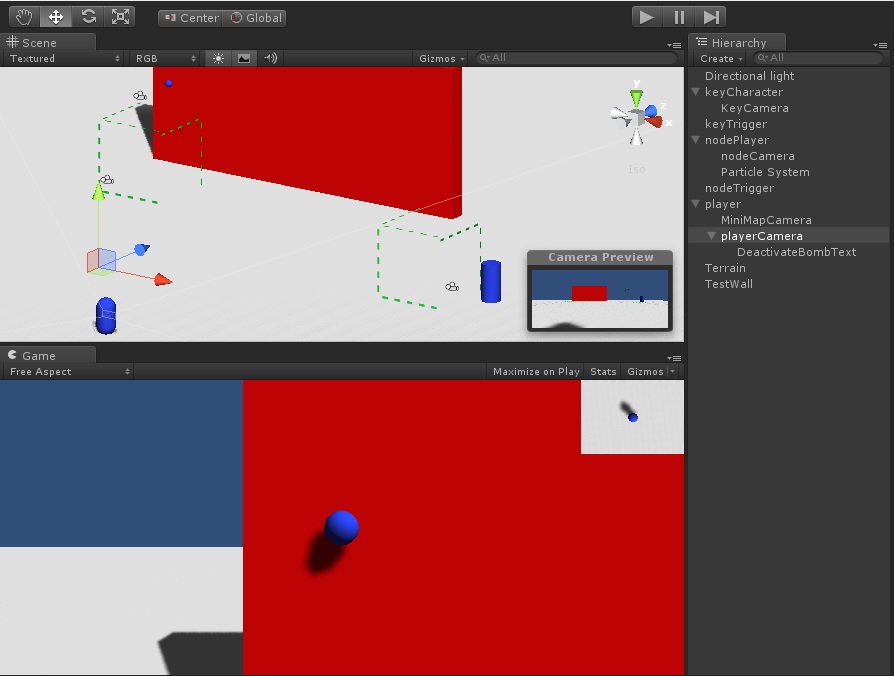 Any help will be awesome. Thanks.
 //First Collider Script

 var change:boolean = false;

 //var PlayerCam: GameObject;

 //var NodeCam: GameObject;

 //var KeyCam: GameObject;

 //var NodeTrigger: GameObject;

 var GameTypeTrigger: GameObject;


 function OnTriggerEnter(col: Collider){
 //Function onTriggerEnter(OnTriggerEnter is called when the Collider "coll" other enters the trigger and activates-
 //the function update below)
     change = true;
  //(activate = true;) refer to the variable playerCam:boolean to be active or true)  S
    }


 function OnTriggerExit(col:Collider){
 // OnTriggerExit is called when the Collider other has stopped touching the trigger.
   change = false;
 //VariableCameraName.UnityCameraObject.Enabled/Disbaled = Activate
 }


 function Update(){


     if(Input.GetKeyDown("e") && change){
    Debug.Log("switch ready");

       GameObject.FindWithTag("playerCam").camera.enabled = false;
           //Disables FirstPerson Camera
       GameObject.FindWithTag("keyCam").camera.enabled = false;

       GameObject.FindWithTag("nodeCam").camera.enabled = true;
           //Enables Node Camera

       GameObject.FindWithTag("nodeCharacter").GetComponent("TopDownController").enabled = true;
           //Enables Node Control
       GameObject.FindWithTag("firstPersonCharacter").GetComponent("FPSInputController").enabled = false;
           //Disables FirstPerson Control
       GameObject.FindWithTag("keyCharacter").GetComponent("CharacterController").enabled = false;
           //Disables Platformer Functionality

     }

 }

 //Second Collider Script
 var activate:boolean = false;

 //var PlayerCam: GameObject;

 //var KeyCam: GameObject;

 //var NodeCam:GameObject;

 var PlatformerTrigger: GameObject;

 //var GameTypeTrigger: GameObject;

 function OnTriggerEnter(col: Collider){
 //Function onTriggerEnter(OnTriggerEnter is called when the Collider "coll" other enters the trigger and activates-
 //the function update below)
     activate = true;
  //(activate = true;) refer to the variable playerCam:boolean to be active or true)  S
    }


 function OnTriggerExit(col:Collider){
 // OnTriggerExit is called when the Collider other has stopped touching the trigger.
   activate = false;
 //VariableCameraName.UnityCameraObject.Enabled/Disbaled = Activate
 }


 function Update(){


     if(Input.GetKeyDown("e") && activate){
    Debug.Log("switch ready");

     GameObject.FindWithTag("playerCam").camera.enabled = false;
           //Disables FirstPerson Camera
      GameObject.FindWithTag("keyCam").camera.enabled = true;

       GameObject.FindWithTag("nodeCam").camera.enabled = false;
           //Enables Node Camera

       GameObject.FindWithTag("firstPersonCharacter").GetComponent("FPSInputController").enabled = false;
           //Disables FirstPerson Control
       GameObject.FindWithTag("nodeCharacter").GetComponent("TopDownController").enabled = false;
           //Disables BombDiffusal Functionality
       GameObject.FindWithTag("keyCharacter").GetComponent("CharacterController").enabled = true;
           //Enables Platformer Functionality
     }
 }

How did you implement the Java V$$anonymous$$ in Unity?

I dont understand what you mean by Java V$$anonymous$$, in anycase, it probably means I did not implement it :/
JAVA is a program$$anonymous$$g language that runs on it's own Virtual $$anonymous$$achine. It is also the program$$anonymous$$g language that $$anonymous$$inecraft and a couple other games were made in. It absolutely terrible for games due to certain performance issues and it's completely incompatible with Unity. I was just wondering how you managed to run Java in Unity, and how you taught Java to run Javascript code???
Lol what? I have Unity 3.5 idk what version you are using but when you right click in the inspector, it says create new Javascript running on $$anonymous$$ono Develop. Unity's engine is preset to run Java so that is why I am a bit confused as to why you asked how I got it to work. Its been working for me thus far. I created a small FPS Alpha and it works fine its just a bit buggy because you have to be ridiculously specific from what I've found. Everything has been reference up until the point where I've failed so much through trial and error that I can now look at the code and understand it. All I am trying to do now is OnEnterTrigger check for collision with a specific object's tag and I cannot for the love of Scripting figure it out >:/

Java and Javascript are two very different things. Unity allows scripting in Javascript. I wonder if you are confusing Java with Javascript.

You said you wanted OnTriggerEnter to check for collision with a specific object's tag. This is how it should work:
 void OnTriggerEnter(Collider other)
     {
         if(other.gameObject.tag == "PickUp"){
                         Debug.Log("You collided with a Pickup");
             other.gameObject.SetActive(false);

         }


         if(other.gameObject.tag == "Finish"){
             winText.text = "YOU WIN!";
         }

     }
Here, "other" is the collider that contacted the trigger. You can access its tag via other.gameObject.tag
Here is the thing though toborific, in my code I have a collider (col) in my OnTriggerEnter, is there a way to call it in my "If" paramaters for function update? All I keep getting is an error for if(Input.Get$$anonymous$$eyDown("e") && change && col.gameObject.tag("blah");
Unity says it doesnt recognize (col) even though I already declared it in my ontriggerenter
I have a boolean to check for collision named (change) so thats why I am calling it there, tried to tag that and I get some really weird error
Oh toborific you are right, however I meant for it to check on my function update. On$$anonymous$$yTriggerEnters I have a collider (col) and Im trying to call for it with a tag in my function update's if statement. However, when I col.tag("nodeTrigger) in the the update's if statemtent I get an error saying there is no such thing as (col) if(Input.Get$$anonymous$$eyDown("e") && activate && col.tag("nodeTrigger)== Error also tried activate.tag and no instance of activate exists. Perhaps I am looking at this all wrong?
Yeah, Update() doesn't have access to your player collider like that. I think what you want to do is put your if/then in the OnTriggerEnter and OnTriggerExit:
function OnTriggerExit(col:Collider){ // OnTriggerExit is called when the Collider other has stopped touching the trigger. if(col.gameObject.tag == "nodeTrigger"){ activate = false; }
//VariableCameraName.UnityCameraObject.Enabled/Disbaled = Activate }
Toborific I Found a workaround thanks to your first OnTriggerEnter Solution however, I did not know you can apply a collider setting to an OnTrigger thinking it was unity preset and not modifiable . Thanks! I appreciate it! Here is my Workaround But I will try what you provided now
 function OnTriggerEnter(other: Collider) {
         if(other.gameObject.tag == "nodeTrigger")
         {
         Debug.Log("Working!");

       GameObject.FindWithTag("nodeCharacter").GetComponent("TopDownController").enabled = true;
           //Enables Node Control
       GameObject.FindWithTag("Player").GetComponent("FPSInputController").enabled = false;
           //Disables FirstPerson Control
       GameObject.FindWithTag("keyCharacter").GetComponent("CharacterController").enabled = false;
           //Disables Platformer Functionality
       GameObject.FindWithTag("playerCam").camera.enabled = false;
           //Disables FirstPerson Camera
       GameObject.FindWithTag("keyCam").camera.enabled = false;

       GameObject.FindWithTag("nodeCam").camera.enabled = true;
           //Enables Node Camera
         }

         else if (other.gameObject.tag == "keyTrigger") {
         Debug.Log("otheroneisWorking!");

         GameObject.FindWithTag("nodeCharacter").GetComponent("TopDownController").enabled = false;
           //Enables Node Control
       GameObject.FindWithTag("Player").GetComponent("FPSInputController").enabled = false;
           //Disables FirstPerson Control
       GameObject.FindWithTag("keyCharacter").GetComponent("CharacterController").enabled = true;
           //Disables Platformer Functionality
       GameObject.FindWithTag("playerCam").camera.enabled = false;
           //Disables FirstPerson Camera
       GameObject.FindWithTag("keyCam").camera.enabled = true;

       GameObject.FindWithTag("nodeCam").camera.enabled = false;
           //Enables Node Camera
         }

         }

i think one of the problems with the first code
  if(Input.GetKeyDown("e") && change){
 Debug.Log("switch ready");
was 'change' not knowing if it should be true or false ? should be
  if(Input.GetKeyDown("e") && change == true){
 Debug.Log("switch ready");
///////////////////////////////////////////////////////////////////////
here is fixed version i hope =)
  //First Collider Script
 var change:boolean = false;
 //var PlayerCam: GameObject;
 //var NodeCam: GameObject;
 //var KeyCam: GameObject;
 //var NodeTrigger: GameObject;
 var GameTypeTrigger: GameObject;
 function OnTriggerEnter(col: Collider){
 //Function onTriggerEnter(OnTriggerEnter is called when the Collider "coll" other enters the trigger and activates-
 //the function update below)
 if(col.tag == "YOURTAG")
 {
 change = true;
 }
 //(activate = true;) refer to the variable playerCam:boolean to be active or true) S
 }
 function OnTriggerExit(col:Collider){
 // OnTriggerExit is called when the Collider other has stopped touching the trigger.
 if(col.tag == "YOURTAG")
 {
 change = false;
 }
 //VariableCameraName.UnityCameraObject.Enabled/Disbaled = Activate
 }
 function Update(){
 if(Input.GetKeyDown("e") && change == true){
 Debug.Log("switch ready");
 GameObject.FindWithTag("playerCam").camera.enabled = false;
 //Disables FirstPerson Camera
 GameObject.FindWithTag("keyCam").camera.enabled = false;
 GameObject.FindWithTag("nodeCam").camera.enabled = true;
 //Enables Node Camera
 GameObject.FindWithTag("nodeCharacter").GetComponent("TopDownController").enabled = true;
 //Enables Node Control
 GameObject.FindWithTag("firstPersonCharacter").GetComponent("FPSInputController").enabled = false;
 //Disables FirstPerson Control
 GameObject.FindWithTag("keyCharacter").GetComponent("CharacterController").enabled = false;
 //Disables Platformer Functionality
 }
 }

 //Second Collider Script
 var activate:boolean = false;
 //var PlayerCam: GameObject;
 //var KeyCam: GameObject;
 //var NodeCam:GameObject;
 var PlatformerTrigger: GameObject;
 //var GameTypeTrigger: GameObject;
 function OnTriggerEnter(col: Collider){
 //Function onTriggerEnter(OnTriggerEnter is called when the Collider "coll" other enters the trigger and activates-
 //the function update below)
 if(col.tag == "YOURTAG")
 {
 activate = true;
 }
 //(activate = true;) refer to the variable playerCam:boolean to be active or true) S
 }
 function OnTriggerExit(col:Collider){
 // OnTriggerExit is called when the Collider other has stopped touching the trigger.
 if(col.tag == "YOURTAG")
 {
 activate = false;
 }
 //VariableCameraName.UnityCameraObject.Enabled/Disbaled = Activate
 }
 function Update(){
 if(Input.GetKeyDown("e") && activate == false){
 Debug.Log("switch ready");
 GameObject.FindWithTag("playerCam").camera.enabled = false;
 //Disables FirstPerson Camera
 GameObject.FindWithTag("keyCam").camera.enabled = true;
 GameObject.FindWithTag("nodeCam").camera.enabled = false;
 //Enables Node Camera
 GameObject.FindWithTag("firstPersonCharacter").GetComponent("FPSInputController").enabled = false;
 //Disables FirstPerson Control
 GameObject.FindWithTag("nodeCharacter").GetComponent("TopDownController").enabled = false;
 //Disables BombDiffusal Functionality
 GameObject.FindWithTag("keyCharacter").GetComponent("CharacterController").enabled = true;
 //Enables Platformer Functionality
 }
 }
///////////////////////////////////////////////////////
I think that may fix it but you would have to change 'YOURTAG' to the correct names, let me know if you care hahahah
@DubT Hey I reprogrammed the Entire Game a long time ago when I got a bit better afterwards and sorry for the last response. I have not been on this in a while and just saw this
$$anonymous$$y real issue was all those tags were just too messy and not specific and I still had no idea how to use gameObject variables but its all good now. Thank You ALL THO I appreciate it alot.
Here's what we were able to do with it if anyone is interested in the results!

You do not need to use "== true" or "== false" when checking for booleans. You can simply use the boolean's name to check.
In this instance:
if (change)
is the same as:
if (change == true)
Putting a ! in front of your boolean will also read as false. This is just an easier way to clean up code.



