
Wayback Machinekoobas.hobune.stream
May JUN Jul
Previous capture 13 Next capture
2021 2022 2023
1 capture
13 Jun 22 - 13 Jun 22
sparklines
Close Help
  • Products
  • Solutions
  • Made with Unity
  • Learning
  • Support & Services
  • Community
  • Asset Store
  • Get Unity

UNITY ACCOUNT

You need a Unity Account to shop in the Online and Asset Stores, participate in the Unity Community and manage your license portfolio. Login Create account
  • Blog
  • Forums
  • Answers
  • Evangelists
  • User Groups
  • Beta Program
  • Advisory Panel

Navigation

  • Home
  • Products
  • Solutions
  • Made with Unity
  • Learning
  • Support & Services
  • Community
    • Blog
    • Forums
    • Answers
    • Evangelists
    • User Groups
    • Beta Program
    • Advisory Panel

Unity account

You need a Unity Account to shop in the Online and Asset Stores, participate in the Unity Community and manage your license portfolio. Login Create account

Language

  • Chinese
  • Spanish
  • Japanese
  • Korean
  • Portuguese
  • Ask a question
  • Spaces
    • Default
    • Help Room
    • META
    • Moderators
    • Topics
    • Questions
    • Users
    • Badges
  • Home /
avatar image
1
Question by GalanoDev · Jun 16, 2014 at 12:14 AM · custom inspector

Inspector current highlighted element

Hello all:

I am making a custom inspector and I have a list of sprites. With those I want to do something (say print the sprite's name on the console) each time it is clicked (selected) but i don't know how. I know this functionality already exists when you click on something on the inspector it highlights it blue and shows the asset path on the project view, I'm just not being able to find the correct function to call. Could you help me with this, many thanks in advance

(The image shows the blue rectangle I mean. I'd like to know which is the element inside it, in this case Ref-Atlas) alt text

Comment
Add comment · Show 1
10 |3000 characters needed characters left characters exceeded
▼
  • Viewable by all users
  • Viewable by moderators
  • Viewable by moderators and the original poster
  • Advanced visibility
Viewable by all users
avatar image JGriffith · Apr 07, 2015 at 12:02 AM 0
Share

Looking for this as well. I need to know what was clicked on as well as highlight specific ones though gui button presses. The functionality is obviously there, but I can't find anything that works.

4 Replies

· Add your reply
  • Sort: 
avatar image
2

Answer by 3ddave · Jun 04, 2016 at 03:55 PM

After spending hours searching for a way to do this I think I have come across the simplest solution. The biggest issue with the documentation is that it doesn't specifically mention how to get the selected item for custom editor GUIs. As it turns out, the method is basically the same as a non-editor GUI.

I was attempting to make a custom vertex list with selectable entries (using SelectableLabels). To figure out what list item the user selects, the code must assign a unique name to each item in the list using SetNextControlName when the list is created. Then, during successive iterations of the GUI update (OnInspectorGUI in my case), you can call GetNameOfFocusedControl which will return the unique name set for the selected item if that item is selected.

Here is a snippet from my code showing how the custom inspector elements are setup:

     public override void OnInspectorGUI() {
         serializedObject.Update();
         layoutVertList(); //create the list
         //display in console the unique name of the selected item
         Debug.Log("Focused control is: " + GUI.GetNameOfFocusedControl());
         if (GUI.changed) {
             serializedObject.ApplyModifiedProperties();
         }
     }
 
     private void layoutVertList() {
         SerializedProperty sv = serializedObject.FindProperty("selectedVerts");
         int len = sv.arraySize;
         
         //Use fold control to show or hide full list
         showVertFold = EditorGUILayout.Foldout(showVertFold, "Selected Points");
         if (showVertFold) {
             EditorGUI.indentLevel = 1;
             for (int i = 0; i < len; i++) {
                 Vector3 v = sv.GetArrayElementAtIndex(i).vector3Value;
                 //display index-value like '[5] (1.0, 2.0, 0.0)'
                 string vertText = "[" + i + "] (" + v.x + ", " + v.y + ", " + v.z + ")";
                 //set the unique identity for this list entry
                 GUI.SetNextControlName("vert" + i);
                 EditorGUILayout.SelectableLabel(vertText, GUILayout.Height(18)); //make the label with a compact height
             }
             EditorGUI.indentLevel = 0;
         }
 
     }
 

Result (selection in blue): Custom Vertex List
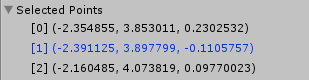
Selection output

Each item in the list is identified by a common string value "vert" and the index of the item. So item 0 is "vert0" item 1 is "vert1" etc. Now, when "vert1" is selected, GUI.GetNameOfFocusedControl will return that string which can be used to take further action as desired.


vertlist.png (4.9 kB)
vertlist-sel.png (3.0 kB)
Comment
Add comment · Show 1 · Share
10 |3000 characters needed characters left characters exceeded
▼
  • Viewable by all users
  • Viewable by moderators
  • Viewable by moderators and the original poster
  • Advanced visibility
Viewable by all users
avatar image Dennijr · Oct 20, 2018 at 11:41 PM 0
Share

4 year old topic and 2 year old answer, but I have no idea how many hours I've spent in the last couple days Googling and trying to make an inspector foldout menu have the last selected element show hover color but not show hover color on hovered elements (why there is no 'selected' color, we may never know). Thanks to you, my search is now over!

avatar image
1

Answer by Karsten · Nov 09, 2014 at 12:22 AM

same problem here, how to get the selected object in the inspector... such basic stuff... it probably exists but were...

EDIT: please TRY this and tell if it works thx, i am atm on a cellphone cant check http://docs.unity3d.com/ScriptReference/Selection-activeObject.html

Comment
Add comment · Share
10 |3000 characters needed characters left characters exceeded
▼
  • Viewable by all users
  • Viewable by moderators
  • Viewable by moderators and the original poster
  • Advanced visibility
Viewable by all users
avatar image
0

Answer by Landern · Jun 16, 2014 at 01:56 PM

Are you referring to EditorGUIUtility.PingObject?

Comment
Add comment · Show 1 · Share
10 |3000 characters needed characters left characters exceeded
▼
  • Viewable by all users
  • Viewable by moderators
  • Viewable by moderators and the original poster
  • Advanced visibility
Viewable by all users
avatar image GalanoDev · Jun 16, 2014 at 03:42 PM 0
Share

Not quite. What i do need is the object currently selected in the inspector. Right now, in the image, you can see the Ref Atlas is selected on the inspector but i want to be able to do something in the script with it. Im searching for wherever unity stores the current inspector selected element (Something like Editor.CurrentInspectorSelected that should return a Ref_Atlas object)

avatar image
0

Answer by JGriffith · Apr 07, 2015 at 04:31 PM

I was able to find what I needed to get my stuff working(close to) how I wanted.

This stuff might help you guys....

http://docs.unity3d.com/ScriptReference/GUI.SetNextControlName.html

http://docs.unity3d.com/ScriptReference/GUI.GetNameOfFocusedControl.html

http://docs.unity3d.com/ScriptReference/GUI.FocusControl.html

http://docs.unity3d.com/ScriptReference/EditorGUI.FocusTextInControl.html

http://docs.unity3d.com/ScriptReference/GUIUtility.html

http://docs.unity3d.com/ScriptReference/EditorGUIUtility.html

Comment
Add comment · Share
10 |3000 characters needed characters left characters exceeded
▼
  • Viewable by all users
  • Viewable by moderators
  • Viewable by moderators and the original poster
  • Advanced visibility
Viewable by all users

Your answer

Hint: You can notify a user about this post by typing @username

Up to 2 attachments (including images) can be used with a maximum of 524.3 kB each and 1.0 MB total.

Follow this Question

Answers Answers and Comments

6 People are following this question.

avatar image avatar image avatar image avatar image avatar image avatar image

Related Questions

Refreshing custom Inspector window while playing 1 Answer

How can I create and override Prefabs from a script? 0 Answers

Custom Inspector, Textfield with Icon 1 Answer

Instantiating and displaying enum objects using custom inspector 1 Answer

Using EditorGUI.FloatField With Custom Class Inspectors? 1 Answer


Enterprise
Social Q&A

Social
Subscribe on YouTube social-youtube Follow on LinkedIn social-linkedin Follow on Twitter social-twitter Follow on Facebook social-facebook Follow on Instagram social-instagram

Footer

  • Purchase
    • Products
    • Subscription
    • Asset Store
    • Unity Gear
    • Resellers
  • Education
    • Students
    • Educators
    • Certification
    • Learn
    • Center of Excellence
  • Download
    • Unity
    • Beta Program
  • Unity Labs
    • Labs
    • Publications
  • Resources
    • Learn platform
    • Community
    • Documentation
    • Unity QA
    • FAQ
    • Services Status
    • Connect
  • About Unity
    • About Us
    • Blog
    • Events
    • Careers
    • Contact
    • Press
    • Partners
    • Affiliates
    • Security
Copyright © 2020 Unity Technologies
  • Legal
  • Privacy Policy
  • Cookies
  • Do Not Sell My Personal Information
  • Cookies Settings
"Unity", Unity logos, and other Unity trademarks are trademarks or registered trademarks of Unity Technologies or its affiliates in the U.S. and elsewhere (more info here). Other names or brands are trademarks of their respective owners.
  • Anonymous
  • Sign in
  • Create
  • Ask a question
  • Spaces
  • Default
  • Help Room
  • META
  • Moderators
  • Explore
  • Topics
  • Questions
  • Users
  • Badges

