
Wayback Machinekoobas.hobune.stream
May JUN Jul
Previous capture 12 Next capture
2021 2022 2023
1 capture
12 Jun 22 - 12 Jun 22
sparklines
Close Help
  • Products
  • Solutions
  • Made with Unity
  • Learning
  • Support & Services
  • Community
  • Asset Store
  • Get Unity

UNITY ACCOUNT

You need a Unity Account to shop in the Online and Asset Stores, participate in the Unity Community and manage your license portfolio. Login Create account
  • Blog
  • Forums
  • Answers
  • Evangelists
  • User Groups
  • Beta Program
  • Advisory Panel

Navigation

  • Home
  • Products
  • Solutions
  • Made with Unity
  • Learning
  • Support & Services
  • Community
    • Blog
    • Forums
    • Answers
    • Evangelists
    • User Groups
    • Beta Program
    • Advisory Panel

Unity account

You need a Unity Account to shop in the Online and Asset Stores, participate in the Unity Community and manage your license portfolio. Login Create account

Language

  • Chinese
  • Spanish
  • Japanese
  • Korean
  • Portuguese
  • Ask a question
  • Spaces
    • Default
    • Help Room
    • META
    • Moderators
    • Topics
    • Questions
    • Users
    • Badges
  • Home /
avatar image
1
Question by D3Duck · Aug 31, 2015 at 06:18 PM · framerateframes per second

Why is my framarate so bad?

I've been typing a bunch of code for a game I'm creating. However, when testing some simple AI code I found my frame rate was already going down to 30-40.

So I went and traveled the internet for some hours and did the following:

  • Used the profiler to find what was giving problems; rendering being the only one that stuck out, together with vSync.

  • Used to frame debugger to find out what was going on. Here found that over half my draw calls where actually from the main canvas (which is quite large but nothing extreme, maybe 100 children in total)

  • I removed things from the scene as much as possible, only leaving the player on a tiny platform.

  • Building and running the game as Windows stand alone.

  • Using a batching script (even though there is nothing to batch really)

Each of these resulted in pretty much exactly the same frame rate of 30-40 frames. Only making the screen smaller helps but at this point you can hardly see anything and the frame rate is barely 60.

I haven't done anything with the lights yet. All that is in my scene is the player, a plane to stand on, 2 NPCs, a directional light, an empty GameObject with some controller scripts and the Canvas. Nothing else, so now what can I miss here that is giving such bad frame rates?

I saw people asking for people's specs in other posts: I'm on a laptop, I7-4700MQ 2.4ghz with GeForce GTX 765M and 16GB RAM. Unity 5

alt text

screenshot.png (392.1 kB)
Comment
Add comment · Show 5
10 |3000 characters needed characters left characters exceeded
▼
  • Viewable by all users
  • Viewable by moderators
  • Viewable by moderators and the original poster
  • Advanced visibility
Viewable by all users
avatar image AngryBurritoCoder · Aug 31, 2015 at 11:40 PM 0
Share

can you show me your inspector and also are you using legacy GUI ? also any debug usage or print ( debug.log or print() )

avatar image AngryBurritoCoder · Aug 31, 2015 at 11:43 PM 0
Share

also are you sure your laptop isnt running on some sort of saving power setting, and also is unity using the GTX gpu or intel for rendering ?

avatar image D3Duck · Sep 01, 2015 at 06:18 AM 0
Share

alt text

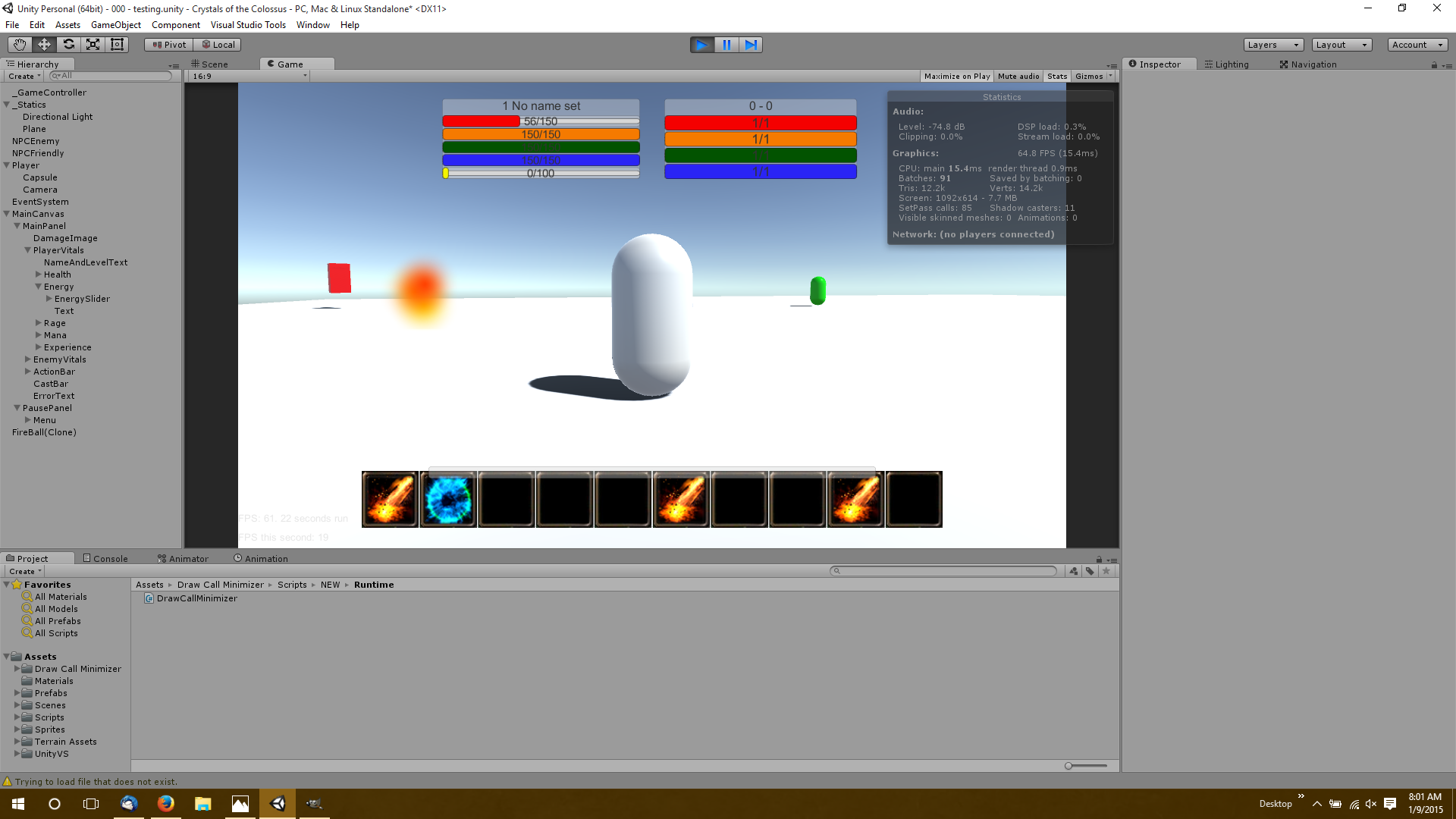
@AngryBurritoCoder There are some more children in the Canvas which are hidden now but like I said about 100 total. No Debug statements, no Print statements, I only use one line of legacy UI to show which target the player has selected (for testing only)

$$anonymous$$y laptop is always in High performance mode (I checked to make sure). Isn't Unity using my GPU by default? I wasn't able to find any settings about that.

screenshot2.png (324.5 kB)
avatar image herman111 · Sep 01, 2015 at 08:37 AM 0
Share

that's why I'm sticking to 4.6...framerate is bad for anything I do in 5.xx

avatar image D3Duck · Sep 01, 2015 at 04:23 PM 0
Share

@AngryBurritoCoder What do you want to see in the inspector by the way?

2 Replies

· Add your reply
  • Sort: 
avatar image
1
Best Answer

Answer by Bunny83 · Sep 01, 2015 at 04:59 PM

Well, if the framerates drops when you enlarge your screen, that simply means that your GPU is simply not strong enough to provide the required fillrate.

If you don't have a high-end GPU you might want to exchange the new Standard shader with the old legacy ones. The Standard shader can be quite demanding, even on high end hardware. It also increases the build size significantly (especially on Android).

edit
Just read what GPU you have in your laptop. Well, according to wikipedia the fillrate shouldn't be a problem even with full HD resolution. 12 GP / s should be more than enough ^^.

Like others have already mentioned, are you sure that your laptop is actually using your dedicated GPU and not the internal one? It usually helps when you simply disable the internal one in the device manager completely.

Comment
Add comment · Show 1 · Share
10 |3000 characters needed characters left characters exceeded
▼
  • Viewable by all users
  • Viewable by moderators
  • Viewable by moderators and the original poster
  • Advanced visibility
Viewable by all users
avatar image D3Duck · Sep 01, 2015 at 07:32 PM 0
Share

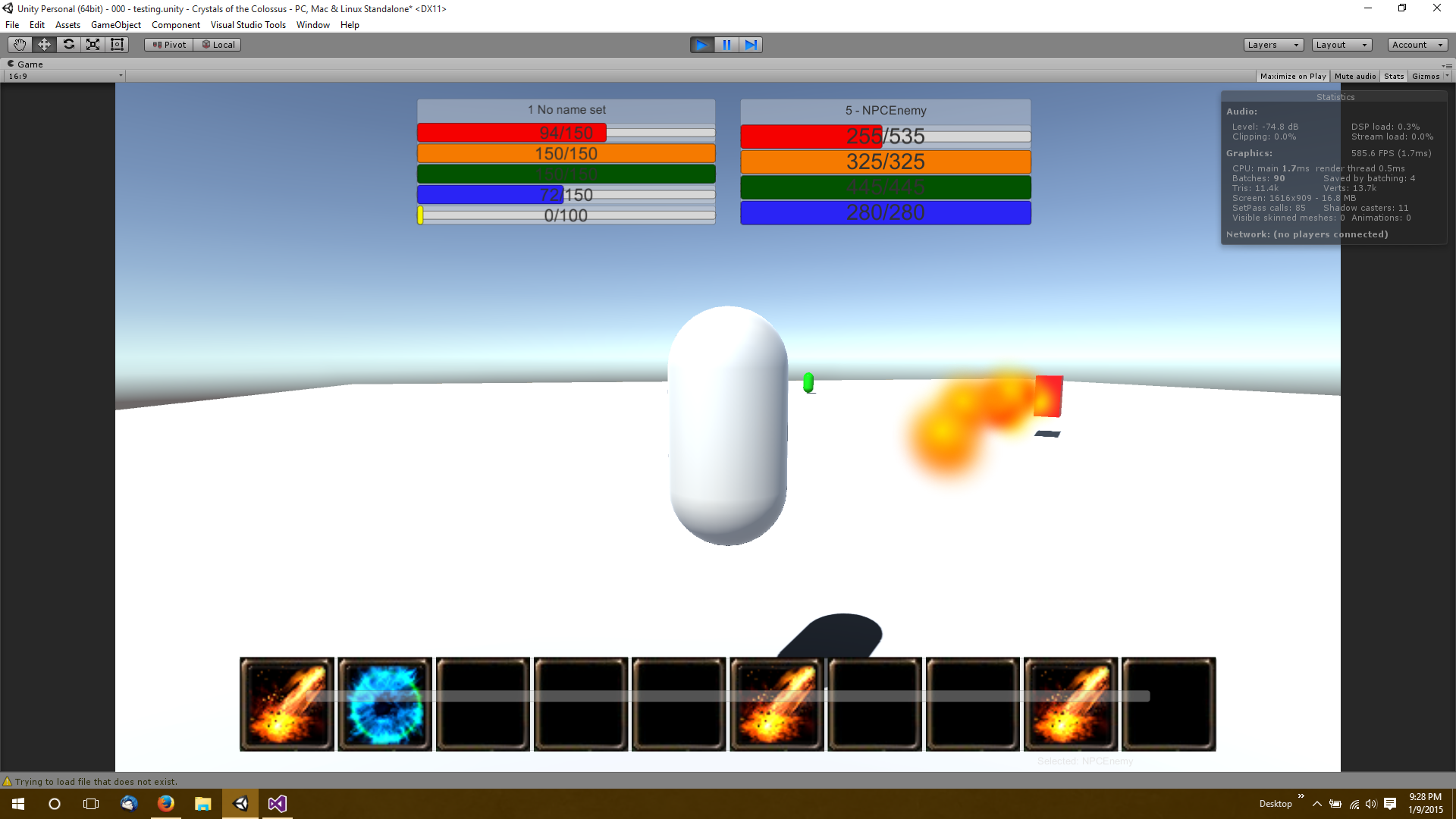
Thanks for the answer. I redid everything I did before and it seems like you were right about the video card. I ran it again and there it went:
alt text

Its not as high as I think it should be, but of course I would expect less out of a laptop running it in the editor than a PC on stand alone.

screenshot3.png (368.3 kB)
avatar image
1

Answer by getyour411 · Aug 31, 2015 at 11:46 PM

Your screenshot shows 428.8 fps

Comment
Add comment · Show 2 · Share
10 |3000 characters needed characters left characters exceeded
▼
  • Viewable by all users
  • Viewable by moderators
  • Viewable by moderators and the original poster
  • Advanced visibility
Viewable by all users
avatar image D3Duck · Sep 01, 2015 at 06:21 AM 0
Share

Not sure how that happened but when I run the game on a maximized screen it is always 30-40. When I run on a small screen like in this second screenshot its around 60 which is still pretty bad.

avatar image getyour411 · Sep 01, 2015 at 07:50 AM 0
Share

If you ave Vsync on the game will run around the 60fps mark. Discrete cards like A$$anonymous$$D and GTX will have an app, probably hidden in your status area where you tell the system what applications you want to use the GPU ins$$anonymous$$d of the integrated card - do check that.

Your answer

Hint: You can notify a user about this post by typing @username

Up to 2 attachments (including images) can be used with a maximum of 524.3 kB each and 1.0 MB total.

Follow this Question

Answers Answers and Comments

5 People are following this question.

avatar image avatar image avatar image avatar image avatar image

Related Questions

FPS in single digits... on ATI Radeon 3000 1 Answer

Why do newer versions of Unity have problems with framerate never exceeding refresh rate despite vsync settings being turned off? 0 Answers

low FPS when battery is low ( unity android ) 0 Answers

How to calculate an accurate frame duration? 0 Answers

in-game grid made of GameObjects 1 Answer


Enterprise
Social Q&A

Social
Subscribe on YouTube social-youtube Follow on LinkedIn social-linkedin Follow on Twitter social-twitter Follow on Facebook social-facebook Follow on Instagram social-instagram

Footer

  • Purchase
    • Products
    • Subscription
    • Asset Store
    • Unity Gear
    • Resellers
  • Education
    • Students
    • Educators
    • Certification
    • Learn
    • Center of Excellence
  • Download
    • Unity
    • Beta Program
  • Unity Labs
    • Labs
    • Publications
  • Resources
    • Learn platform
    • Community
    • Documentation
    • Unity QA
    • FAQ
    • Services Status
    • Connect
  • About Unity
    • About Us
    • Blog
    • Events
    • Careers
    • Contact
    • Press
    • Partners
    • Affiliates
    • Security
Copyright © 2020 Unity Technologies
  • Legal
  • Privacy Policy
  • Cookies
  • Do Not Sell My Personal Information
  • Cookies Settings
"Unity", Unity logos, and other Unity trademarks are trademarks or registered trademarks of Unity Technologies or its affiliates in the U.S. and elsewhere (more info here). Other names or brands are trademarks of their respective owners.
  • Anonymous
  • Sign in
  • Create
  • Ask a question
  • Spaces
  • Default
  • Help Room
  • META
  • Moderators
  • Explore
  • Topics
  • Questions
  • Users
  • Badges
