 koobas.hobune.stream


Cross Product Inverse of what I want for wall run
I am programming my own FPS wall run in a custom character motor using the Character Controller. It is almost where I want, except for one thing. My interpretation of geometry and math seems to be off. I am trying to get the cross product from the MoveDirection and the normal of the wall to run against which, as far as I know, should get a vector parallel with the wall which I can then use as the character's move direction.
And it does! The thing is, it's in the opposite direction of where I want to go. Debug rays are showing it, and it's just plain obvious in the movement. Here's an image to show what I'm going for, and what is happening (the Magenta line is what's occurring):
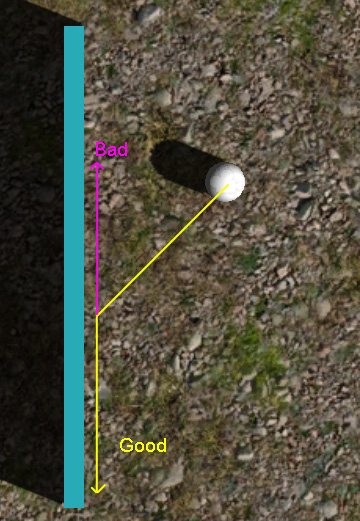
I want to get input from outside sources though to make sure this is occurring as expected, or if I'm missing something vital. If it's as expected, then I can do a little more math to get the inverse, but if I'm doing something wrong and don't see it, I should correct it.
What I'm doing is casting a ray out to the right of my character. If it hits something, it then gets the cross-product of the character's MoveDirection and the plane's normal, and sets that as the new direction before the update moves on with the rest of the housekeeping (the full structure I'll tweak once I know I'm doing the right thing.) Here is the function that creates the wall run vector:
     bool DoWallRunCheck(){

         Ray ray = new Ray(transform.position, transform.TransformDirection(Vector3.right));
         Debug.DrawRay(transform.position, transform.TransformDirection(Vector3.right), Color.red, 2f, false);

         RaycastHit hit;

         if (Physics.Raycast(ray.origin, ray.direction, out hit, 1f)){

             Debug.DrawRay(hit.point, hit.normal, Color.green, 2f, false);

             Vector3 crossProduct = Vector3.Cross(moveDirection, hit.normal);
             Debug.DrawRay(transform.position, crossProduct * BaseSpeed, Color.magenta, 2f, false);

             moveDirection = crossProduct;
             moveDirection = transform.TransformDirection(moveDirection);
             moveDirection.Normalize();
             moveDirection *= BaseSpeed + (RunSpeedIncrease * (moveDownTime / RampUpTime));

             return true;
         }
         else {
             return false;
         }
     }
Just to note, I have also tried it with:
 Vector3 crossProduct = Vector3.Cross(moveDirection, hit.normal);
 crossProduct = Vector3.Cross(crossProduct, hit.normal);
That was suggested to me by one source who's better with vector math than I am, but still produces the same result.

not sure, but thumbs up for well formatted and thorough question! :)
Also, it's silly that Debug.DrawRay doesn't let you just pass in "ray", isn't it?

It is, really. I mean, it's right there for one of them. Visually the rays show me that I have the angles I want, but it's been a while since I've had to do vector math, so I've had to refresh myself and I still don't know if it's right.

@Scavenger$$anonymous$$edia, unless I'm misinterpretting, the cross product will give the normal to a plane created by the two vectors. So you would be getting the vector co$$anonymous$$g out of or entering the screen in the image above...I think, it's a bit rusty. Question though, are you using physics, and is this on a mobile device that you're using the gyroscope for to move the character, or does the player just put an input in to move it? Let me think on this one...
@supernat User RocksYourTeeth has given me a solution that has worked so far. It's also using keyboard and mouse input. I'm kind of scared of the idea of a first-person free-running game on a touch screen device.

I think you need to do something like this on line 12:
Vector3 crossProduct = Vector3.Cross(Vector3.up, hit.normal);
Because combining the normal off the wall with the direction "up", that should give you the line along the wall.
This appears to be working after I get rid of my extra TransformDirection() call before normalizing! Thank you so much!



