 koobas.hobune.stream


Need a helping Hand: Dragging a rigidbody on touch move.
I having trouble implementing a function to drag a rigidbody platform when the user moves a finger on the screen. I want to move the rigidbody only on the X axis and I want the rigidbody platform object to act naturally under physics all the time.
I did try many ways to make this work and I actually managed to do it, but the dragging of the rigidbody is still not so comfortable to use and collisions are not working at their best either (and I'm guessing the latter is happening due to high speeds). I need the dragging to be as easy as possible as this will be used to control a platform to prevent a ball from falling.
This is my current work, it makes the object move quite well but I really wish to improve it.
I'm applying a boundary limit in which the object is allowed to move on the X asix. The object is allowed to be moved between 400 and 880 world points.
My idea to make this work is to calculate the difference between the touch position and the rigidbody's position, and increase the rigidbody's velocity by the difference found.
Check out the screen shots below to understand the setup.
function FixedInputs() {
   if (Input.touchCount > 0 && Input.touchCount < 3) {

         for (var touch:Touch in Input.touches){

             if (touch.phase == TouchPhase.Moved && playerSlider.HitTest(touch.position)){

                 touchXPos = touch.position.x - ((Screen.width / 10) * 2);
                 playerPos = camera.main.WorldToScreenPoint(playerRigidbody.position);
                 playerXPos = playerPos.x;

                 if (playerRigidbody.position.x > 400 && ((touchXPos - playerXPos) * 6.5)/touchDivider < 0 && ((touchXPos - playerXPos) * 6.5)/touchDivider  > -10){
                     playerRigidbody.velocity = (new Vector3(1, 0, 0) * 1000 * ((touchXPos - playerXPos) * 6.5)/touchDivider/8 * Time.fixedDeltaTime);
                 }
                 else if (playerRigidbody.position.x < 880 && ((touchXPos - playerXPos) * 6.5)/touchDivider > 0 && ((touchXPos - playerXPos) * 6.5)/touchDivider  < 10){
                     playerRigidbody.velocity = (new Vector3(1, 0, 0) * 1000 * ((touchXPos - playerXPos) * 6.5)/touchDivider/8 * Time.fixedDeltaTime);
                 }
                 else if (playerRigidbody.position.x > 400 && ((touchXPos - playerXPos) * 6.5)/touchDivider < 0 && ((touchXPos - playerXPos) * 6.5)/touchDivider  > -30){
                     playerRigidbody.velocity = (new Vector3(1, 0, 0) * 1000 * ((touchXPos - playerXPos) * 6.5)/touchDivider/2 * Time.fixedDeltaTime);
                 }
                 else if (playerRigidbody.position.x < 880 && ((touchXPos - playerXPos) * 6.5)/touchDivider > 0 && ((touchXPos - playerXPos) * 6.5)/touchDivider  < 30){
                     playerRigidbody.velocity = (new Vector3(1, 0, 0) * 1000 * ((touchXPos - playerXPos) * 6.5)/touchDivider/2 * Time.fixedDeltaTime);
                 }
                 else if (playerRigidbody.position.x > 400 && ((touchXPos - playerXPos) * 6.5)/touchDivider  <= -30){

                     if ((touchXPos - playerXPos) < -40)
                     playerRigidbody.velocity = (new Vector3(1, 0, 0) * 1000 * (-70 * 6.5)/2 * Time.fixedDeltaTime);
                     else
                     playerRigidbody.velocity = (new Vector3(1, 0, 0) * 1000 * ((touchXPos - playerXPos) * 6.5)/2 * Time.fixedDeltaTime);
                 }
                 else if (playerRigidbody.position.x < 880 && ((touchXPos - playerXPos) * 6.5)/touchDivider  >= 30){

                     if ((touchXPos - playerXPos) > 40)
                     playerRigidbody.velocity = (new Vector3(1, 0, 0) * 1000 * (70 * 6.5)/2 * Time.fixedDeltaTime);
                     else
                     playerRigidbody.velocity = (new Vector3(1, 0, 0) * 1000 * ((touchXPos - playerXPos) * 6.5)/2 * Time.fixedDeltaTime);
                 }
                 else{
                     playerRigidbody.velocity = (new Vector3(0, 0 , 0) * Time.fixedDeltaTime);
                 }
             }
             else playerRigidbody.velocity = (new Vector3(0, 0, 0) * Time.fixedDeltaTime);
         }
     }
     else playerRigidbody.velocity = (new Vector3(0, 0, 0) * Time.fixedDeltaTime);
}
To be honest I'm not 100% sure of what I'm doing here. The result of this code is a couple of days work of trying to figure out a logic to make the dragging happen.
I'm still not pleased with the work I have. Is there anybody who can provide me with a better way to do the dragging.
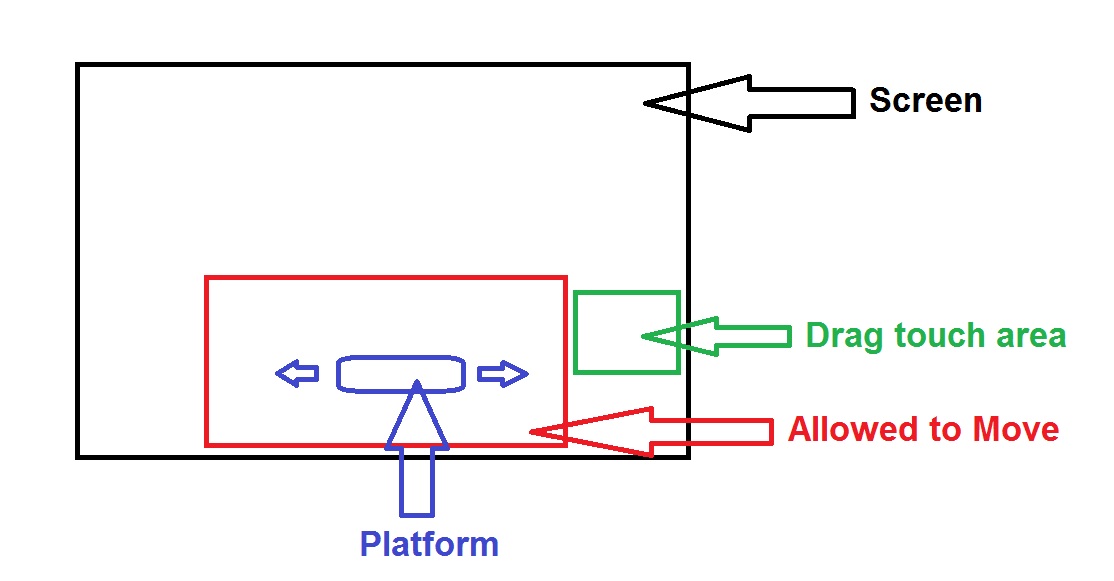
This is what I am trying to do:
The red box is the space in which the rigidbody is allowed to move (X axis, does not move on Y axis)
The green box is the space (GUITexture) on which the user will drag his finger to correspond to the movement of the platform. When the user drags his finger to the left or right side of the green box, the platform should move to the left or right side of the red box, respectively.


Hey mate, did you managed to do this? :) I'm struggling in your footsteps here...

$$anonymous$$ezkal i converted your answer to a comment because answers should really just be used to answer the main question.
Read this page : http://answers.unity3d.com/page/newuser.html
Please watch : http://video.unity3d.com/video/7720450/tutorials-using-unity-answers
Btw. i don't have the time to read through you're entire question but maybe this helps: http://www.youtube.com/watch?v=QjUhQ4z6pF0&feature=youtu.be



