
Wayback Machinekoobas.hobune.stream
May JUN Jul
Previous capture 13 Next capture
2021 2022 2023
1 capture
13 Jun 22 - 13 Jun 22
sparklines
Close Help
  • Products
  • Solutions
  • Made with Unity
  • Learning
  • Support & Services
  • Community
  • Asset Store
  • Get Unity

UNITY ACCOUNT

You need a Unity Account to shop in the Online and Asset Stores, participate in the Unity Community and manage your license portfolio. Login Create account
  • Blog
  • Forums
  • Answers
  • Evangelists
  • User Groups
  • Beta Program
  • Advisory Panel

Navigation

  • Home
  • Products
  • Solutions
  • Made with Unity
  • Learning
  • Support & Services
  • Community
    • Blog
    • Forums
    • Answers
    • Evangelists
    • User Groups
    • Beta Program
    • Advisory Panel

Unity account

You need a Unity Account to shop in the Online and Asset Stores, participate in the Unity Community and manage your license portfolio. Login Create account

Language

  • Chinese
  • Spanish
  • Japanese
  • Korean
  • Portuguese
  • Ask a question
  • Spaces
    • Default
    • Help Room
    • META
    • Moderators
    • Topics
    • Questions
    • Users
    • Badges
  • Home /
avatar image
0
Question by Risna · Nov 27, 2014 at 01:38 PM · c#

Prevent player from goes through the wall

Hi guys, I want to ask a question. First of all, I already can detect the player while the player hit the wall, but I could not make the player not goes through the wall. How could I make the player to stop moving while the player hit the wall?

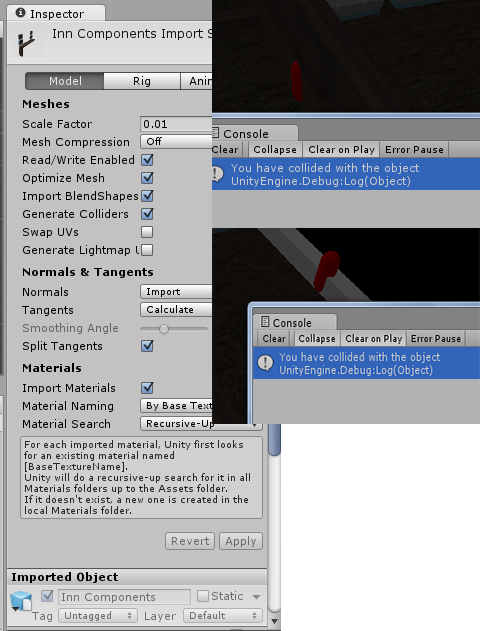
Here is the screenshot (Red capsule is the player):
alt text

The first image where the capsule is collided with the brown wall is the imported object from 3ds max and I already applied the collider by ticking the check box as shown on the above image.

Here is the code that I am using:

 using UnityEngine;
 using System.Collections;
 
 [RequireComponent(typeof(CharacterController))]
 
 public class CheckPlayer : MonoBehaviour 
 {
     public float moveSpeed = 5.0f, rotationSpeed = 5.0f; // Define and set for the movement and rotation of the player
 
     private void Update()
     {
         // Call the Movement and Rotation function
 
         Movement();
 
         Rotation();
     }
 
     private void OnTriggerEnter(Collider col)
     {
         // If the game object collided with the certain tag
         if (col.gameObject.tag == "Inn's Objects")
         {
             // Debug it
             Debug.Log("You have collided with the object");
         }
 
         // If the game object colided with the certain tag
         if (col.gameObject.tag == "Inn's Door")
         {
             // Load another level
             GameManager.LoadLevel("Third Loading Scene");
         }
     }
 
     private void Movement()
     {
         // If user press W on the keyboard
         if (Input.GetKey(KeyCode.W))
         {
             // Move the player forward
             transform.position -= Vector3.forward * moveSpeed * Time.deltaTime;
         }
 
         // But if user press A on the keyboard
         else if (Input.GetKey(KeyCode.A))
         {
             // Move the player to the right
             transform.position += Vector3.right * moveSpeed * Time.deltaTime;
         }
 
         // But if user press S on the keyboard
         else if (Input.GetKey(KeyCode.S))
         {
             // Move the player backward
             transform.position += Vector3.forward * moveSpeed * Time.deltaTime;
         }
 
         // But if user press D on the keyboard
         else if (Input.GetKey(KeyCode.D))
         {
             // Move the player to the left
             transform.position -= Vector3.right * moveSpeed * Time.deltaTime;
         }
     }
 
     private void Rotation()
     {
         // If user press E on the keyboard
         if (Input.GetKey(KeyCode.E))
         {
             // Rotate the player to the right
             transform.Rotate(-Vector3.up * rotationSpeed * Time.deltaTime);
         }
 
         // But if user press Q on the keyboard
         else if (Input.GetKey(KeyCode.Q))
         {
             // Rotate the player to the left
             transform.Rotate(Vector3.up * rotationSpeed * Time.deltaTime);
         }
     }
 }


Any help would be much appreciated!

Thank you

capture.jpg (161.4 kB)
Comment
Add comment · Show 2
10 |3000 characters needed characters left characters exceeded
▼
  • Viewable by all users
  • Viewable by moderators
  • Viewable by moderators and the original poster
  • Advanced visibility
Viewable by all users
avatar image Swaggre · Nov 27, 2014 at 02:14 PM 0
Share

Uncheck the 'generate colliders' box and add a box collider to the wall gameobject. You also need to have a collider in the player gameobject to collide with the wall.

avatar image Risna · Nov 27, 2014 at 02:30 PM 0
Share

I already uncheck the generate colliders, but when I uncheck it, the debug did not run and also still goes through the wall. And also before I ask this question on this forum, I already have a collider for each of the walls and the player gameobject

1 Reply

· Add your reply
  • Sort: 
avatar image
0

Answer by HarshadK · Nov 27, 2014 at 02:17 PM

The option below is based on the fact that you are using OnTriggerEnter to check for collision in your script above.

Your Wall colliders are set to be Trigger. Try to uncheck the is Trigger from your collider on your wall.

Comment
Add comment · Show 4 · Share
10 |3000 characters needed characters left characters exceeded
▼
  • Viewable by all users
  • Viewable by moderators
  • Viewable by moderators and the original poster
  • Advanced visibility
Viewable by all users
avatar image Risna · Nov 27, 2014 at 02:26 PM 0
Share

No, when I uncheck the isTrigger, the function OnTriggerEnter did not run

avatar image HarshadK · Nov 27, 2014 at 02:27 PM 0
Share

You need to replace the OnTriggerEnter function with OnCollisionEnter(). Something like:

 void OnCollisionEnter(Collision col) {
avatar image Risna · Nov 27, 2014 at 02:40 PM 0
Share

When I replace the OnTriggerEnter to OnCollisionEnter, the Debug.Log inside that function did not run sir.

avatar image HarshadK · Nov 28, 2014 at 10:32 AM 0
Share

Can you post a screenshot for inspector settings of both the objects?

Your answer

Hint: You can notify a user about this post by typing @username

Up to 2 attachments (including images) can be used with a maximum of 524.3 kB each and 1.0 MB total.

Follow this Question

Answers Answers and Comments

27 People are following this question.

avatar image avatar image avatar image avatar image avatar image avatar image avatar image avatar image avatar image avatar image avatar image avatar image avatar image avatar image avatar image avatar image avatar image avatar image avatar image avatar image avatar image avatar image avatar image avatar image avatar image avatar image avatar image

Related Questions

Multiple Cars not working 1 Answer

Distribute terrain in zones 3 Answers

After collision how the run animation to die animation will change.. 0 Answers

Weird NullReferenceException 1 Answer

color in textmesh 1 Answer


Enterprise
Social Q&A

Social
Subscribe on YouTube social-youtube Follow on LinkedIn social-linkedin Follow on Twitter social-twitter Follow on Facebook social-facebook Follow on Instagram social-instagram

Footer

  • Purchase
    • Products
    • Subscription
    • Asset Store
    • Unity Gear
    • Resellers
  • Education
    • Students
    • Educators
    • Certification
    • Learn
    • Center of Excellence
  • Download
    • Unity
    • Beta Program
  • Unity Labs
    • Labs
    • Publications
  • Resources
    • Learn platform
    • Community
    • Documentation
    • Unity QA
    • FAQ
    • Services Status
    • Connect
  • About Unity
    • About Us
    • Blog
    • Events
    • Careers
    • Contact
    • Press
    • Partners
    • Affiliates
    • Security
Copyright © 2020 Unity Technologies
  • Legal
  • Privacy Policy
  • Cookies
  • Do Not Sell My Personal Information
  • Cookies Settings
"Unity", Unity logos, and other Unity trademarks are trademarks or registered trademarks of Unity Technologies or its affiliates in the U.S. and elsewhere (more info here). Other names or brands are trademarks of their respective owners.
  • Anonymous
  • Sign in
  • Create
  • Ask a question
  • Spaces
  • Default
  • Help Room
  • META
  • Moderators
  • Explore
  • Topics
  • Questions
  • Users
  • Badges
