 koobas.hobune.stream


Facebook SDK v5.1 cannot login on android device
Hi, I get the trouble with using Facebook SDK on android. Below is what I have done:
I'm using Facebook sdk 5.1.0 and Unity version is 4.3.4
In "`Assets\Facebook\Editor\android\FacebookAndroidUtil.cs`", I add "`System.Environment.GetEnvironmentVariable("HOMEDRIVE")`" in line 62 so that "Debug Android Key Hash" can be generated.
I using C# to type the main script, in "Awake()" I add "FB.Init(SetInit, InitCallback);". It just like the tutorial from developers.facebook.com, and enable is give out "true". (I think that mean
FB.init()is success.)
After that, I build up a GUI button for log in. I have try "`FB.Login("basic_infos", AfterLogin);`", " FB.Login("publish_actions", AfterLogin); " and " FB.Login("email", AfterLogin); ", both the FB.isLoggedIn is false on android device.
Actually I can log in on unity environment using "User Access Token". On android device, after I press the Login button, it give out a permission and then I press "OK", nothing happen...(`FB.isLoggedIn` still false)
Anyone can give a help? I get the trouble a few week already...
p.s. My English is not good, please let me know if you don't understand.
Below is my coding,
 using UnityEngine;
 using System.Collections;
 using System.Collections.Generic;
 using Facebook.MiniJSON;
 using System;

 public class FB_control : MonoBehaviour {

     public Texture2D texture_btn_Login;

     void Awake ()
     {
         FB.Init(SetInit);
     }

     public void SetInit()
     {
         enabled = true;
     }

     void OnGUI()
     {
         // Click
         if (GUI.Button(new Rect(10, 50, texture_btn_Login.width * 2, texture_btn_Login.height * 2), texture_btn_Login))
         {
             FB.Login("basic_infos", AfterLogin);
         }

         // Display
         GUI.Label(new Rect(10, 300, 400, 30), "Login: "+ FB.IsLoggedIn +"      ||  init.enabled: "+ enabled);

         if(api_get_result == true)
         {
             GUI.Label(new Rect(10, 500, 400, 30), "ID: "+ profile["id"]);
             GUI.Label(new Rect(10, 550, 400, 30), "Name: "+ profile["name"]);
         }
     }

     void AfterLogin(FBResult result)
     {
         if(FB.IsLoggedIn)
         {
             FB.API("/me?fields=id,name", Facebook.HttpMethod.GET, APICallback);
         }
     }

     void APICallback(FBResult result)
     {
         result_str = result.Text;
         profile = Util.DeserializeJSONProfile(result.Text);
     }
 }

Did you enable status & review feature on facebook to be public?
You can turned it on at developers.facebook.com
select your app and choose Statuc and Reviews in the left side.
This will be work only when you have correct keyhash
so if this solution doesn't help I suggest you'd better try to logcat to find correct keyhash.

Hi $$anonymous$$axoja, I follow your suggest to go thought the facebook apps again. Now the submission is pending, I have to wait if it can approved or not.

You don't need to start any submission , just switch the toggle on top left on to "yes" 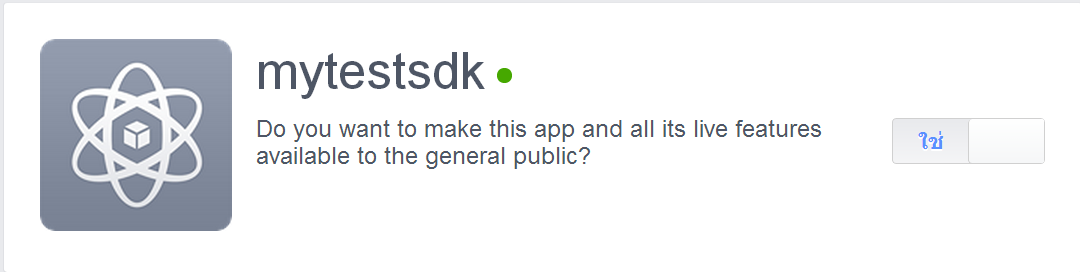
Really? The apps already switch on! But I still cannot log in on mobile...
P.S. I just add the new content. Hope that can help you understand more.
Have you already tried to logcat your device? then check if keyhash you found in logcat command line is the same as you have generated.
I heard from many people that the key generated by keytool is wrong :)
Hi $$anonymous$$axoja! You are right! I found many tutorial to learn how to generate log file (Because I don't know how to use "logcat"...), After that, I found that the key hash is not correct as you say!
Then put the right key to facebook app, the problem is solved! Thank you very much! :D

The main problem is the key hash that generate unity. The key which shows unity is different you have to put in facebook settings.
Here's the solution!
Unzip .apk file and extract META-INF\CERT.RSA file (like renaming your .apk to .zip)
run keytool -printcert -file CERT.RSA (paste this in cmd, make sure you are in the correct path)
notice SHA1 bytes are printed like 29:37:F1:CB:06…
copy SHA1 bytes into HEX to BASE64 converter (http://tomeko.net/online_tools/hex_to_base64.php?lang=en)
see your BASE64 key hash in output field
That Key BASE64 is the REAL key you have to put in facebook settings on https://apps.facebook.com/nameapp

So should I be using this as my only keyhash or just add this to the keyhashes(with the previous one that I got from unity).



