
Wayback Machinekoobas.hobune.stream
May JUN Jul
Previous capture 13 Next capture
2021 2022 2023
1 capture
13 Jun 22 - 13 Jun 22
sparklines
Close Help
  • Products
  • Solutions
  • Made with Unity
  • Learning
  • Support & Services
  • Community
  • Asset Store
  • Get Unity

UNITY ACCOUNT

You need a Unity Account to shop in the Online and Asset Stores, participate in the Unity Community and manage your license portfolio. Login Create account
  • Blog
  • Forums
  • Answers
  • Evangelists
  • User Groups
  • Beta Program
  • Advisory Panel

Navigation

  • Home
  • Products
  • Solutions
  • Made with Unity
  • Learning
  • Support & Services
  • Community
    • Blog
    • Forums
    • Answers
    • Evangelists
    • User Groups
    • Beta Program
    • Advisory Panel

Unity account

You need a Unity Account to shop in the Online and Asset Stores, participate in the Unity Community and manage your license portfolio. Login Create account

Language

  • Chinese
  • Spanish
  • Japanese
  • Korean
  • Portuguese
  • Ask a question
  • Spaces
    • Default
    • Help Room
    • META
    • Moderators
    • Topics
    • Questions
    • Users
    • Badges
  • Home /
avatar image
0
Question by unity_hL4PWxG3fblNGQ · Jan 07, 2021 at 04:04 PM · uiwaitforsecondsinstantiate prefab

UI shows text not in order

Im making a fake chat for a visual novel/otome but the text on screen is not the same as in the script. Usually, the last "message" shows first and i don´t know why. The message instanciates every second, so the last message on the array should not be sent, but stills shows, even when in the debugger i cant yet see it. i really don´t know what am i doing wrong since in the debugger shows with the order i want. Thank you so much!

Heres the example and how it´s instanciated. alt text
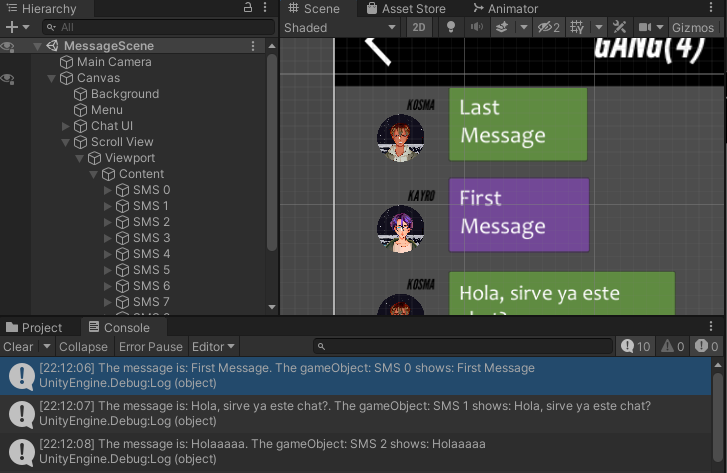
the chat story:

 static string[] test = new string[]
 {
     "First Message:Kayro",
     "Hola, sirve ya este chat?:Kosma",
     "Holaaaaa:Kayro",
     "Hey:Luan",
     "Si llegan los mensajes:Luan",
     "Cool:Luan",
     "SIGNIFICA QUE YA SIRVEEEE:Kayro",
     "WUUUU:Kayro",
     "Pero si tu no hiciste nada dude:Luan",
     "Last Message:Kosma",
     "Choice"
 };

how its sent to the manager:

 IEnumerator sendChat()
 {
     while (true)
     {
         yield return new WaitForSeconds(1.0f);
         if (test.Length > click)
         {
             //Debug.Log("Numero de clicks: " + click);
             Say(test[click]);

             clicks();
         }
     }

 }

 public void Say(string test)
 {
     string[] escena = test.Split(':');
     string sp = escena[0];
     string oc = (escena.Length >= 2) ? escena[1] : "";

     manager.Historia(sp, oc, cho);

     //Debug.Log(oc + " envia: " + sp);
 }

the manager:

       public void Historia(string di, string pj, string [] cho)
        {
         Img = SMS.transform.Find("User").gameObject;
         MessageIcon = Img.transform.Find("Name").gameObject;
         MessageText = Img.transform.Find("Text").gameObject;
         Message = SMS.transform.Find("Mensaje").gameObject;

         var parent = ChatContainer.transform;

         var messageicon = Instantiate(SMS);
         messageicon.name = "SMS " + click;
         clicks();

         messageicon.transform.SetParent(parent, false);
         Message.GetComponentInChildren<Text>().text = di;

         MessageIcon.GetComponent<Image>().sprite = Resources.Load<Sprite>("Images/Characters/" + pj + "/Icon");

         MessageText.GetComponentInChildren<Text>().text = pj.ToUpper();
         }

uni1.png (83.7 kB)
uni2.png (15.7 kB)
Comment
Add comment
10 |3000 characters needed characters left characters exceeded
▼
  • Viewable by all users
  • Viewable by moderators
  • Viewable by moderators and the original poster
  • Advanced visibility
Viewable by all users

2 Replies

· Add your reply
  • Sort: 
avatar image
0

Answer by Tomatotom1234 · Jan 07, 2021 at 05:22 PM

its because the first message is older than the newest messages so obviously the new ones will be in front

Comment
Add comment · Show 1 · Share
10 |3000 characters needed characters left characters exceeded
▼
  • Viewable by all users
  • Viewable by moderators
  • Viewable by moderators and the original poster
  • Advanced visibility
Viewable by all users
avatar image unity_hL4PWxG3fblNGQ · Jan 07, 2021 at 09:13 PM 0
Share

the "messages" iterate from top to bottom, so the last message should be at the bottom :c

avatar image
0

Answer by unity_hL4PWxG3fblNGQ · Jan 07, 2021 at 09:57 PM

FORGET IT! I JUST SOLVED IT I WAS ASSIGNING WRONG THE MESSAGES

Comment
Add comment · Share
10 |3000 characters needed characters left characters exceeded
▼
  • Viewable by all users
  • Viewable by moderators
  • Viewable by moderators and the original poster
  • Advanced visibility
Viewable by all users

Your answer

Hint: You can notify a user about this post by typing @username

Up to 2 attachments (including images) can be used with a maximum of 524.3 kB each and 1.0 MB total.

Follow this Question

Answers Answers and Comments

194 People are following this question.

avatar image avatar image avatar image avatar image avatar image avatar image avatar image avatar image avatar image avatar image avatar image avatar image avatar image avatar image avatar image avatar image avatar image avatar image avatar image avatar image avatar image avatar image avatar image avatar image avatar image avatar image avatar image avatar image avatar image avatar image avatar image avatar image avatar image avatar image avatar image avatar image avatar image avatar image avatar image avatar image avatar image avatar image avatar image avatar image avatar image avatar image avatar image avatar image avatar image avatar image avatar image avatar image avatar image avatar image avatar image avatar image avatar image avatar image avatar image avatar image avatar image avatar image avatar image avatar image avatar image avatar image avatar image avatar image avatar image avatar image avatar image avatar image avatar image avatar image avatar image avatar image avatar image avatar image avatar image avatar image avatar image avatar image avatar image avatar image avatar image avatar image avatar image avatar image avatar image avatar image avatar image avatar image avatar image avatar image avatar image avatar image avatar image avatar image avatar image avatar image avatar image avatar image avatar image avatar image avatar image avatar image avatar image avatar image avatar image avatar image avatar image avatar image avatar image avatar image avatar image avatar image avatar image avatar image avatar image avatar image avatar image avatar image avatar image avatar image avatar image avatar image avatar image avatar image avatar image avatar image avatar image avatar image avatar image avatar image avatar image avatar image avatar image avatar image avatar image avatar image avatar image avatar image avatar image avatar image avatar image avatar image avatar image avatar image avatar image avatar image avatar image avatar image avatar image avatar image avatar image avatar image avatar image avatar image avatar image avatar image avatar image avatar image avatar image avatar image avatar image avatar image avatar image avatar image avatar image avatar image avatar image avatar image avatar image avatar image avatar image avatar image avatar image avatar image avatar image avatar image avatar image avatar image avatar image avatar image avatar image avatar image avatar image avatar image avatar image avatar image avatar image avatar image avatar image avatar image

Related Questions

Instanciate prefab responsively 1 Answer

Custom Script and Controls for Canvas UI button ?? 1 Answer

How to change Image on button click in a prefab that is instantiated 1 Answer

How to instantiate random object in a panel ? 2 Answers

Changing scenes with unity 4.6 UI 1 Answer


Enterprise
Social Q&A

Social
Subscribe on YouTube social-youtube Follow on LinkedIn social-linkedin Follow on Twitter social-twitter Follow on Facebook social-facebook Follow on Instagram social-instagram

Footer

  • Purchase
    • Products
    • Subscription
    • Asset Store
    • Unity Gear
    • Resellers
  • Education
    • Students
    • Educators
    • Certification
    • Learn
    • Center of Excellence
  • Download
    • Unity
    • Beta Program
  • Unity Labs
    • Labs
    • Publications
  • Resources
    • Learn platform
    • Community
    • Documentation
    • Unity QA
    • FAQ
    • Services Status
    • Connect
  • About Unity
    • About Us
    • Blog
    • Events
    • Careers
    • Contact
    • Press
    • Partners
    • Affiliates
    • Security
Copyright © 2020 Unity Technologies
  • Legal
  • Privacy Policy
  • Cookies
  • Do Not Sell My Personal Information
  • Cookies Settings
"Unity", Unity logos, and other Unity trademarks are trademarks or registered trademarks of Unity Technologies or its affiliates in the U.S. and elsewhere (more info here). Other names or brands are trademarks of their respective owners.
  • Anonymous
  • Sign in
  • Create
  • Ask a question
  • Spaces
  • Default
  • Help Room
  • META
  • Moderators
  • Explore
  • Topics
  • Questions
  • Users
  • Badges
