
Wayback Machinekoobas.hobune.stream
May JUN Jul
Previous capture 12 Next capture
2021 2022 2023
1 capture
12 Jun 22 - 12 Jun 22
sparklines
Close Help
  • Products
  • Solutions
  • Made with Unity
  • Learning
  • Support & Services
  • Community
  • Asset Store
  • Get Unity

UNITY ACCOUNT

You need a Unity Account to shop in the Online and Asset Stores, participate in the Unity Community and manage your license portfolio. Login Create account
  • Blog
  • Forums
  • Answers
  • Evangelists
  • User Groups
  • Beta Program
  • Advisory Panel

Navigation

  • Home
  • Products
  • Solutions
  • Made with Unity
  • Learning
  • Support & Services
  • Community
    • Blog
    • Forums
    • Answers
    • Evangelists
    • User Groups
    • Beta Program
    • Advisory Panel

Unity account

You need a Unity Account to shop in the Online and Asset Stores, participate in the Unity Community and manage your license portfolio. Login Create account

Language

  • Chinese
  • Spanish
  • Japanese
  • Korean
  • Portuguese
  • Ask a question
  • Spaces
    • Default
    • Help Room
    • META
    • Moderators
    • Topics
    • Questions
    • Users
    • Badges
  • Home /
avatar image
0
Question by Scoutas · Jan 09, 2017 at 05:33 AM · movementcontrolleroptimizationgame developmentmethods

Hanging on a ledge, moving alongside of it.

First and fore-most: I don't have that much experience with game development. I have no idea if certain approaches to a problem are 'right' so I just want it to make it a bit more clear for myself. I am creating a first-person movement controller, which has an ability to hang on ledges.

The way I have it implemented, is that the player GameObject has an empty GameObject as a child, from which it uses Physics.OverlapBox method, to find any GameObjects that surround it. Once that happens, it checks if the highest point of the OverlapBox is higher than the highest point of the GameObjects that it found. If so, it assigns that object to a variable and changes the player state to "OnLedge" (before using a Coroutine to place the player into into the right position) which changes the movement scheme to move alongside it.

Several questions arose:

What if what I am climbing on is not a simple cube? What if it's a more difficult mesh? How would I go around to implement that? Because the implementation that I use now wouldn't exactly work with difficult meshes.

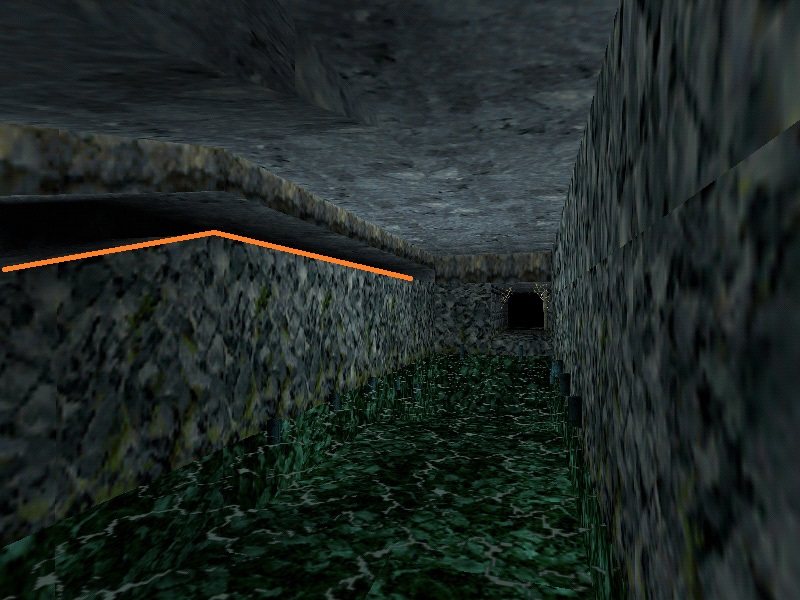
The below picture would be an example. If the whole wall with the orange line would be a mesh, would there be a way to make the player hang onto it and when moving sideways, adjust to the height of it. (If the player would move to the left in the picture, on the slanted edge, I would want his y coordinate to go down as well).
alt text

The thing that have popped into my head is using several nodes for that. In the picture example, I would use three. One at the left-most position of the ledge, one at the 'corner' of it, and one at the rightmost position. Then I would find a way for a player to move through those nodes. Is such an implementation reasonable? Because that way, if I am developing a level, I would need to create those nodes for every single ledge that I would want the player to be able to grab on.
alt text

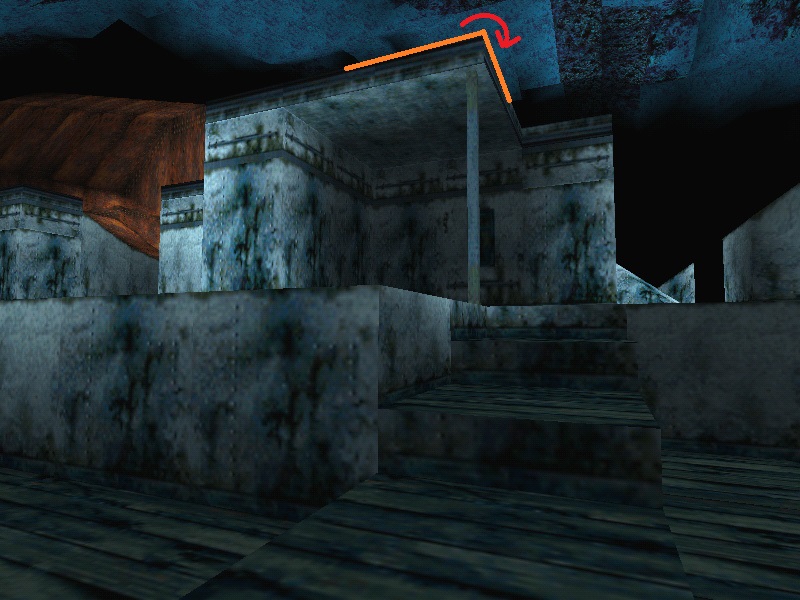
Going around corners is a problem as well, but I had an idea in mind that would work using my current implemention. If the actual collider object moves off of the cube GameObject, just rotate the player and put it in the right spot using a Coroutine. But again, more difficult meshes would not work with this method and this whole implementation just feels a little bit off. The node solution for this feels the most right, but again, when designing a level for a game, would it be right to add tons of these nodes to the level, for each ledge I would want the player to be able to grab on?

tiltedledge.jpg (193.2 kB)
aroundacorner.jpg (174.4 kB)
Comment
Add comment · Show 1
10 |3000 characters needed characters left characters exceeded
▼
  • Viewable by all users
  • Viewable by moderators
  • Viewable by moderators and the original poster
  • Advanced visibility
Viewable by all users
avatar image doublemax · Jan 09, 2017 at 01:20 PM 1
Share

I'm not a professional game developer either, but i guess that in most games there will be additional invisible objects as markers to indicate where the player can grab, ledge, shimmy etc.

$$anonymous$$g. also vsible in the demo video for this asset: https://www.assetstore.unity3d.com/en/#!/content/67802

0 Replies

· Add your reply
  • Sort: 

Your answer

Hint: You can notify a user about this post by typing @username

Up to 2 attachments (including images) can be used with a maximum of 524.3 kB each and 1.0 MB total.

Follow this Question

Answers Answers and Comments

80 People are following this question.

avatar image avatar image avatar image avatar image avatar image avatar image avatar image avatar image avatar image avatar image avatar image avatar image avatar image avatar image avatar image avatar image avatar image avatar image avatar image avatar image avatar image avatar image avatar image avatar image avatar image avatar image avatar image avatar image avatar image avatar image avatar image avatar image avatar image avatar image avatar image avatar image avatar image avatar image avatar image avatar image avatar image avatar image avatar image avatar image avatar image avatar image avatar image avatar image avatar image avatar image avatar image avatar image avatar image avatar image avatar image avatar image avatar image avatar image avatar image avatar image avatar image avatar image avatar image avatar image avatar image avatar image avatar image avatar image avatar image avatar image avatar image avatar image avatar image avatar image avatar image avatar image avatar image avatar image avatar image avatar image

Related Questions

The name 'Joystick' does not denote a valid type ('not found') 2 Answers

FPS controller, only for use on object 0 Answers

Movement help 2D Android HELP ME 0 Answers

Gradual Speed Increase with Variable Input 0 Answers

Stuttering Player Movement 2 Answers


Enterprise
Social Q&A

Social
Subscribe on YouTube social-youtube Follow on LinkedIn social-linkedin Follow on Twitter social-twitter Follow on Facebook social-facebook Follow on Instagram social-instagram

Footer

  • Purchase
    • Products
    • Subscription
    • Asset Store
    • Unity Gear
    • Resellers
  • Education
    • Students
    • Educators
    • Certification
    • Learn
    • Center of Excellence
  • Download
    • Unity
    • Beta Program
  • Unity Labs
    • Labs
    • Publications
  • Resources
    • Learn platform
    • Community
    • Documentation
    • Unity QA
    • FAQ
    • Services Status
    • Connect
  • About Unity
    • About Us
    • Blog
    • Events
    • Careers
    • Contact
    • Press
    • Partners
    • Affiliates
    • Security
Copyright © 2020 Unity Technologies
  • Legal
  • Privacy Policy
  • Cookies
  • Do Not Sell My Personal Information
  • Cookies Settings
"Unity", Unity logos, and other Unity trademarks are trademarks or registered trademarks of Unity Technologies or its affiliates in the U.S. and elsewhere (more info here). Other names or brands are trademarks of their respective owners.
  • Anonymous
  • Sign in
  • Create
  • Ask a question
  • Spaces
  • Default
  • Help Room
  • META
  • Moderators
  • Explore
  • Topics
  • Questions
  • Users
  • Badges
