
Wayback Machinekoobas.hobune.stream
May JUN Jul
Previous capture 13 Next capture
2021 2022 2023
1 capture
13 Jun 22 - 13 Jun 22
sparklines
Close Help
  • Products
  • Solutions
  • Made with Unity
  • Learning
  • Support & Services
  • Community
  • Asset Store
  • Get Unity

UNITY ACCOUNT

You need a Unity Account to shop in the Online and Asset Stores, participate in the Unity Community and manage your license portfolio. Login Create account
  • Blog
  • Forums
  • Answers
  • Evangelists
  • User Groups
  • Beta Program
  • Advisory Panel

Navigation

  • Home
  • Products
  • Solutions
  • Made with Unity
  • Learning
  • Support & Services
  • Community
    • Blog
    • Forums
    • Answers
    • Evangelists
    • User Groups
    • Beta Program
    • Advisory Panel

Unity account

You need a Unity Account to shop in the Online and Asset Stores, participate in the Unity Community and manage your license portfolio. Login Create account

Language

  • Chinese
  • Spanish
  • Japanese
  • Korean
  • Portuguese
  • Ask a question
  • Spaces
    • Default
    • Help Room
    • META
    • Moderators
    • Topics
    • Questions
    • Users
    • Badges
  • Home /
avatar image
0
Question by putlucky · Apr 02, 2014 at 05:05 PM · support

Moving object to where a ray lands(C#)

Hello, so I have a script called Control. It enables the user to select the "Player" object (Indicated when it turns blue). When this happens the bool 'selected' becomes true and we can think about adding some extra functionality. It is that which I have attempted. Once the player is selected I want to be able to move him to the position of another ray I cast with the right mouse button. Here is my code:

 using UnityEngine;
 using System.Collections;
 
 /*ISSUE SECT: 
 1. Ray is colliding with other objects. Work with layers 
 in order to prevent this.
  */
 
 public class Control : MonoBehaviour
 {
     //Variable Declaration
     public Vector3 rayPoint;
     public GameObject player;
     public bool selected = false;
     public RaycastHit hit = new RaycastHit ();
     public Ray thisRay;
 
     void Start ()
     {
         //Nothing here yet.
     }
 
     //Selected checks to see if you have selected "Player".
     void Selected ()
     {
 
 
         //Using my Ray variable. Tying it to the screenpoint of the main camera. 
         thisRay = Camera.main.ScreenPointToRay (Input.mousePosition);    
         //So if it doesn't hit anything, return (early leave from function)
         if (!Physics.Raycast (thisRay, out hit))
             return;
         //If the collider/rigidbody hit reads "Player"
         if (hit.transform.CompareTag ("Player")) {
             selected = true;
             hit.transform.renderer.material.color = Color.blue;
         }
         
     }
 
     void MovePlayer ()
     {
         if (selected == true) {
             thisRay = Camera.main.ScreenPointToRay (Input.mousePosition);
 
             if (!Physics.Raycast (thisRay, out hit))
                 return;
 
             hit.point = rayPoint;
 
         }  


     }
 
     //Update will deal with inputs. 
     void Update ()
     {


         //If left click access Select Method.
         if (Input.GetMouseButtonDown (0)) {
             Selected ();
             if (Input.GetMouseButton (1)) {
                 MovePlayer ();
             }
         }


         Debug.DrawLine (thisRay.origin, hit.point, Color.red);
 
     } 
 
 }
 
Comment
Add comment
10 |3000 characters needed characters left characters exceeded
▼
  • Viewable by all users
  • Viewable by moderators
  • Viewable by moderators and the original poster
  • Advanced visibility
Viewable by all users

1 Reply

· Add your reply
  • Sort: 
avatar image
0

Answer by Leuthil · Apr 02, 2014 at 05:24 PM

I think you are overcomplicating this. You don't need to use a Ray to determine where your player will move to. You can simply just get the appropriate Vector3 position with:

 Vector3 targetPosition = Camera.main.ScreenToWorldPoint(Input.mousePosition);
Comment
Add comment · Show 3 · Share
10 |3000 characters needed characters left characters exceeded
▼
  • Viewable by all users
  • Viewable by moderators
  • Viewable by moderators and the original poster
  • Advanced visibility
Viewable by all users
avatar image putlucky · Apr 02, 2014 at 05:31 PM 0
Share

ohhh... indeed I am. Thank you good sir!

avatar image putlucky · Apr 02, 2014 at 05:48 PM 0
Share

Hi, so thanks for the great advice, I have taken it and implemented it within my script and it works well (compared to nothing happening). Here's my code and below it is my problem: (Note: I am only showing you the $$anonymous$$ovePlayer method as nothing else has changed)

 void $$anonymous$$ovePlayer ()
     {
         if (selected == true) {
             Vector3 targetPosition = Camera.main.ScreenToWorldPoint(Input.mousePosition);
             player.transform.Translate(targetPosition * Time.deltaTime);
         }  

The problem with this is that it causes my game object to move down the surface. So here's my scene:
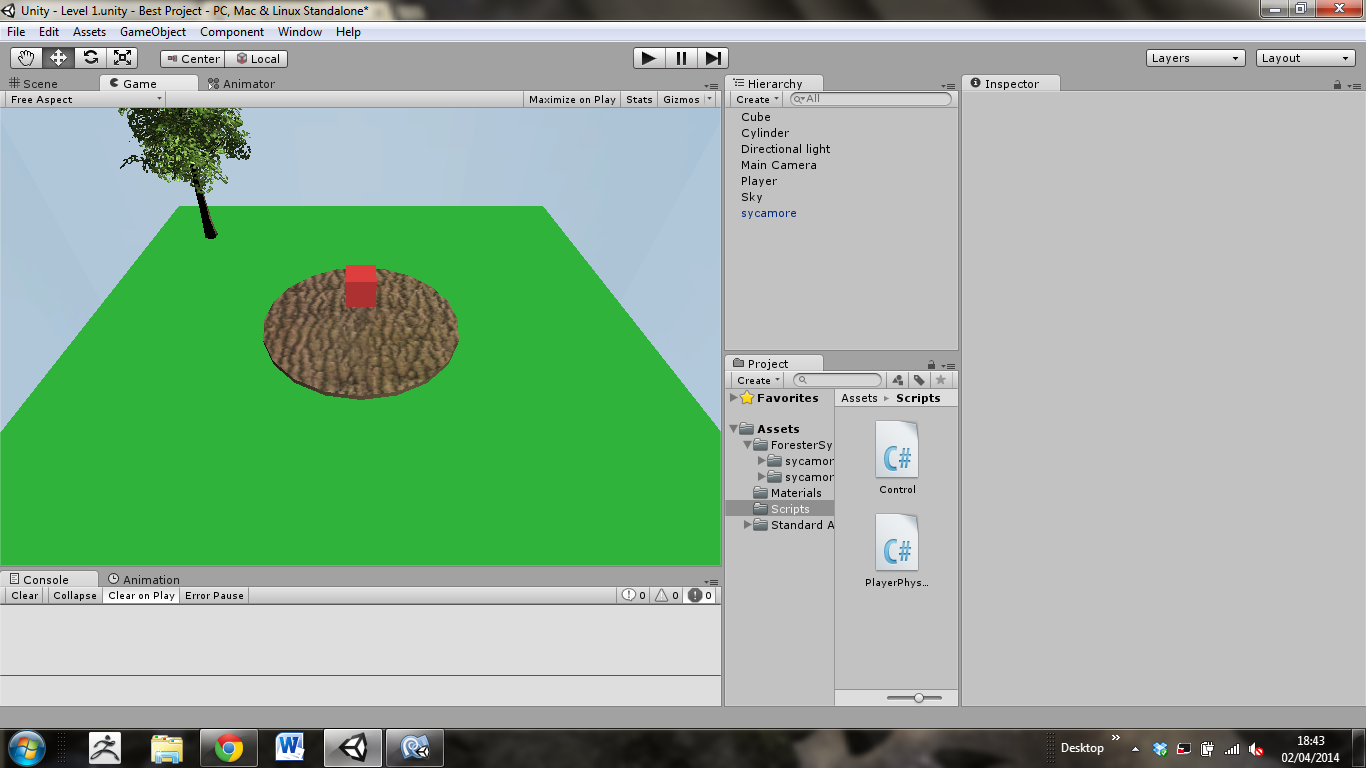
alt text

And the red Player cube just starts moving towards the camera with every click. I had some kind of idea so I took away Time.deltatime and found that I was able to select positions in 3d space beyond my objects, like waaaaaay beyond my objects. So It automatically just teleports off the viewport. Sorry for the long comment.

screenshot.png (262.1 kB)
avatar image Leuthil · Apr 02, 2014 at 06:05 PM 0
Share

Edit: For some reason I was thinking that you were doing completely top view.

I understand your issue. Perhaps using a Ray was the best option Try using the method that this answer describes:

 var hit : RaycastHit;
 if(Physics.Raycast(Camera.main.ScreenPointToRay(Input.mousePosition), hit))
     player.transform.Translate(hit.point * Time.deltaTime);
 }


Your answer

Hint: You can notify a user about this post by typing @username

Up to 2 attachments (including images) can be used with a maximum of 524.3 kB each and 1.0 MB total.

Follow this Question

Answers Answers and Comments

20 People are following this question.

avatar image avatar image avatar image avatar image avatar image avatar image avatar image avatar image avatar image avatar image avatar image avatar image avatar image avatar image avatar image avatar image avatar image avatar image avatar image avatar image

Related Questions

Multiple Cars not working 1 Answer

Visa was charged $1500 but I recieved no confirmation email or serial number 0 Answers

How to make a time mission 1 Answer

Enter Trigger, display Text, then delete object 1 Answer

Only access door if it's not locked? 1 Answer


Enterprise
Social Q&A

Social
Subscribe on YouTube social-youtube Follow on LinkedIn social-linkedin Follow on Twitter social-twitter Follow on Facebook social-facebook Follow on Instagram social-instagram

Footer

  • Purchase
    • Products
    • Subscription
    • Asset Store
    • Unity Gear
    • Resellers
  • Education
    • Students
    • Educators
    • Certification
    • Learn
    • Center of Excellence
  • Download
    • Unity
    • Beta Program
  • Unity Labs
    • Labs
    • Publications
  • Resources
    • Learn platform
    • Community
    • Documentation
    • Unity QA
    • FAQ
    • Services Status
    • Connect
  • About Unity
    • About Us
    • Blog
    • Events
    • Careers
    • Contact
    • Press
    • Partners
    • Affiliates
    • Security
Copyright © 2020 Unity Technologies
  • Legal
  • Privacy Policy
  • Cookies
  • Do Not Sell My Personal Information
  • Cookies Settings
"Unity", Unity logos, and other Unity trademarks are trademarks or registered trademarks of Unity Technologies or its affiliates in the U.S. and elsewhere (more info here). Other names or brands are trademarks of their respective owners.
  • Anonymous
  • Sign in
  • Create
  • Ask a question
  • Spaces
  • Default
  • Help Room
  • META
  • Moderators
  • Explore
  • Topics
  • Questions
  • Users
  • Badges
