
Wayback Machinekoobas.hobune.stream
May JUN Jul
Previous capture 13 Next capture
2021 2022 2023
1 capture
13 Jun 22 - 13 Jun 22
sparklines
Close Help
  • Products
  • Solutions
  • Made with Unity
  • Learning
  • Support & Services
  • Community
  • Asset Store
  • Get Unity

UNITY ACCOUNT

You need a Unity Account to shop in the Online and Asset Stores, participate in the Unity Community and manage your license portfolio. Login Create account
  • Blog
  • Forums
  • Answers
  • Evangelists
  • User Groups
  • Beta Program
  • Advisory Panel

Navigation

  • Home
  • Products
  • Solutions
  • Made with Unity
  • Learning
  • Support & Services
  • Community
    • Blog
    • Forums
    • Answers
    • Evangelists
    • User Groups
    • Beta Program
    • Advisory Panel

Unity account

You need a Unity Account to shop in the Online and Asset Stores, participate in the Unity Community and manage your license portfolio. Login Create account

Language

  • Chinese
  • Spanish
  • Japanese
  • Korean
  • Portuguese
  • Ask a question
  • Spaces
    • Default
    • Help Room
    • META
    • Moderators
    • Topics
    • Questions
    • Users
    • Badges
  • Home /
avatar image
0
Question by DevMerlin · Aug 18, 2013 at 09:38 PM · gravitymovement scriptmove an object

What would the best way be to do directional gravity on a cube?

I am building a system that puts the player movement on a cube, moving in grids. When the player reaches the edge of the cube, the player should be able to rotate and move to the next side. I don't want to rotate the whole cube itself, as there are objects on it, and the player is an independent entity. Based on grid movement, the player currently moves with transform. What would be the best way to handle 'gravity', even simulated under transform, for this kind of system? alt text
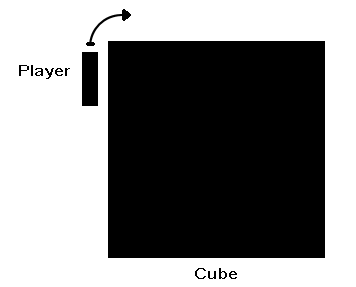
demonstration.png (4.6 kB)
Comment
Add comment
10 |3000 characters needed characters left characters exceeded
▼
  • Viewable by all users
  • Viewable by moderators
  • Viewable by moderators and the original poster
  • Advanced visibility
Viewable by all users

2 Replies

· Add your reply
  • Sort: 
avatar image
1

Answer by save · Aug 18, 2013 at 09:55 PM

The most convenient way is to create your own physics class and apply those behaviors to your physic objects. Quick example:

 class MyPhysics {
     static var gravity : Vector3 = Vector3(0,-9.8,0);
 }

 // A physic object
 private var myMass : float = 2.0;
 function Update () {
     transform.Translate(MyPhysics.gravity*myMass*Time.deltaTime);
 }

 // Changing gravity
 MyPhysics.gravity = Vector3.Lerp(MyPhysics.gravity, Vector3(-9.8,0,0), 10*Time.deltaTime);

If the objects have different physics all together, just create different rules depending on which side of the cube world they're on, defining a local gravity.

 enum LocalGravity {
     onLeft,
     onRight,
     onTop,
     onBottom
 }

 var localGravity : LocalGravity = LocalGravity.onTop; //Which would be normal gravity downwards in world perspective
 var myMass : float = 1.0;
 private var gravityDirection : Vector3;

 function Awake () {
     switch (localGravity) {
         case LocalGravity.onLeft: gravityDirection = Vector3(9.8,0,0); break;
         case LocalGravity.onRight: gravityDirection = Vector3(-9.8,0,0); break;
         case LocalGravity.onTop: gravityDirection = Vector3(0,-9.8,0); break;
         case LocalGravity.onBottom: gravityDirection = Vector3(0,9.8,0); break;
     }
 }

 function Update () {
     transform.Translate(gravityDirection*myMass*Time.deltaTime);
 }
Comment
Add comment · Share
10 |3000 characters needed characters left characters exceeded
▼
  • Viewable by all users
  • Viewable by moderators
  • Viewable by moderators and the original poster
  • Advanced visibility
Viewable by all users
avatar image
0

Answer by Bloodyem · Aug 18, 2013 at 09:50 PM

Well, I can't say this is right, but I'll throw in my two cents.

What I would do is make a collision object, and put it into the grid where the player can move. When the player hits it, use rigidbody.addforce(Vector3(<>), so the player is reacted on by a different gravity. It might not be a bad idea to remove the gravity from the gameobjects rigidbody component, and simply use forces like this in an update or fixedupdate function.

Again, don't know if it'll help.

Comment
Add comment · Share
10 |3000 characters needed characters left characters exceeded
▼
  • Viewable by all users
  • Viewable by moderators
  • Viewable by moderators and the original poster
  • Advanced visibility
Viewable by all users

Your answer

Hint: You can notify a user about this post by typing @username

Up to 2 attachments (including images) can be used with a maximum of 524.3 kB each and 1.0 MB total.

Follow this Question

Answers Answers and Comments

16 People are following this question.

avatar image avatar image avatar image avatar image avatar image avatar image avatar image avatar image avatar image avatar image avatar image avatar image avatar image avatar image avatar image avatar image

Related Questions

Character floats upward when looking up and down 0 Answers

Slowly move a GameObject on 1 axis, then destroy it. 1 Answer

Two problems One code 1 Answer

move enemy to old position of player 2 Answers

Helicoper Movement Help 1 Answer


Enterprise
Social Q&A

Social
Subscribe on YouTube social-youtube Follow on LinkedIn social-linkedin Follow on Twitter social-twitter Follow on Facebook social-facebook Follow on Instagram social-instagram

Footer

  • Purchase
    • Products
    • Subscription
    • Asset Store
    • Unity Gear
    • Resellers
  • Education
    • Students
    • Educators
    • Certification
    • Learn
    • Center of Excellence
  • Download
    • Unity
    • Beta Program
  • Unity Labs
    • Labs
    • Publications
  • Resources
    • Learn platform
    • Community
    • Documentation
    • Unity QA
    • FAQ
    • Services Status
    • Connect
  • About Unity
    • About Us
    • Blog
    • Events
    • Careers
    • Contact
    • Press
    • Partners
    • Affiliates
    • Security
Copyright © 2020 Unity Technologies
  • Legal
  • Privacy Policy
  • Cookies
  • Do Not Sell My Personal Information
  • Cookies Settings
"Unity", Unity logos, and other Unity trademarks are trademarks or registered trademarks of Unity Technologies or its affiliates in the U.S. and elsewhere (more info here). Other names or brands are trademarks of their respective owners.
  • Anonymous
  • Sign in
  • Create
  • Ask a question
  • Spaces
  • Default
  • Help Room
  • META
  • Moderators
  • Explore
  • Topics
  • Questions
  • Users
  • Badges
