
Wayback Machinekoobas.hobune.stream
May JUN Jul
Previous capture 12 Next capture
2021 2022 2023
1 capture
12 Jun 22 - 12 Jun 22
sparklines
Close Help
  • Products
  • Solutions
  • Made with Unity
  • Learning
  • Support & Services
  • Community
  • Asset Store
  • Get Unity

UNITY ACCOUNT

You need a Unity Account to shop in the Online and Asset Stores, participate in the Unity Community and manage your license portfolio. Login Create account
  • Blog
  • Forums
  • Answers
  • Evangelists
  • User Groups
  • Beta Program
  • Advisory Panel

Navigation

  • Home
  • Products
  • Solutions
  • Made with Unity
  • Learning
  • Support & Services
  • Community
    • Blog
    • Forums
    • Answers
    • Evangelists
    • User Groups
    • Beta Program
    • Advisory Panel

Unity account

You need a Unity Account to shop in the Online and Asset Stores, participate in the Unity Community and manage your license portfolio. Login Create account

Language

  • Chinese
  • Spanish
  • Japanese
  • Korean
  • Portuguese
  • Ask a question
  • Spaces
    • Default
    • Help Room
    • META
    • Moderators
    • Topics
    • Questions
    • Users
    • Badges
  • Home /
avatar image
0
Question by SteenPetersen · Jul 17, 2018 at 02:48 PM · directionangleprojectile

Shooting extra arrows at an angle from the first

Hey guys,

I wish to make my arrows in my game under certain conditions fire a couple of extra arrows at an angle from the main one. so basically like the red lines in the diagram below:
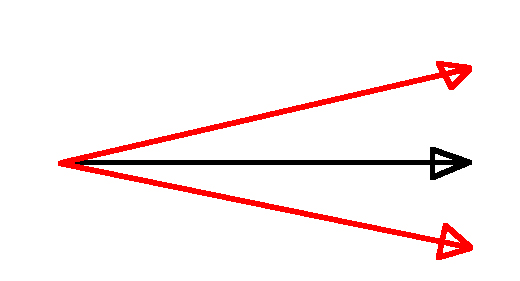
alt text


It seems however that this is not working, and it is making some weird effect that is making the arrows fly slower than normal depending on where the mouse is on the screen.

what I do to fire one arrow is as follows:

 var startPos = projectilePoint.transform.position;
 
 // create a direction vector from Hit pos of the mouse and the projectiles original position
  Vector2 direction = new Vector2(mousePosition.x - startPos.x, mousePosition.y - startPos.y);
  direction.Normalize();
 
  // Determine the correct angle to turn the projectile
  float angle = Mathf.Atan2(direction.y, direction.x) * Mathf.Rad2Deg;

  // get an arrow from the already exiting arrows or create a new one if they are all in use
  GameObject projectile = pooledArrows.GetPooledArrow();
 
  var projectileScript = projectile.GetComponent<Projectile>();
  projectileScript.MakeProjectileReady();
 
  projectile.transform.position = projectilePoint.transform.position;
  projectile.transform.rotation = Quaternion.identity;
  projectile.transform.localScale = new Vector3(1, 1, 1);
 
  projectile.transform.Rotate(0, 0, angle, Space.World);


So this works very well for firing one arrow. What I wanted to do then was basically determine 2 new directions by doing:

 Vector2 direction1 = new Vector2((mousePosition.x - deviation) - startPos.x, mousePosition.y - startPos.y);
 direction.Normalize();

 Vector2 direction2 = new Vector2(mousePosition.x - startPos.x, (mousePosition.y - deviation)  - startPos.y);
 direction.Normalize();


Where the deviation would be the how much of an angle I want.

However I think im going about this wrong and I just wanted to hear if anyone had any better ideas.

untitled-1.jpg (59.8 kB)
Comment
Add comment
10 |3000 characters needed characters left characters exceeded
▼
  • Viewable by all users
  • Viewable by moderators
  • Viewable by moderators and the original poster
  • Advanced visibility
Viewable by all users

1 Reply

· Add your reply
  • Sort: 
avatar image
1
Best Answer

Answer by Qq0 · Jul 17, 2018 at 03:59 PM

Hey, I think your issue might just be a typo : in the second snippet of code you posted, you have written direction.Normalize(), where it should be direction1 and direction2.Normalize().

Also, I think there may be simpler ways to achieve this, without calculating angles etc; have you considered Transform.Lookat? Then perhaps achieve the 2 new directions with Quaternion.Lerp... although that could be tricky.

Hope this helps!

Comment
Add comment · Show 1 · Share
10 |3000 characters needed characters left characters exceeded
▼
  • Viewable by all users
  • Viewable by moderators
  • Viewable by moderators and the original poster
  • Advanced visibility
Viewable by all users
avatar image SteenPetersen · Jul 17, 2018 at 05:31 PM 0
Share

It was the typo silly me, thanks for taking a look! =)

Your answer

Hint: You can notify a user about this post by typing @username

Up to 2 attachments (including images) can be used with a maximum of 524.3 kB each and 1.0 MB total.

Follow this Question

Answers Answers and Comments

90 People are following this question.

avatar image avatar image avatar image avatar image avatar image avatar image avatar image avatar image avatar image avatar image avatar image avatar image avatar image avatar image avatar image avatar image avatar image avatar image avatar image avatar image avatar image avatar image avatar image avatar image avatar image avatar image avatar image avatar image avatar image avatar image avatar image avatar image avatar image avatar image avatar image avatar image avatar image avatar image avatar image avatar image avatar image avatar image avatar image avatar image avatar image avatar image avatar image avatar image avatar image avatar image avatar image avatar image avatar image avatar image avatar image avatar image avatar image avatar image avatar image avatar image avatar image avatar image avatar image avatar image avatar image avatar image avatar image avatar image avatar image avatar image avatar image avatar image avatar image avatar image avatar image avatar image avatar image avatar image avatar image avatar image avatar image avatar image avatar image avatar image avatar image avatar image avatar image avatar image avatar image avatar image

Related Questions

Instantiating a projectile pointing at target. 1 Answer

Converting direction to Vector2 2 Answers

Projectile trajectory velocity and angle instead of force with a rigidbody 2 Answers

Getting startangle for projectile 1 Answer

how to drop mesh in all of directions? 0 Answers


Enterprise
Social Q&A

Social
Subscribe on YouTube social-youtube Follow on LinkedIn social-linkedin Follow on Twitter social-twitter Follow on Facebook social-facebook Follow on Instagram social-instagram

Footer

  • Purchase
    • Products
    • Subscription
    • Asset Store
    • Unity Gear
    • Resellers
  • Education
    • Students
    • Educators
    • Certification
    • Learn
    • Center of Excellence
  • Download
    • Unity
    • Beta Program
  • Unity Labs
    • Labs
    • Publications
  • Resources
    • Learn platform
    • Community
    • Documentation
    • Unity QA
    • FAQ
    • Services Status
    • Connect
  • About Unity
    • About Us
    • Blog
    • Events
    • Careers
    • Contact
    • Press
    • Partners
    • Affiliates
    • Security
Copyright © 2020 Unity Technologies
  • Legal
  • Privacy Policy
  • Cookies
  • Do Not Sell My Personal Information
  • Cookies Settings
"Unity", Unity logos, and other Unity trademarks are trademarks or registered trademarks of Unity Technologies or its affiliates in the U.S. and elsewhere (more info here). Other names or brands are trademarks of their respective owners.
  • Anonymous
  • Sign in
  • Create
  • Ask a question
  • Spaces
  • Default
  • Help Room
  • META
  • Moderators
  • Explore
  • Topics
  • Questions
  • Users
  • Badges
