
Wayback Machinekoobas.hobune.stream
May JUN Jul
Previous capture 13 Next capture
2021 2022 2023
1 capture
13 Jun 22 - 13 Jun 22
sparklines
Close Help
  • Products
  • Solutions
  • Made with Unity
  • Learning
  • Support & Services
  • Community
  • Asset Store
  • Get Unity

UNITY ACCOUNT

You need a Unity Account to shop in the Online and Asset Stores, participate in the Unity Community and manage your license portfolio. Login Create account
  • Blog
  • Forums
  • Answers
  • Evangelists
  • User Groups
  • Beta Program
  • Advisory Panel

Navigation

  • Home
  • Products
  • Solutions
  • Made with Unity
  • Learning
  • Support & Services
  • Community
    • Blog
    • Forums
    • Answers
    • Evangelists
    • User Groups
    • Beta Program
    • Advisory Panel

Unity account

You need a Unity Account to shop in the Online and Asset Stores, participate in the Unity Community and manage your license portfolio. Login Create account

Language

  • Chinese
  • Spanish
  • Japanese
  • Korean
  • Portuguese
  • Ask a question
  • Spaces
    • Default
    • Help Room
    • META
    • Moderators
    • Topics
    • Questions
    • Users
    • Badges
  • Home /
avatar image
0
Question by Dnileok · Mar 20, 2014 at 02:57 AM · rotationphysicsrigidbodyvector3turning

Turning a rigidbody that's in motion

I am creating a script to handle the movement of my "player" which happens to be a skateboard that has a rigidbody with a box collider attached to it. To move it forwards and backwards I add a relative force to the rigidbody. However I'm having trouble with getting the object to turn correctly. I have gotten it to turn by adding a torque but the results were not what I am looking for. I want to be able to turn the board while its "coasting" along. What I mean by "coasting" is that no new force can act on the object. I know I may have to keep adding some small amount of force after the rotation, however what I want to simulate is the rider has stopped pushing and now has both feet on the board and is turning. Eventually coming to a stop depending on how much force was added to the board.

For the turning aspect I've thought about using Vector3.forward as the movement vector that will face the direction where the board is currently heading and then have another vector offset a certain degree from Vector3.forward. This turn Direction vector will be where the board needs to rotate to. Then get the cross product of these two vectors and rotate about that vectors axis by said degrees. I would like to vary the amount of turn depending on player input.GetAxis("Horizontal"), negative would be a left turn, positive a right turn.

However I cannot seem to figure out how to generate the turn direction vector that is a specific degree away (depending on the player) from the movement vector. Im also not sure how to handle the actual rotation as well. I am assuming using Quaternion. Here is a picture of what I am thinking alt text
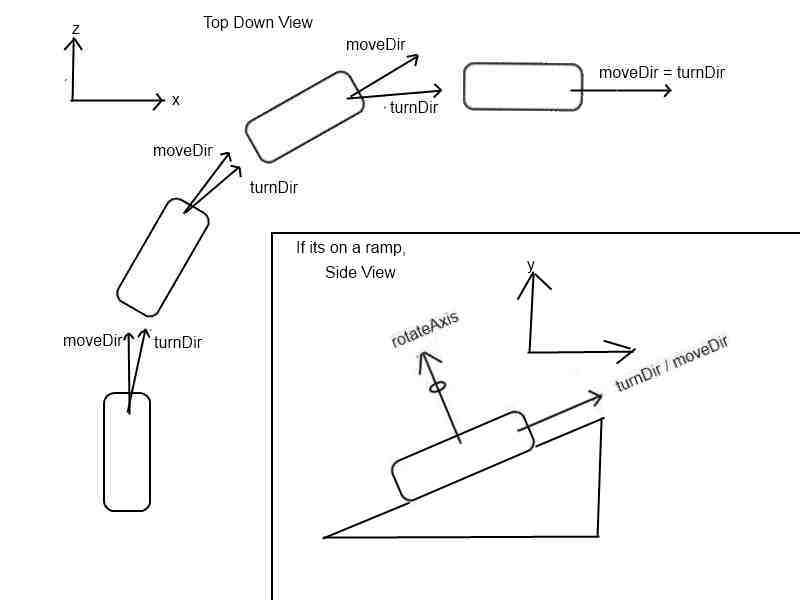
Here's the little bit of working code I have.

     void Update () 
         {
             turnAmount =  Input.GetAxis("Horizontal");
             thrustAmount = Input.GetAxis("Vertical") * 10;
     
             moveDirection = Vector3.forward;
         }
     
         void FixedUpdate()
         {
             if((rigidbody.velocity.magnitude <= maxSpeed) && (!turning))
             {
 
                 rigidbody.AddRelativeForce(moveDirection * thrustAmount);
             }
         }

Any help would be much appreciated.

rotationimage2.jpg (21.4 kB)
Comment
Add comment
10 |3000 characters needed characters left characters exceeded
▼
  • Viewable by all users
  • Viewable by moderators
  • Viewable by moderators and the original poster
  • Advanced visibility
Viewable by all users

2 Replies

· Add your reply
  • Sort: 
avatar image
0
Best Answer

Answer by robertbu · Mar 20, 2014 at 03:10 AM

Try something like this:

 if (turning) {
    Quaternion q = AngleAxis(turnAnglePerFixedUpdate, transform.up) * transform.rotation;
    rigidbody.moveRotation(q);
    float mag = rigidbody.velocity.magnitude;
    rigidbody.velocity = transform.forward * mag * dampingFactor;
 }

This is untested, but I've played with similar things, and they worked well. My main concern is how this code will interact with any angular velocity of the board. Set 'dampingFactor' to some value slightly under 1.0 like 0.995 to start. 'turnAnglePerFixedUpdate' is how much you want to turn each fixed update call. You can adjust it for faster or slower turns.

Comment
Add comment · Show 6 · Share
10 |3000 characters needed characters left characters exceeded
▼
  • Viewable by all users
  • Viewable by moderators
  • Viewable by moderators and the original poster
  • Advanced visibility
Viewable by all users
avatar image Dnileok · Mar 20, 2014 at 12:49 PM 0
Share

Thanks for the quick response! I'll test this later today and let you know how it works. Just so I can make sure I understand the logic of your code. What it does is first it calculates how much rotation is needed to be done from the objects current rotation then rotates the object. Then changes the velocity to account for slowing down. This code seems much easier than what I was originally thinking would have to be done.

avatar image robertbu · Mar 20, 2014 at 02:58 PM 0
Share

In addition to the actions you list, line 5 also changes the velocity vector so that the direction of travel is on the new forward of the board.

avatar image Dnileok · Mar 20, 2014 at 09:58 PM 0
Share

Just tested it and it seems to work wonderfully on flat surfaces with no dampingFactor. However if I approach a ramp at a certain velocity and try and turn I slow down extremely fast and cannot complete the turn. I'm not sure if this is because of the script or something else like friction. Other than that its great though.

avatar image robertbu · Mar 20, 2014 at 10:04 PM 0
Share

Your slowdown is likely due to other factors. This code will always slow down at a fixed rate from any specified initial velocity. Look to friction and even gravity.

avatar image Dnileok · Mar 20, 2014 at 11:30 PM 0
Share

Alright I will look into the other factors. Thanks so much for your help I really appreciate it!

avatar image eXept Dnileok · Aug 01, 2016 at 08:33 PM 0
Share

@Dnileok Could you please post the resulting movement code, that you have used for your model? I've stuck here like couple days, can't find the way out :( I would really appreciate that!

avatar image
-1

Answer by saadali211 · Feb 21, 2017 at 10:43 PM

Solved watch this video

https://www.youtube.com/watch?v=Csi3LHyQSAc

Comment
Add comment · Share
10 |3000 characters needed characters left characters exceeded
▼
  • Viewable by all users
  • Viewable by moderators
  • Viewable by moderators and the original poster
  • Advanced visibility
Viewable by all users

Your answer

Hint: You can notify a user about this post by typing @username

Up to 2 attachments (including images) can be used with a maximum of 524.3 kB each and 1.0 MB total.

Follow this Question

Answers Answers and Comments

22 People are following this question.

avatar image avatar image avatar image avatar image avatar image avatar image avatar image avatar image avatar image avatar image avatar image avatar image avatar image avatar image avatar image avatar image avatar image avatar image avatar image avatar image avatar image avatar image

Related Questions

transform.Rotate and Rigidbody.MovePosition 1 Answer

How to limit the motion direction of a GameObject? 1 Answer

How to make a dynamic bow shot and the arrow to curve and turn correctly when shot? 0 Answers

Rigidody.velocity = Direction * speed; How to get direction? 1 Answer

How to set a limit for my player rotation ? 0 Answers


Enterprise
Social Q&A

Social
Subscribe on YouTube social-youtube Follow on LinkedIn social-linkedin Follow on Twitter social-twitter Follow on Facebook social-facebook Follow on Instagram social-instagram

Footer

  • Purchase
    • Products
    • Subscription
    • Asset Store
    • Unity Gear
    • Resellers
  • Education
    • Students
    • Educators
    • Certification
    • Learn
    • Center of Excellence
  • Download
    • Unity
    • Beta Program
  • Unity Labs
    • Labs
    • Publications
  • Resources
    • Learn platform
    • Community
    • Documentation
    • Unity QA
    • FAQ
    • Services Status
    • Connect
  • About Unity
    • About Us
    • Blog
    • Events
    • Careers
    • Contact
    • Press
    • Partners
    • Affiliates
    • Security
Copyright © 2020 Unity Technologies
  • Legal
  • Privacy Policy
  • Cookies
  • Do Not Sell My Personal Information
  • Cookies Settings
"Unity", Unity logos, and other Unity trademarks are trademarks or registered trademarks of Unity Technologies or its affiliates in the U.S. and elsewhere (more info here). Other names or brands are trademarks of their respective owners.
  • Anonymous
  • Sign in
  • Create
  • Ask a question
  • Spaces
  • Default
  • Help Room
  • META
  • Moderators
  • Explore
  • Topics
  • Questions
  • Users
  • Badges
