
Wayback Machinekoobas.hobune.stream
May JUN Jul
Previous capture 12 Next capture
2021 2022 2023
1 capture
12 Jun 22 - 12 Jun 22
sparklines
Close Help
  • Products
  • Solutions
  • Made with Unity
  • Learning
  • Support & Services
  • Community
  • Asset Store
  • Get Unity

UNITY ACCOUNT

You need a Unity Account to shop in the Online and Asset Stores, participate in the Unity Community and manage your license portfolio. Login Create account
  • Blog
  • Forums
  • Answers
  • Evangelists
  • User Groups
  • Beta Program
  • Advisory Panel

Navigation

  • Home
  • Products
  • Solutions
  • Made with Unity
  • Learning
  • Support & Services
  • Community
    • Blog
    • Forums
    • Answers
    • Evangelists
    • User Groups
    • Beta Program
    • Advisory Panel

Unity account

You need a Unity Account to shop in the Online and Asset Stores, participate in the Unity Community and manage your license portfolio. Login Create account

Language

  • Chinese
  • Spanish
  • Japanese
  • Korean
  • Portuguese
  • Ask a question
  • Spaces
    • Default
    • Help Room
    • META
    • Moderators
    • Topics
    • Questions
    • Users
    • Badges
  • Home /
avatar image
0
Question by INDAX · May 24, 2017 at 07:41 AM · 2draycasttopdownraylaser

Unity 2D Top-Down Raycast length/distance and direction problem

I'm trying to build a top down 2D game and now I want to add a laser shooting to the game. I watched Unity raycasting video and also searched over 20+ post about raycasting, but still can't figured a way to shoot the ray properly.

Problem 1:

I can't make the ray shoot along the x-axis, it always shoot towards the z-axis, meaning that you can't see anything when it shoots because it shoot into the screen.

So, I rotate my laser tip by 90 degree on y-axis, making its z-axis facing toward the right size(aka the front side) so it shoots to its front. I don't know if it is a proper way to solve it, if there's a better way like a setting or just scripting. I would like to know! thx!

Here is what I've got so far(adjust the Scene View to see from the back side of the game, so you can see the all the ray):

The left circle is the one i apply my rotation fix, the other one is where i haven't apply the fix and so it's shooting into the screen. alt text
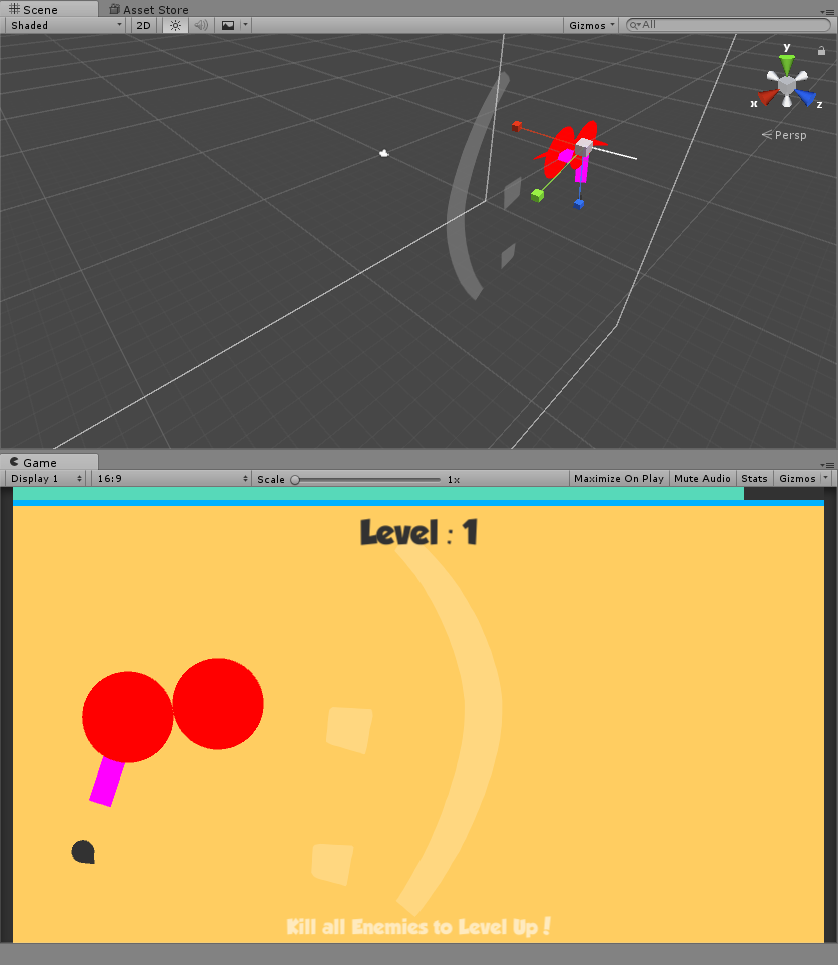
Problem 2:

As you can see from above screenshot, the laser isn't shooting far enough, and in my code I have already set the distance to Mathf.Infinity. No matter what value I set, it always shoot at the same distance. I've tried 1f, 100f, and 100000f and none of them work.

and here is my code for the raycasting part (was doing IEnumeratot because the tutorial was doing it this way, and I don't think it's what causing the problems):

 IEnumerator fireLaser()
     {
         line.enabled = true;
         while (Input.GetKey("r"))
         {
             //Debug.DrawLine(transform.position, player.transform.position);
             //Physics2D.Linecast(transform.position, player.transform.position);
             Debug.DrawRay(transform.position, player.transform.position);
 
             Ray2D ray = new Ray2D(transform.position, transform.right);
             RaycastHit2D hit = Physics2D.Raycast(transform.position, transform.right, Mathf.Infinity);
             
             yield return null;
         }
         line.enabled = false;
     }

for the "Line Renderer" component settings, I've unchecked the "use world space" box, or else the laser will have one end that stick to the center of the screen...

Problem 2.5:

From above code. I found that I can change "transform.right" to "transform.up" or "transform.toward", and it has no impact to what i see from game. Is that normal? should it shoot to different direction when I change it?

That's all the questions I need to ask, I hope someone could give me some help. THANK YOU!

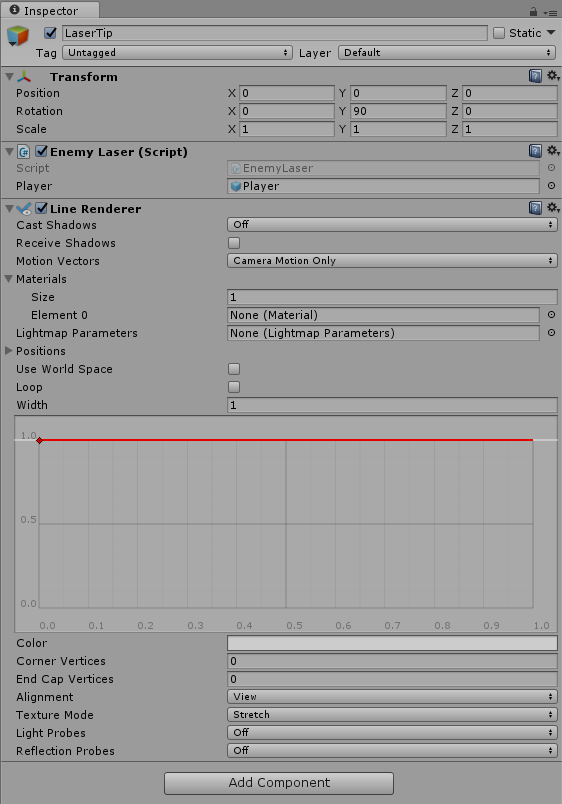
this it the LaserTip setting, just in case alt text
ask01.png (121.9 kB)
ask02.png (40.5 kB)
Comment
Add comment
10 |3000 characters needed characters left characters exceeded
▼
  • Viewable by all users
  • Viewable by moderators
  • Viewable by moderators and the original poster
  • Advanced visibility
Viewable by all users

0 Replies

· Add your reply
  • Sort: 

Your answer

Hint: You can notify a user about this post by typing @username

Up to 2 attachments (including images) can be used with a maximum of 524.3 kB each and 1.0 MB total.

Follow this Question

Answers Answers and Comments

3 People are following this question.

avatar image avatar image avatar image

Related Questions

Trying to make a topdown 2d laser 2 Answers

RaycastHit2D to hit an enemy when player rotates. (Using keyboard input only) 2 Answers

Detect tag with 2d raycasting 1 Answer

LineRenderer (Laser Beam) is not following the ray it's going on the wrong direction when reflecting 1 Answer

Is there a better way to find where to start my raycast? 2 Answers


Enterprise
Social Q&A

Social
Subscribe on YouTube social-youtube Follow on LinkedIn social-linkedin Follow on Twitter social-twitter Follow on Facebook social-facebook Follow on Instagram social-instagram

Footer

  • Purchase
    • Products
    • Subscription
    • Asset Store
    • Unity Gear
    • Resellers
  • Education
    • Students
    • Educators
    • Certification
    • Learn
    • Center of Excellence
  • Download
    • Unity
    • Beta Program
  • Unity Labs
    • Labs
    • Publications
  • Resources
    • Learn platform
    • Community
    • Documentation
    • Unity QA
    • FAQ
    • Services Status
    • Connect
  • About Unity
    • About Us
    • Blog
    • Events
    • Careers
    • Contact
    • Press
    • Partners
    • Affiliates
    • Security
Copyright © 2020 Unity Technologies
  • Legal
  • Privacy Policy
  • Cookies
  • Do Not Sell My Personal Information
  • Cookies Settings
"Unity", Unity logos, and other Unity trademarks are trademarks or registered trademarks of Unity Technologies or its affiliates in the U.S. and elsewhere (more info here). Other names or brands are trademarks of their respective owners.
  • Anonymous
  • Sign in
  • Create
  • Ask a question
  • Spaces
  • Default
  • Help Room
  • META
  • Moderators
  • Explore
  • Topics
  • Questions
  • Users
  • Badges
