
Wayback Machinekoobas.hobune.stream
May JUN Jul
Previous capture 12 Next capture
2021 2022 2023
1 capture
12 Jun 22 - 12 Jun 22
sparklines
Close Help
  • Products
  • Solutions
  • Made with Unity
  • Learning
  • Support & Services
  • Community
  • Asset Store
  • Get Unity

UNITY ACCOUNT

You need a Unity Account to shop in the Online and Asset Stores, participate in the Unity Community and manage your license portfolio. Login Create account
  • Blog
  • Forums
  • Answers
  • Evangelists
  • User Groups
  • Beta Program
  • Advisory Panel

Navigation

  • Home
  • Products
  • Solutions
  • Made with Unity
  • Learning
  • Support & Services
  • Community
    • Blog
    • Forums
    • Answers
    • Evangelists
    • User Groups
    • Beta Program
    • Advisory Panel

Unity account

You need a Unity Account to shop in the Online and Asset Stores, participate in the Unity Community and manage your license portfolio. Login Create account

Language

  • Chinese
  • Spanish
  • Japanese
  • Korean
  • Portuguese
  • Ask a question
  • Spaces
    • Default
    • Help Room
    • META
    • Moderators
    • Topics
    • Questions
    • Users
    • Badges
  • Home /
avatar image
0
Question by Bencarbon · Apr 11, 2019 at 08:58 PM · collisionvelocityglitch

Collision gives insane velocity to the character

Hi everyone,

I currently create a 3D game with a humanoid character. This character contain a rigidbody and a capsule collider. All works well, but when I collide with a bloc ( which contain a box collider ) which is placed just a little bit under the size of my character, the character will have a velocity insane. Here is some image to illustrate my problem:

At this point, my character is supposed to collide next frame with the red block
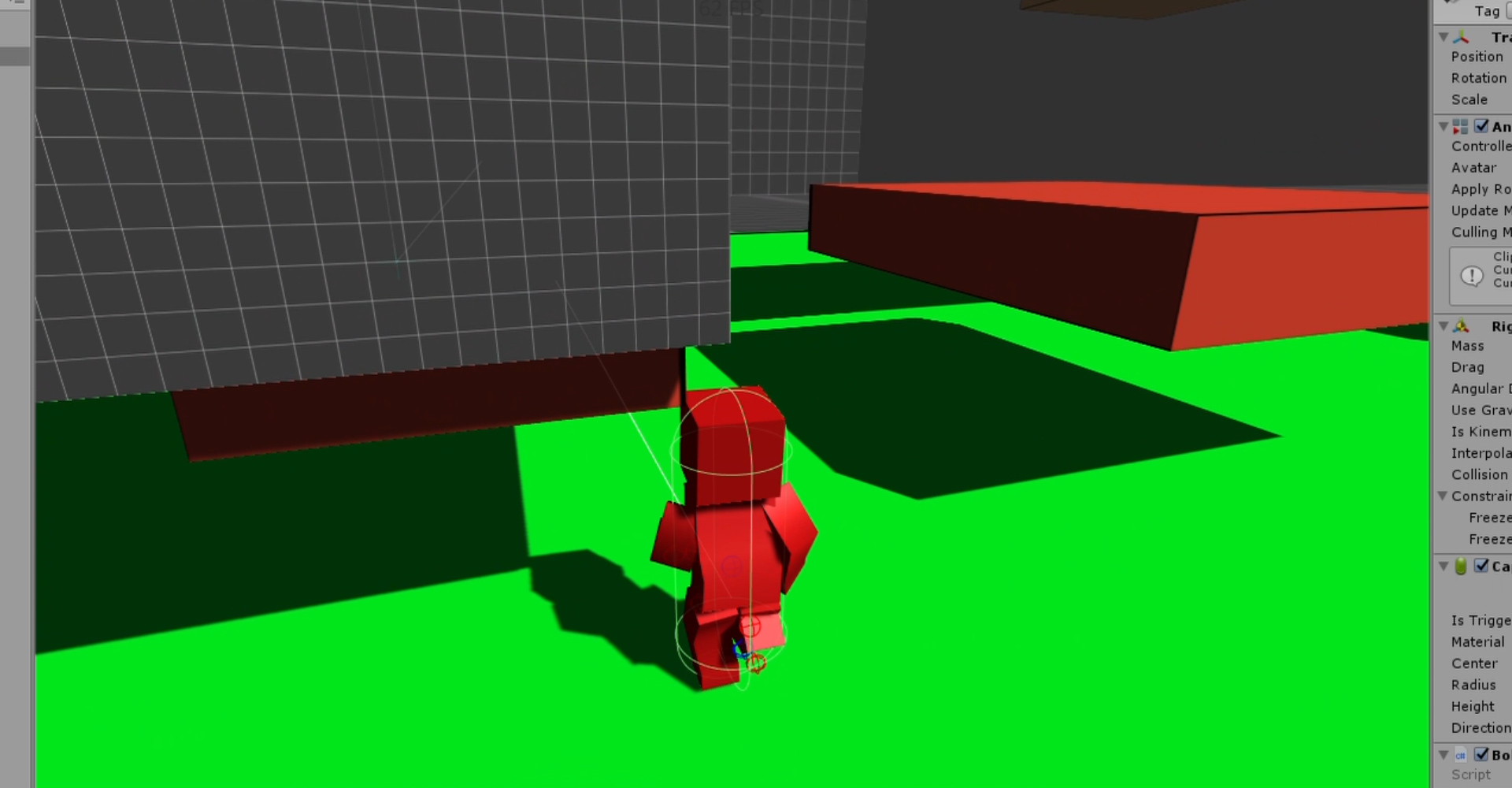
alt text But instead of just collide, it earn a crazy velocity on all axis. Here is the next frame: alt text And then, the character is going to the moon, then fall due to gravity.
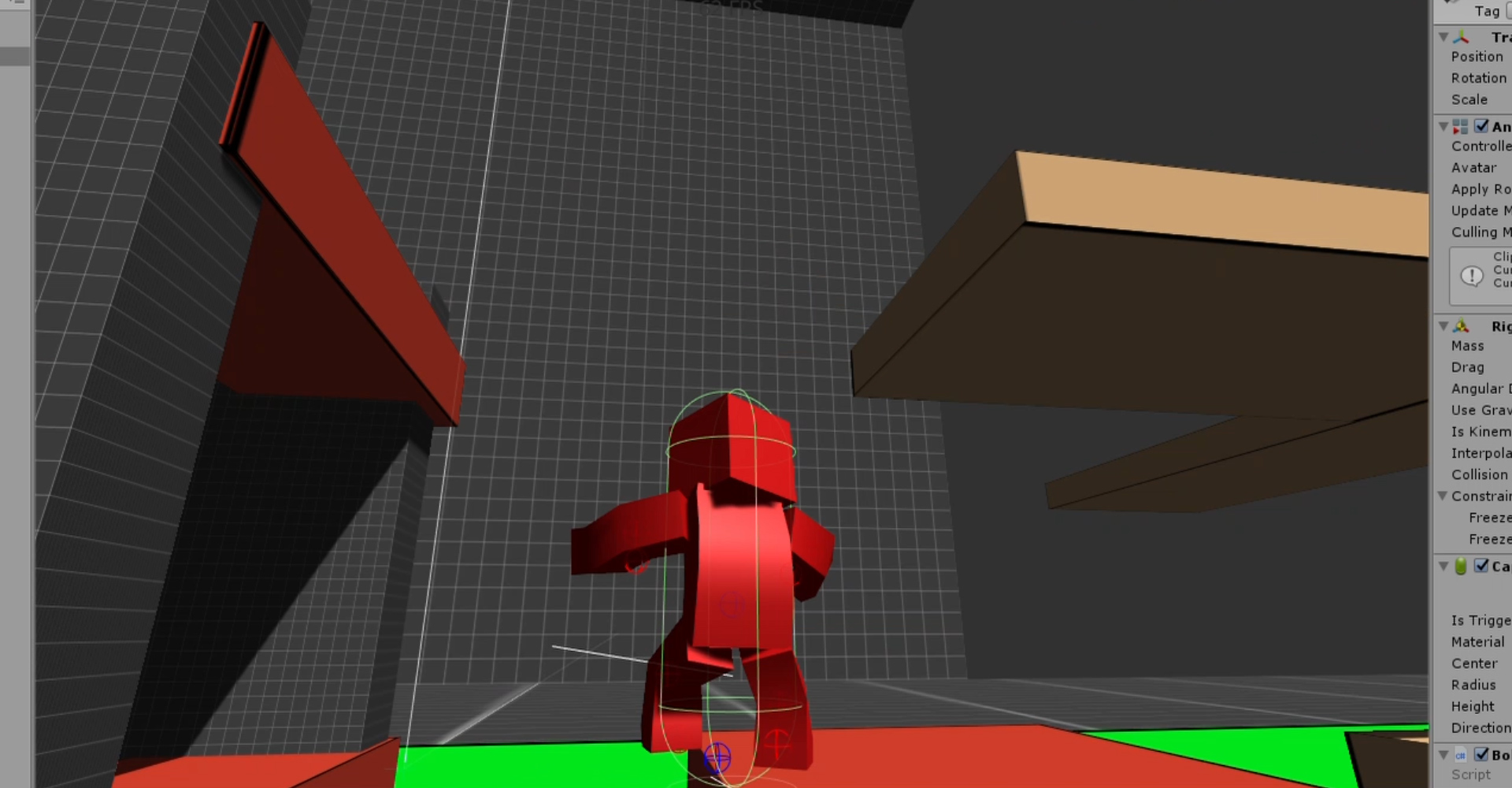
Is this a bug from unity, or am i doing something wrong?

Thank you

unity-201835f1-personal-3rdpersonflyunity-speedrun.jpg (382.9 kB)
unity-201835f1-personal-3rdpersonflyunity-speedrun.jpg (258.1 kB)
Comment
Add comment
10 |3000 characters needed characters left characters exceeded
▼
  • Viewable by all users
  • Viewable by moderators
  • Viewable by moderators and the original poster
  • Advanced visibility
Viewable by all users

2 Replies

· Add your reply
  • Sort: 
avatar image
1
Best Answer

Answer by Bunny83 · Apr 12, 2019 at 01:24 PM

Well you have to understand how collisions and more important how collision response work. Collisions are detected due to overlap after a physics move. If overlap is detected the physics solver tries to solve that collision by applying penalty forces which are based on the collision normal / hit point and your current velocity. So what's happening here is that you actually overlap with the top part of your capsule with the ceiling. The collision normal will point downwards at an angle due to the round shape of the capsule. However moving your character along that direction will push it into the ground which will result in another penalty force upwards. This may again push you into the box above, etc.


This might repeat until the collisions / overlaps are all solved or the solver runs out of iterations in which case the problem may continue the next frame. At narrow angles the capsule could bounce quite often between the floor and the ceiling. Not really related but the animation of this 3b1b video might help to understand the issue better. Ideally if conservation of energy can be guaranteed the resulting movement should never be larger than the movement before the collision. However we actually don't work with accurate physics models in the first place and we have limited number precision so it's possible that you build up more and more momentum due to the bouncing.


This is essentially a corner case and i wouldn't call it a bug. You just pushed beyond the borders of reliable approximation of a physics simulation. Also keep in mind that if you consider it a bug, it's not a Unity bug since Unity just uses PhysX.


edit
I forgot to mention some solutions. Well first of all you should avoid level designs where you could squeeze a slightly oversized capsule into a narrow place. The other solution is to not using a capsule but a simple box collider. Such cases are one of the reasons why most games still prefer using box colliders over anything else (the main reason is speed and simplicity). Actually i would go crazy if games like Quake used capsules. This would require you to jump way earlier at an edge than with a box collider. Capsules are great for getting slightly more realistical behaviour automatically (since you slide off an edge as soon as your capsule center is over the edge). However if you use capsules you have to be more careful during the level design. If there's an area you should not be able to enter, block the way completely with a collider. This is even done in most FPS games to prevent getting stuck at some decorative pillar at a wall. Designing the visual aspects of a level and designing the physical aspects are often two seperate topics. (stairs often are not actual stairs but have a continuous slope for better movement).

Comment
Add comment · Show 1 · Share
10 |3000 characters needed characters left characters exceeded
▼
  • Viewable by all users
  • Viewable by moderators
  • Viewable by moderators and the original poster
  • Advanced visibility
Viewable by all users
avatar image Bencarbon · Apr 14, 2019 at 02:35 PM 0
Share

Thank you for your explaination, I was about to ask you for solutions but you are faster than me ;) I will try to use a simple box collider. I seems to be the best solution on my case.

avatar image
0

Answer by Saiguru · Apr 12, 2019 at 09:49 AM

Hi @Bencarbon
I guess, since there is box collider (which should be underneath the player) and the capsule collider of the player collides with each other and creates that insane velocity i guess. (or) If the box collider underneath the size of the player collides with the ground plane which has a collider (i.e., box collider below the ground plane or box collider and the ground plane collider are intersecting each other) it might create the insane velocity.

If you are using the box collider just for checking if the player is in ground or in air, try changing from box collider to box trigger collider.

Comment
Add comment · Show 1 · Share
10 |3000 characters needed characters left characters exceeded
▼
  • Viewable by all users
  • Viewable by moderators
  • Viewable by moderators and the original poster
  • Advanced visibility
Viewable by all users
avatar image Bencarbon · Apr 12, 2019 at 11:32 AM 0
Share

Hi, thanks for your answer but I use a CapsuleCast for checking if the player is on ground. There is no other collider on my player than the capsule collider.

Your answer

Hint: You can notify a user about this post by typing @username

Up to 2 attachments (including images) can be used with a maximum of 524.3 kB each and 1.0 MB total.

Follow this Question

Answers Answers and Comments

158 People are following this question.

avatar image avatar image avatar image avatar image avatar image avatar image avatar image avatar image avatar image avatar image avatar image avatar image avatar image avatar image avatar image avatar image avatar image avatar image avatar image avatar image avatar image avatar image avatar image avatar image avatar image avatar image avatar image avatar image avatar image avatar image avatar image avatar image avatar image avatar image avatar image avatar image avatar image avatar image avatar image avatar image avatar image avatar image avatar image avatar image avatar image avatar image avatar image avatar image avatar image avatar image avatar image avatar image avatar image avatar image avatar image avatar image avatar image avatar image avatar image avatar image avatar image avatar image avatar image avatar image avatar image avatar image avatar image avatar image avatar image avatar image avatar image avatar image avatar image avatar image avatar image avatar image avatar image avatar image avatar image avatar image avatar image avatar image avatar image avatar image avatar image avatar image avatar image avatar image avatar image avatar image avatar image avatar image avatar image avatar image avatar image avatar image avatar image avatar image avatar image avatar image avatar image avatar image avatar image avatar image avatar image avatar image avatar image avatar image avatar image avatar image avatar image avatar image avatar image avatar image avatar image avatar image avatar image avatar image avatar image avatar image avatar image avatar image avatar image avatar image avatar image avatar image avatar image avatar image avatar image avatar image avatar image avatar image avatar image avatar image avatar image avatar image avatar image avatar image avatar image avatar image avatar image avatar image avatar image avatar image avatar image avatar image avatar image avatar image avatar image avatar image avatar image avatar image avatar image avatar image avatar image avatar image avatar image avatar image

Related Questions

Collider question 0 Answers

Rigidbody magnitude comparison is not working correctlly? 2 Answers

Troublesome collision detection when changing rigidbody.velocity directly 0 Answers

Manually Apply Cars Collision Response Force 0 Answers

Collision is glitchy 1 Answer


Enterprise
Social Q&A

Social
Subscribe on YouTube social-youtube Follow on LinkedIn social-linkedin Follow on Twitter social-twitter Follow on Facebook social-facebook Follow on Instagram social-instagram

Footer

  • Purchase
    • Products
    • Subscription
    • Asset Store
    • Unity Gear
    • Resellers
  • Education
    • Students
    • Educators
    • Certification
    • Learn
    • Center of Excellence
  • Download
    • Unity
    • Beta Program
  • Unity Labs
    • Labs
    • Publications
  • Resources
    • Learn platform
    • Community
    • Documentation
    • Unity QA
    • FAQ
    • Services Status
    • Connect
  • About Unity
    • About Us
    • Blog
    • Events
    • Careers
    • Contact
    • Press
    • Partners
    • Affiliates
    • Security
Copyright © 2020 Unity Technologies
  • Legal
  • Privacy Policy
  • Cookies
  • Do Not Sell My Personal Information
  • Cookies Settings
"Unity", Unity logos, and other Unity trademarks are trademarks or registered trademarks of Unity Technologies or its affiliates in the U.S. and elsewhere (more info here). Other names or brands are trademarks of their respective owners.
  • Anonymous
  • Sign in
  • Create
  • Ask a question
  • Spaces
  • Default
  • Help Room
  • META
  • Moderators
  • Explore
  • Topics
  • Questions
  • Users
  • Badges