 koobas.hobune.stream


How rotate turret and follow body object.
I want rotate my turret, but does not work.
This function called once per frame. And this 2 codes have same problem.
When i use Transform.rotation,turret don't follow my body.(sphere is testObject) 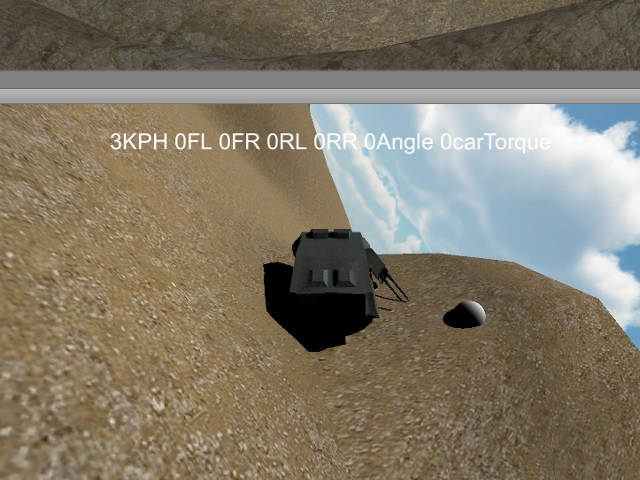
And if i use Transform.localRotation then drive and turn my car, look like this. 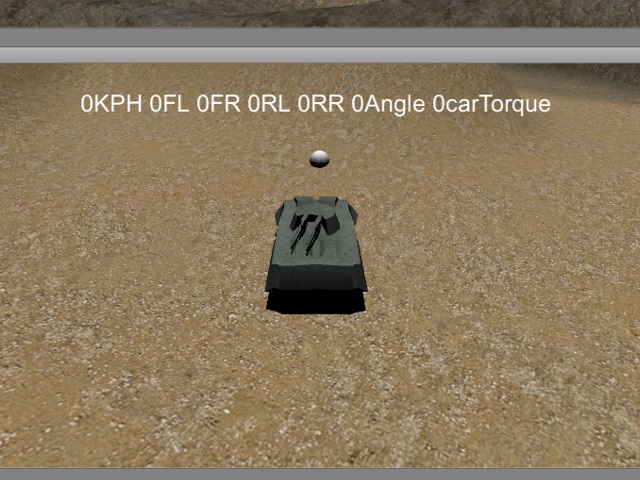
How fix this ? Please help ! and apologise my terrible English.
     void RotateTurret()
     {
         //turret
         Ray ray = _mainCameraTransform.ScreenPointToRay(Input.mousePosition);
         RaycastHit hit;
         if( _terrainCollider.Raycast(ray,out hit,Mathf.Infinity) )
         {
             Vector3 targetPosition = hit.point;

 //code1
 //            Vector3 newRotation = Quaternion.LookRotation(targetPosition - _turretTransform.position).eulerAngles;
 //            Vector3 angles = _turretTransform.rotation.eulerAngles;
 //            _turretTransform.rotation = Quaternion.Euler(0,Mathf.SmoothDampAngle(angles.y,newRotation.y,ref _ref,1.0f, 40.0f),0);

 //code2
 //            Vector3 newRotation = Quaternion.LookRotation(targetPosition - _turretTransform.position).eulerAngles;
 //            newRotation.x = 0; newRotation.z=0;
 //            _turretTransform.rotation= Quaternion.Slerp(_turretTransform.rotation,Quaternion.Euler(newRotation),Time.deltaTime);

             //debug
             testObject.position = targetPosition;
         }
     }

i'm not really sure what you're trying to make, but maybe this?
 RaycastHit hit;
 Physics.Raycast(the$$anonymous$$ainCamera.transform.position, the$$anonymous$$ainCamera.transform.forward, out hit);
 shootThing.transform.LookAt(hit.point);

Thanks reply but i don't want camera forward direction and raycast-hit.point.
i want rotate Yaw of _turretTransform with mouse.
That sphere just locate where hit.point for debug. Turret should be rotate that sphere direction. Sorry that may confuse you.

Turret rotation for a tank that can move over a terrain is complicated. Below is a script I wrote for another question, but the code was buried down some levels in comments, so I'll repost it here. It has a restriction on the angle of the gun. This restriction is based on the starting angle of the gun.
This code is designed to be added to the turret. Then the guns (as child objects) would initialize the 'gun' transform.
I don't know how you are handling your target, but in this script 'target' needs to be initialized.
 #pragma strict

 var target : Transform;
 var gun : Transform;
 var turretDegreesPerSecond : float = 45.0;
 var gunDegreesPerSecond : float = 45.0;

 var maxGunAngle = 45.0;

 private var qTurret : Quaternion;
 private var qGun : Quaternion;
 private var qGunStart : Quaternion;
 private var trans : Transform;

 function Start() {
     trans = transform;
     qGunStart = gun.transform.localRotation;
 }

 function Update () {
     var distanceToPlane = Vector3.Dot(trans.up, target.position - trans.position);
     var planePoint = target.position - trans.up * distanceToPlane;

     qTurret = Quaternion.LookRotation(planePoint - trans.position, transform.up);
     transform.rotation = Quaternion.RotateTowards(transform.rotation, qTurret, turretDegreesPerSecond * Time.deltaTime);

     var v3 = Vector3(0.0, distanceToPlane, (planePoint - transform.position).magnitude);
     qGun = Quaternion.LookRotation(v3);

     if (Quaternion.Angle(qGunStart, qGun) <= maxGunAngle)
        gun.localRotation = Quaternion.RotateTowards(gun.localRotation, qGun, gunDegreesPerSecond * Time.deltaTime);
     else
        Debug.Log("Target beyond gun range");
 }
Nice! This is exact im looking for few days! Thank you!
I copied in c#.
 void RotateTurret()
 {
     float _deltaTime = Time.deltaTime;
     Ray ray = _mainCameraTransform.ScreenPointToRay(Input.mousePosition);
     RaycastHit hit;
     if( _terrainCollider.Raycast(ray,out hit,$$anonymous$$athf.Infinity) )
     {
         Vector3 targetPosition = hit.point;
         Vector3 turretPosition = _turretTransform.position;
         Vector3 turretUpTransform = _turretTransform.up;
         float distanceToPlane = Vector3.Dot(turretUpTransform,targetPosition - turretPosition);
         Vector3 planePoint = targetPosition - turretUpTransform * distanceToPlane;

         //turret
         Quaternion qTurret = Quaternion.LookRotation(planePoint - turretPosition,turretUpTransform);
         _turretTransform.rotation = Quaternion.RotateTowards(_turretTransform.rotation, qTurret,30.0f * _deltaTime);

         //gun
         Vector3 v = new Vector3(0,distanceToPlane,(planePoint - turretPosition).magnitude);
         Quaternion qGun = Quaternion.LookRotation(v);
         if(Quaternion.Angle(Quaternion.identity, qGun) <= 30.0f)
             _gunTransform.localRotation = Quaternion.RotateTowards(_gunTransform.localRotation,qGun,30.0f * _deltaTime);

         //debug
         testObject.position = targetPosition;
     }
 }

Hi I am trying to rotate the turret where mouse is pointing, your script is great, can you modify it so the turret would rotate where mouse is pointing ? Thanks!

hey bud. how did you make it work? im very interested.
Actually dont, it works only in front of the tank, transformed targets position into mouse position , input.mouseposition x and y, and some things proportionally with the screen width and lenght


Like 1elfdragon1 said , I am not sure too what you want exactly, but I think you want to ask your turret to look where your cursor is right?
I am assuming that your tank is rolling on a flat ground.
try this (I am writing the 'if' condition part only):
if(_your condition_)
{
   Vector3 targetPosition = hit.point;
   Vector3 newRotation = Quaternion.LookRotation(targetPosition - _turretTransform.position,_turretTransform.up).eulerAngles;
   _turretTransform.rotation= Quaternion.Slerp(_turretTransform.rotation,Quaternion.Euler(newRotation),Time.deltaTime);
}
Yes you are right. Your code is much better than $$anonymous$$e.
But turret still rotate x-axis (pitch) like 1st picture. How stop that?
Also i uploaded test build and full C# code on my WordPress. $$anonymous$$y WordPress log Can you try that?
I fixed problem with robertbu's script. Thank you for comment!




