
Wayback Machinekoobas.hobune.stream
May JUN Jul
Previous capture 13 Next capture
2021 2022 2023
1 capture
13 Jun 22 - 13 Jun 22
sparklines
Close Help
  • Products
  • Solutions
  • Made with Unity
  • Learning
  • Support & Services
  • Community
  • Asset Store
  • Get Unity

UNITY ACCOUNT

You need a Unity Account to shop in the Online and Asset Stores, participate in the Unity Community and manage your license portfolio. Login Create account
  • Blog
  • Forums
  • Answers
  • Evangelists
  • User Groups
  • Beta Program
  • Advisory Panel

Navigation

  • Home
  • Products
  • Solutions
  • Made with Unity
  • Learning
  • Support & Services
  • Community
    • Blog
    • Forums
    • Answers
    • Evangelists
    • User Groups
    • Beta Program
    • Advisory Panel

Unity account

You need a Unity Account to shop in the Online and Asset Stores, participate in the Unity Community and manage your license portfolio. Login Create account

Language

  • Chinese
  • Spanish
  • Japanese
  • Korean
  • Portuguese
  • Ask a question
  • Spaces
    • Default
    • Help Room
    • META
    • Moderators
    • Topics
    • Questions
    • Users
    • Badges
  • Home /
avatar image
0
Question by stainless7221 · Sep 13, 2013 at 01:20 PM · renderinglightcubefadeblending

Walls are blending over each other

Hi, i can't really find the words for my problem, since english is not my first language. But you can see my Problem very well on this screenshot: http://i.imgur.com/Z4W5XlY.png

I have cubes as walls, all with the same height. They are alligned to form an obstacle and when they are in game view, you can see that they are fading over each other, which makes ugly brigther spots (red circles).

I am using an perspective camera and a spotlight. Is there something i can change on the shader to make this stop??

Thanks!

Comment
Add comment
10 |3000 characters needed characters left characters exceeded
▼
  • Viewable by all users
  • Viewable by moderators
  • Viewable by moderators and the original poster
  • Advanced visibility
Viewable by all users

2 Replies

· Add your reply
  • Sort: 
avatar image
1
Best Answer

Answer by vexe · Sep 13, 2013 at 01:26 PM

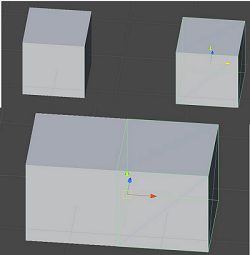
Just position them well, use snapping, check out the docs. And here's a tutorial. With vertex snapping, you won't have placement problems :)
alt text


vertex.png (45.3 kB)
Comment
Add comment · Show 7 · Share
10 |3000 characters needed characters left characters exceeded
▼
  • Viewable by all users
  • Viewable by moderators
  • Viewable by moderators and the original poster
  • Advanced visibility
Viewable by all users
avatar image stainless7221 · Sep 13, 2013 at 01:56 PM 0
Share

I did everything with vertex snapping now, thanks for the tip! However, i now still have those small gaps between blocks... http://i.imgur.com/RAEDG0N.png

avatar image vexe · Sep 13, 2013 at 02:00 PM 0
Share

Are you making a 2D game? - Do you need to have depth in your game? If you don't, use an orthographic camera ins$$anonymous$$d, it could eli$$anonymous$$ate your problem.

avatar image stainless7221 · Sep 13, 2013 at 02:02 PM 0
Share

I wanted to make it 2.5D, thats why i am using a perspective camera, it was ortographic before, but it just looks so much better with a perspective one :/

avatar image vexe · Sep 13, 2013 at 02:04 PM 0
Share

I just remembered something, lower down your snap settings. Go to Edit | Snap Settings. Those are the Unit snapping settings, lowering them should make placement more accurate when you use unit snapping, try it... Btw it's strange that you got that result using vertex snapping...

avatar image stainless7221 · Sep 13, 2013 at 02:13 PM 0
Share

Yeah i already changed that after watching the tutorial, but as far as i understand, that doesn't affect vertex snapping?

Show more comments
avatar image
0

Answer by YoungDeveloper · Sep 13, 2013 at 01:27 PM

It is because the polygons overlap each other. Change little wall height to lets say 5.03, higher or smaller, or place boxes so there is a tiny gap. Otherwise, if can do the previous ones i mentioned, model the walls in 3d max or blender and then import it as one mesh.

Comment
Add comment · Share
10 |3000 characters needed characters left characters exceeded
▼
  • Viewable by all users
  • Viewable by moderators
  • Viewable by moderators and the original poster
  • Advanced visibility
Viewable by all users

Your answer

Hint: You can notify a user about this post by typing @username

Up to 2 attachments (including images) can be used with a maximum of 524.3 kB each and 1.0 MB total.

Follow this Question

Answers Answers and Comments

17 People are following this question.

avatar image avatar image avatar image avatar image avatar image avatar image avatar image avatar image avatar image avatar image avatar image avatar image avatar image avatar image avatar image avatar image avatar image

Related Questions

Hardlight for spotlight 0 Answers

Change Fog Color Smoothly 1 Answer

Objects turning white 2 Answers

Directional light disabling when player is looking away 1 Answer

RenderTexture Painting - color blending issues 1 Answer


Enterprise
Social Q&A

Social
Subscribe on YouTube social-youtube Follow on LinkedIn social-linkedin Follow on Twitter social-twitter Follow on Facebook social-facebook Follow on Instagram social-instagram

Footer

  • Purchase
    • Products
    • Subscription
    • Asset Store
    • Unity Gear
    • Resellers
  • Education
    • Students
    • Educators
    • Certification
    • Learn
    • Center of Excellence
  • Download
    • Unity
    • Beta Program
  • Unity Labs
    • Labs
    • Publications
  • Resources
    • Learn platform
    • Community
    • Documentation
    • Unity QA
    • FAQ
    • Services Status
    • Connect
  • About Unity
    • About Us
    • Blog
    • Events
    • Careers
    • Contact
    • Press
    • Partners
    • Affiliates
    • Security
Copyright © 2020 Unity Technologies
  • Legal
  • Privacy Policy
  • Cookies
  • Do Not Sell My Personal Information
  • Cookies Settings
"Unity", Unity logos, and other Unity trademarks are trademarks or registered trademarks of Unity Technologies or its affiliates in the U.S. and elsewhere (more info here). Other names or brands are trademarks of their respective owners.
  • Anonymous
  • Sign in
  • Create
  • Ask a question
  • Spaces
  • Default
  • Help Room
  • META
  • Moderators
  • Explore
  • Topics
  • Questions
  • Users
  • Badges
