
Wayback Machinekoobas.hobune.stream
May JUN Jul
Previous capture 12 Next capture
2021 2022 2023
1 capture
12 Jun 22 - 12 Jun 22
sparklines
Close Help
  • Products
  • Solutions
  • Made with Unity
  • Learning
  • Support & Services
  • Community
  • Asset Store
  • Get Unity

UNITY ACCOUNT

You need a Unity Account to shop in the Online and Asset Stores, participate in the Unity Community and manage your license portfolio. Login Create account
  • Blog
  • Forums
  • Answers
  • Evangelists
  • User Groups
  • Beta Program
  • Advisory Panel

Navigation

  • Home
  • Products
  • Solutions
  • Made with Unity
  • Learning
  • Support & Services
  • Community
    • Blog
    • Forums
    • Answers
    • Evangelists
    • User Groups
    • Beta Program
    • Advisory Panel

Unity account

You need a Unity Account to shop in the Online and Asset Stores, participate in the Unity Community and manage your license portfolio. Login Create account

Language

  • Chinese
  • Spanish
  • Japanese
  • Korean
  • Portuguese
  • Ask a question
  • Spaces
    • Default
    • Help Room
    • META
    • Moderators
    • Topics
    • Questions
    • Users
    • Badges
  • Home /
avatar image
0
Question by GamezAtWork · Jul 04, 2017 at 03:28 PM · assetsscriptableobject

Destroying unused child subassets

Hey guys,

So, long story short, I have a list of scriptable objects which have been added as subassets to a gameobject. And a while back, while I was mucking around with making it work, I accidentally ended up with ALOT of subassets attached to some prefabs. (And till now, I still keep getting leftover subassets which don't actually exist in the list)

So... Can someone please tell me how to get rid of all the unused child assets of a game object? Like, these ones:
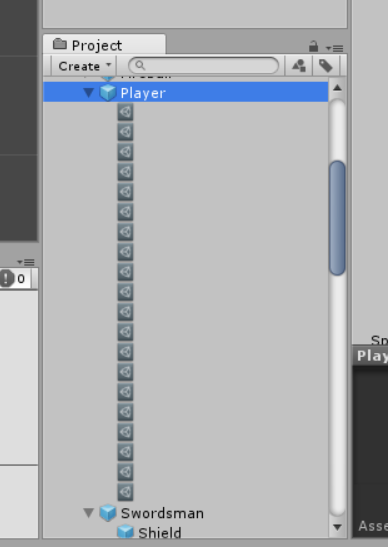
alt text

For instance, in this case, Player actually only has like 4 of the scriptable objects in the list, but you can see that there are MANY leftover scriptable objects from changing around the list stuff.

subassets.png (32.3 kB)
Comment
Add comment · Show 2
10 |3000 characters needed characters left characters exceeded
▼
  • Viewable by all users
  • Viewable by moderators
  • Viewable by moderators and the original poster
  • Advanced visibility
Viewable by all users
avatar image hexagonius · Jul 04, 2017 at 05:27 PM 0
Share

What's with dragging it into the hiearchy, removing them there and applying the Prefab again?

avatar image GamezAtWork hexagonius · Jul 05, 2017 at 01:47 PM 0
Share

Well, it doesn't appear when i drag it into the hierachy, since it only exists in the prefab. (like, if i drag the Player prefab into the hierachy, it'll actually have no children there).

1 Reply

· Add your reply
  • Sort: 
avatar image
0

Answer by Bunny83 · Jul 05, 2017 at 02:38 PM

First i wouldn't recomment to add other assets to "prefab assets". It's ok to add multiple assets to a generic ".asset" asset.

Though there are several ways how to remove such assets. First you can try an editor script like this:

 //DestroyObjectsEditorWindow.cs 
 using UnityEditor;
 using System.Collections.Generic;
 
 public class DestroyObjectsEditorWindow : ScriptableWizard
 {
     public List<UnityEngine.Object> objects;
     [MenuItem("Tools/DestroyObjects")]
     static void CreateWizard()
     {
         DisplayWizard<DestroyObjectsEditorWindow>("Destroy Objects", "Destroy");
     }
 
     void OnWizardCreate()
     {
         if (EditorUtility.DisplayDialog("Destroy Objects", "Are you sure you want to destroy those objects?", "yes, i'm sure", "the hell, no"))
         {
             foreach (var obj in objects)
             {
                 DestroyImmediate(obj, true);
             }
         }
     }
 }

It allows you to drag and drop one or multiple objects into the object list and then to destroy those objects.

Another way could be, as hexagonius said, instantiating the prefab into the scene and recreating a prefab from the instance by dragging it back into the project window.

Finally you can set the asset serialization mode to "force text" (Edit --> Project Settings --> Editor --> Asset Serialization). This would re-serialize your prefab as YAML. Now you can open the prefab file in a proper text editor and remove the unwanted instances. Though be careful. You may want to create a backup first if the prefab is important.

Comment
Add comment · Share
10 |3000 characters needed characters left characters exceeded
▼
  • Viewable by all users
  • Viewable by moderators
  • Viewable by moderators and the original poster
  • Advanced visibility
Viewable by all users

Your answer

Hint: You can notify a user about this post by typing @username

Up to 2 attachments (including images) can be used with a maximum of 524.3 kB each and 1.0 MB total.

Follow this Question

Answers Answers and Comments

68 People are following this question.

avatar image avatar image avatar image avatar image avatar image avatar image avatar image avatar image avatar image avatar image avatar image avatar image avatar image avatar image avatar image avatar image avatar image avatar image avatar image avatar image avatar image avatar image avatar image avatar image avatar image avatar image avatar image avatar image avatar image avatar image avatar image avatar image avatar image avatar image avatar image avatar image avatar image avatar image avatar image avatar image avatar image avatar image avatar image avatar image avatar image avatar image avatar image avatar image avatar image avatar image avatar image avatar image avatar image avatar image avatar image avatar image avatar image avatar image avatar image avatar image avatar image avatar image avatar image avatar image avatar image avatar image avatar image avatar image

Related Questions

Auto-refresh assets after changing scriptable object 0 Answers

how to use Scriptable Objects outside editor 2 Answers

Referencing a ScriptableObject asset programatically 0 Answers

Scriptable Object not saving changes to a list. 0 Answers

Created Assets not persisting after closing/opening editor 1 Answer


Enterprise
Social Q&A

Social
Subscribe on YouTube social-youtube Follow on LinkedIn social-linkedin Follow on Twitter social-twitter Follow on Facebook social-facebook Follow on Instagram social-instagram

Footer

  • Purchase
    • Products
    • Subscription
    • Asset Store
    • Unity Gear
    • Resellers
  • Education
    • Students
    • Educators
    • Certification
    • Learn
    • Center of Excellence
  • Download
    • Unity
    • Beta Program
  • Unity Labs
    • Labs
    • Publications
  • Resources
    • Learn platform
    • Community
    • Documentation
    • Unity QA
    • FAQ
    • Services Status
    • Connect
  • About Unity
    • About Us
    • Blog
    • Events
    • Careers
    • Contact
    • Press
    • Partners
    • Affiliates
    • Security
Copyright © 2020 Unity Technologies
  • Legal
  • Privacy Policy
  • Cookies
  • Do Not Sell My Personal Information
  • Cookies Settings
"Unity", Unity logos, and other Unity trademarks are trademarks or registered trademarks of Unity Technologies or its affiliates in the U.S. and elsewhere (more info here). Other names or brands are trademarks of their respective owners.
  • Anonymous
  • Sign in
  • Create
  • Ask a question
  • Spaces
  • Default
  • Help Room
  • META
  • Moderators
  • Explore
  • Topics
  • Questions
  • Users
  • Badges
