 koobas.hobune.stream


scale plane to screen width and keep ratio
Hi,
I'm using Vuforia to get an texture to a plane. I want to get the texture in front of camera and keep the ratio and remove the offset. But somehow I cannot get it scaled correctly to the screen. I think i'm looking too long at the code. :)
 float distance = Vector3.Distance(Camera.main.transform.position, gameObject.transform.position);
         float height =  Mathf.Tan(0.5f * Camera.main.fieldOfView * Mathf.Deg2Rad) * distance;
         float width = height * ((float)mTextureInfo.imageSize.x/(float)mTextureInfo.imageSize.y); // x and y are with and height


 gameObject.transform.localScale = new Vector3(-width , 1.0f,height);

How about:
 float ratio = ((float)mTextureInfo.imageSize.x/(float)mTextureInfo.imageSize.y);
 gameObject.transform.localScale = new Vector3(ratio*Screen.height , 1.0f,Screen.height);
using Screen class. here we take the height as a base scale but you could also decide use the width to scale your object.
Then you might need to center your object, I will edit this comment if needed later.
If that's not the effect you expected maybe post an screenshot of your scene.

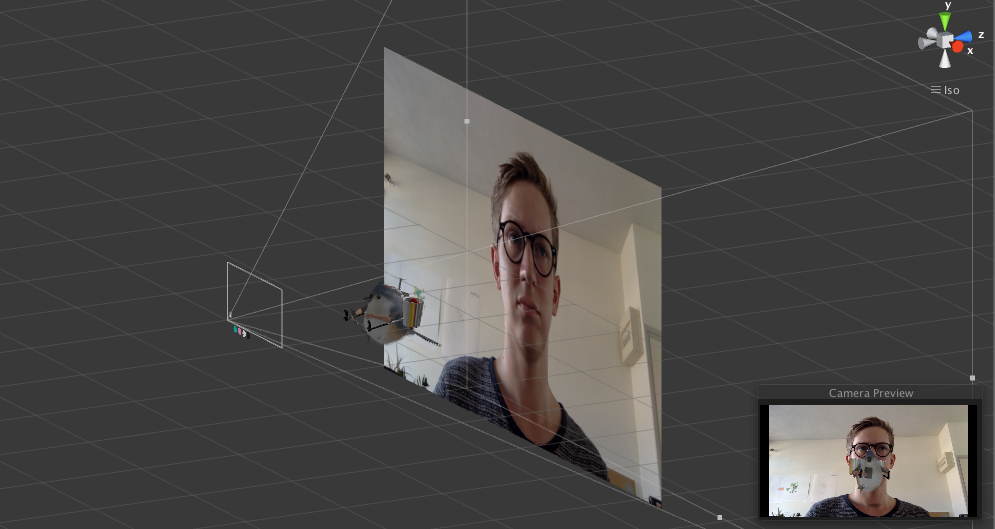
Here's a screenshot. I'm using a perspective camera. Currently it fills the plane only vertically, but not horizontally. It's centered.

Your code is fine, just needs a little fix, multiply height and width by two (I think because in Orthographic mode, the Camera size is 1/2 of the vertical size) and divide the result height and width by 10 because the plane with scale 1 by 1 is 10 by 10 units.
 float distance = Vector3.Distance(Camera.main.transform.position, gameObject.transform.position);
 float height =  2.0f * Mathf.Tan(0.5f * Camera.main.fieldOfView * Mathf.Deg2Rad) * distance;
 float width = height * Screen.width / Screen.height;
 gameObject.transform.localScale = new Vector3(width / 10f, 1.0f, height / 10f);

Actully, using this code is better to keep the ratio from the camera:
float width = height * mTextureInfo.width / mTextureInfo.height;
Where mTextureInfo is from type WebCamTexture of the back camera in the device.
Also I had a problem where it fills only the height so the solution is to fill the height and calculate the width form it, then fill the width and calculate the height from it and choose the max between the two calculations, here's my function: backCam is the texture of the back camera. backCamPlane is the plane which has the texture on.
 void fixSize()
     {
         float distance = Vector3.Distance(camera.transform.position, backCamPlane.transform.position);

         float fieldOfView = 2f * $$anonymous$$athf.Atan($$anonymous$$athf.Tan(camera.fieldOfView * $$anonymous$$athf.Deg2Rad / 2f) * camera.aspect) * $$anonymous$$athf.Rad2Deg; // Horizonal Field of View
         float width1 = $$anonymous$$athf.Tan(0.5f * fieldOfView * $$anonymous$$athf.Deg2Rad) * distance / 5f;
         float height1 = width1 * backCam.height / backCam.width;

         float height2 = $$anonymous$$athf.Tan(0.5f * camera.fieldOfView * $$anonymous$$athf.Deg2Rad) * distance / 5f;
         float width2 = height2 * backCam.width / backCam.height;

         float width = $$anonymous$$athf.$$anonymous$$ax(width1, width2);
         float height = $$anonymous$$athf.$$anonymous$$ax(height1, height2);

         backCamPlane.transform.localScale = new Vector3(width, backCam.videoVertically$$anonymous$$irrored ? -1f : 1f, height);
     }

The final answer by @IbraheemTuffaha was accurate for a perspective camera, but too dependent on extraneous variables and having everything attached to the camera.
     Transform scaledImage = gameObject.transform; // not required, but simplifies code
         // When attaching to a different object, change this variable to reconnect

     float dst = Vector3.Distance(Camera.main.transform.position, scaledImage.position);

     float fov = 2f * Mathf.Atan(Mathf.Tan(Camera.main.fieldOfView * Mathf.Deg2Rad / 2f)
         * Camera.main.aspect) * Mathf.Rad2Deg; // Horizonal Field of View
     float w1 = Mathf.Tan(0.5f * fov * Mathf.Deg2Rad) * dst / 5f;
     float h1 = w1 * scaledImage.GetComponent<Renderer>().material.mainTexture.height
         / scaledImage.GetComponent<Renderer>().material.mainTexture.width;

     float h2 = Mathf.Tan(0.5f * Camera.main.fieldOfView * Mathf.Deg2Rad) * dst / 5f;
     float w2 = h2 * scaledImage.GetComponent<Renderer>().material.mainTexture.width
         / scaledImage.GetComponent<Renderer>().material.mainTexture.height;

     float width = Mathf.Max(w1, w2);
     float height = Mathf.Max(h1, h2);

     scaledImage.localScale = new Vector3(width, scaledImage.localScale.y, height);



