
Wayback Machinekoobas.hobune.stream
May JUN Jul
Previous capture 13 Next capture
2021 2022 2023
1 capture
13 Jun 22 - 13 Jun 22
sparklines
Close Help
  • Products
  • Solutions
  • Made with Unity
  • Learning
  • Support & Services
  • Community
  • Asset Store
  • Get Unity

UNITY ACCOUNT

You need a Unity Account to shop in the Online and Asset Stores, participate in the Unity Community and manage your license portfolio. Login Create account
  • Blog
  • Forums
  • Answers
  • Evangelists
  • User Groups
  • Beta Program
  • Advisory Panel

Navigation

  • Home
  • Products
  • Solutions
  • Made with Unity
  • Learning
  • Support & Services
  • Community
    • Blog
    • Forums
    • Answers
    • Evangelists
    • User Groups
    • Beta Program
    • Advisory Panel

Unity account

You need a Unity Account to shop in the Online and Asset Stores, participate in the Unity Community and manage your license portfolio. Login Create account

Language

  • Chinese
  • Spanish
  • Japanese
  • Korean
  • Portuguese
  • Ask a question
  • Spaces
    • Default
    • Help Room
    • META
    • Moderators
    • Topics
    • Questions
    • Users
    • Badges
  • Home /
avatar image
0
Question by h0stis · Dec 21, 2012 at 10:47 AM · resolutionpaintingterran

Terran painting brush resolution.

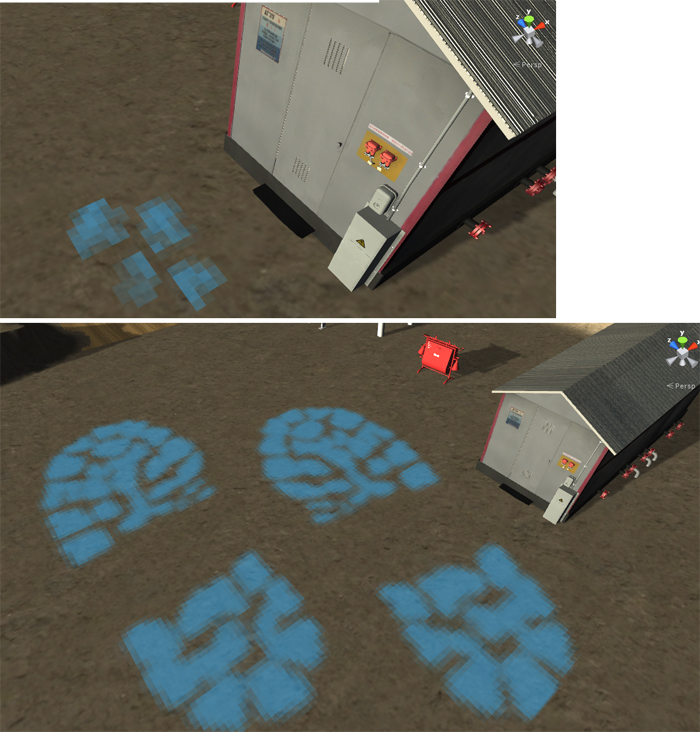
Hi, everyone! Is it possible to sculpt details with a greater precision then the default one. I've made a custom brush flollowing these steps: http://forum.unity3d.com/threads/15848-Texture-terrain-brush?p=109747&viewfull=1#post109747. Everything works well, but the brush size has to be much bigger then desired in order to be discernable. Basicaly, when I make it small enough to be the proper size I get a mess of a 10-15 pixels instead of the picture I used for the brush. I want to paint some footprints on the ground and a bit puzzled by what I get. I tried to increase the resolution of the brush, but 128x128 brush and 2048x2048 one look exacly the same. So I think that it depends on the terran resolution, but I've increased all that I could in the terran settings. Is it possible to do something about it to be able to paint footprints with the proper size and more detail then 10-15 pixels?

And the picture to illustrate:
alt text

q.jpg (346.9 kB)
Comment
Add comment
10 |3000 characters needed characters left characters exceeded
▼
  • Viewable by all users
  • Viewable by moderators
  • Viewable by moderators and the original poster
  • Advanced visibility
Viewable by all users

2 Replies

· Add your reply
  • Sort: 
avatar image
0
Best Answer

Answer by cgcookie · Dec 21, 2012 at 08:48 PM

Hi, When using the terrain system in unity it is designed to allow you to paint terrain areas such as "I want a patch of grass here among my rocks", not for painting details as that would require a very high resolution image or multiple images. So here is what we do:

Attach your detail to a small plane and use it as a projector to project the detail on the terrain, make sure you use layers so it doesn't project the detail onto anything between the plane and the ground.

Using this method also means you can turn off the details when they are not visible and save performance.

Does this help answer your question?

Comment
Add comment · Show 1 · Share
10 |3000 characters needed characters left characters exceeded
▼
  • Viewable by all users
  • Viewable by moderators
  • Viewable by moderators and the original poster
  • Advanced visibility
Viewable by all users
avatar image h0stis · Dec 25, 2012 at 01:02 AM 0
Share

Thanks! A very useful technique. I've found a free decal system in the asset store. Have not tried Unity built-in projectors yet. But there are projection materials only for shadows and lights. Try to learn how to use them a bit late. Thanks again!

avatar image
0

Answer by cgcookie · Dec 21, 2012 at 08:48 PM

Hi, When using the terrain system in unity it is designed to allow you to paint terrain areas such as "I want a patch of grass here among my rocks", not for painting details as that would require a very high resolution image or multiple images. So here is what we do:

Attach your detail to a small plane and use it as a projector to project the detail on the terrain, make sure you use layers so it doesn't project the detail onto anything between the plane and the ground.

Using this method also means you can turn off the details when they are not visible and save performance.

Does this help answer your question?

Comment
Add comment · Share
10 |3000 characters needed characters left characters exceeded
▼
  • Viewable by all users
  • Viewable by moderators
  • Viewable by moderators and the original poster
  • Advanced visibility
Viewable by all users

Your answer

Hint: You can notify a user about this post by typing @username

Up to 2 attachments (including images) can be used with a maximum of 524.3 kB each and 1.0 MB total.

Follow this Question

Answers Answers and Comments

11 People are following this question.

avatar image avatar image avatar image avatar image avatar image avatar image avatar image avatar image avatar image avatar image avatar image

Related Questions

How can I applay a normal map to my terran? 1 Answer

Can you change what resolution "Standalone" is in the Game view? 1 Answer

How do you account for iPhoneSettings.generation not working in the Editor? 2 Answers

Make buttons visible in the editor? 2 Answers

How to work around perspective distortion on very wide displays? 3 Answers


Enterprise
Social Q&A

Social
Subscribe on YouTube social-youtube Follow on LinkedIn social-linkedin Follow on Twitter social-twitter Follow on Facebook social-facebook Follow on Instagram social-instagram

Footer

  • Purchase
    • Products
    • Subscription
    • Asset Store
    • Unity Gear
    • Resellers
  • Education
    • Students
    • Educators
    • Certification
    • Learn
    • Center of Excellence
  • Download
    • Unity
    • Beta Program
  • Unity Labs
    • Labs
    • Publications
  • Resources
    • Learn platform
    • Community
    • Documentation
    • Unity QA
    • FAQ
    • Services Status
    • Connect
  • About Unity
    • About Us
    • Blog
    • Events
    • Careers
    • Contact
    • Press
    • Partners
    • Affiliates
    • Security
Copyright © 2020 Unity Technologies
  • Legal
  • Privacy Policy
  • Cookies
  • Do Not Sell My Personal Information
  • Cookies Settings
"Unity", Unity logos, and other Unity trademarks are trademarks or registered trademarks of Unity Technologies or its affiliates in the U.S. and elsewhere (more info here). Other names or brands are trademarks of their respective owners.
  • Anonymous
  • Sign in
  • Create
  • Ask a question
  • Spaces
  • Default
  • Help Room
  • META
  • Moderators
  • Explore
  • Topics
  • Questions
  • Users
  • Badges
