 koobas.hobune.stream


Problem with variables
I have two types of boats in my 2D game. I'm cloning boats and sending to another side of screen. First type works fine, but second no. When i use breakpoints to find problem, i clone first boat of sekond type fine, but second was cloned to same x coordinates. I check array with childs transforms and everythink was null.
First type script:
 using UnityEngine;
 using System.Collections;

 public class lod_normal_vpravo : MonoBehaviour
 {

         public static bool spawnship;
         static Transform[] childs;

         // Use this for initialization
         void Start ()
         {
             childs = new Transform[40];
         }

         // Update is called once per frame
         void Update ()
         {
                 if (spawnship) {
                         SpawnChild ();
                 }

                 for (int i = 0; i<childs.Length; i++) {
                         if (childs [i] != null) {
                                 childs [i].Translate (Vector3.left * Time.deltaTime, Camera.main.transform);
                                 if (childs [i].position.x < 0 - childs [i].renderer.bounds.size.x) {
                                         Destroy (childs [i].gameObject);
                                         childs [i] = null;
                                 }
                         }
                 }
                 //transform.Translate (Vector3.left * Time.deltaTime, Camera.main.transform);
         }

         void SpawnChild ()
         {
                 bool volno = true;
                 int i = 0;
                 while (volno) {
                         if (childs [i] == null) {
                                 volno = false;
                         } else {
                                 if (i == 39) {
                                         return;
                                 }
                                 i++;
                         }
                 }

                 childs [i] = Instantiate (transform) as Transform;
                 float position = Random.Range (6.5f, 9.8f);
                 childs [i].localPosition = new Vector3(childs [i].position.x, position, childs [i].position.z);
                 spawnship = false;
         }
 }
Second type script:
 using UnityEngine;
 using System.Collections;

 public class lod_normal_vlevo : MonoBehaviour {

     public static bool spawnship;
     Transform[] childs;

     // Use this for initialization
     void Start () {
         childs = new Transform[40];
     }

     // Update is called once per frame
     void Update () {
         if (spawnship) {
             SpawnChild ();
         }

         for (int i = 0; i<childs.Length; i++) {
             if (childs [i] != null) {
                 childs [i].Translate (Vector3.right * Time.deltaTime, Camera.main.transform);
                 if (childs [i].position.x > Screen.width) {
                     Destroy (childs [i].gameObject);
                     childs [i] = null;
                 }
             }
         }
     }

     void SpawnChild ()
     {
         bool volno = true;
         int i = 0;
         while (volno) {
             if (childs [i] == null) {
                 volno = false;
             } else {
                 if (i == 39) {
                     return;
                 }
                 i++;
             }
         }

         childs [i] = Instantiate (transform) as Transform;
         float position = Random.Range (6.5f, 9.8f);
         childs [i].localPosition = new Vector3(childs [i].position.x, position, childs [i].position.z);
         spawnship = false;
     }
 }

First type works fine, but second no.
Do you get an error or is it just that the coordinates are wrong? Where do you set spawnship of either script back to true?
was cloned to same x coordinates
You mean the same spot where the first got destroyed? Or correct side of screen but same y coordinate as first?
I check array with childs transforms and everythink was null.
At what point do you check it? You call destroy on the childs array at the end of the loop so I'd expect it to be full of null

Spawnship true i set in $$anonymous$$ainCamera script(i use it like event listener and timer).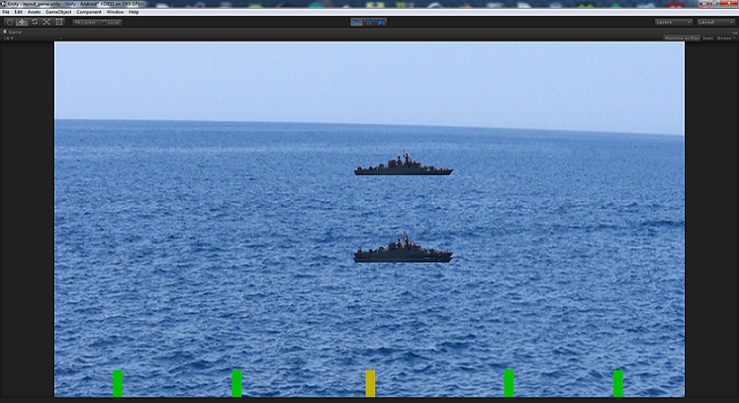 I check it in SpawnChild void. First boat normally go from one side to another and second is spawned on same x coordinates but different y coordinates. And destroy don´t work too.

Of course, since you're setting the same X for localPosition in SpawnChild. So since you're not passing a location to Instantiate so it's spawning to the default position (Vector3.zero), then you're not changing X but only Y with the Random.Range
PS: also consider that using "localPosition" is not different from world position, because you're not parenting the new instantiated object to any other so those are really world coordinates and not local.
So what I have to do to get it working? If it help i create clone of clone i don´t know why.

Honestly I'd divide your logic into 2 scripts: one spawns the ships (and maintains a pool array by deactivating/activating the objects in the list, so that it'll not create/destroy objects every time but instantiate only once for better performance) and one handles the movement (and deactivate itself once it is out of screen). The spawner script would have a public variable where you'll drag the ship prefab.

you can add as many scripts as you like to any object; try to make each perform a single task.
you can add as many scripts as you like to any object; try to make each perform a single task.
So why when I start game, Unity doesn´t respond.



