 koobas.hobune.stream


Curving bullets
I've been programming for a bit over a week now. I'm working on a 2D-scrolling shooter with 3D visuals. The idea is for the game area to fly around the 3D world. Hence, everything that happens gameplay-wise should happen in coordinates relative to the GameArea prefab. I've managed to make the GameArea-prefab fly through the game world using iTween, I've managed to make the bullets parent themselves to the GameArea and I've SORT OF managed to make the bullets fire in the correct orientation. What's happening now is that the bullets behave like in the pictures below.
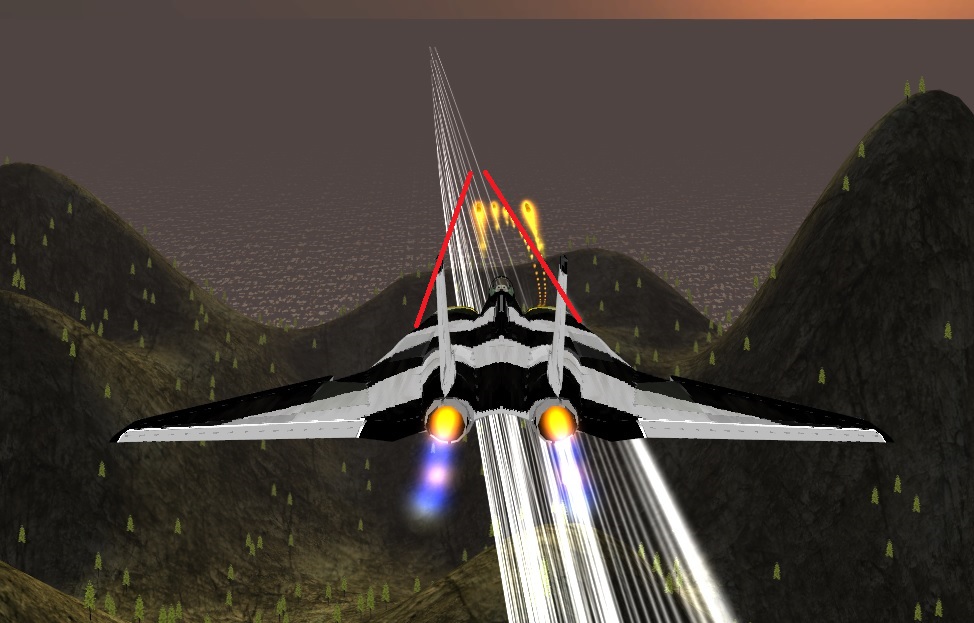
Also, since the problem seems so difficult to describe, I have decided to fraps it. Check out this video to better see what I mean: Link.
Below is the code for the bullet. I've decided to make it do all the parenting itself, rather than to put huge ammounts of code in the GameArea object (currently named iTweenrider in code).
 using UnityEngine;
 using System.Collections;

 public class Projectile : MonoBehaviour {
     public float ProjectileSpeed;
     public Transform iTweenrider;
     // Use this for initialization
     void Start () {

     }
     void Awake () {
         transform.parent = iTweenrider;
         //GameObject Projectile = Instantiate(Projectile,PlayerCannon ,Quaternion.identity);
         //Projectile.transform.parent = iTweenrider;
     }
     // Update is called once per frame
     void Update () {
         float amtToMove = ProjectileSpeed * Time.deltaTime;
         transform.Translate (iTweenrider.transform.forward * amtToMove);
         //transform.TransformDirection (Vector3.forward * amtToMove);
     }
 }
In case I'm not making myself clear enough, the bullets SHOULD fly towards the center of the screen, regardless of how the gamearea flies around the environment, and bullets should allways have the correct orientetion (not fly out sideways from the cannons as they do now).

I'm not really sure of what you are trying to achieve. If the plane takes a turn, then it would only be natural for the bullets to keep going in their original direction. Otherwise it would look a bit awkward. Why would the bullet know that the camera turned.
If this is really what you want, then I'd suggest to move the environment ins$$anonymous$$d of every thing else.

$$anonymous$$inda looks like the bullets are children of the plane? Definitely should not be

Well, they're children to the game area prefab. Like I said, the game is supposed to be, from a gameplay perspective, a 2D shooter. The only thing that the player can do is to turn left and right, and shoot.
But if you still think it's wrong, then please do tell me how it should, because I am a complete noob at this.

I don't think there is a problem here. The bullets are going straight, they just appear to be moving at an angle because the ship/camera is moving. I would suggest to either increase the bullet's velocity to lessen the curving effect, or add the ship's velocity to the starting velocity of the bullets.

Just some points since major parts of you code are missing:
transform.Translate takes a direction in local space by default. You can pass Space.World to actually pass a world space direction.
A projectile usually should fly straighr in the direction it has been launched. So
transform.Translate(Vector3.forward * amtToMove);would be the most logical way to move your projectileYou didn't show how you create / instantiate the bullet. Do you rotate the bullet the right way when you instantiate it?
You said you move the "gamearea" with iTween. What kind of movement? It looks like a sine-wave. If the whole game elements move along a sine path it will always look strange if the terrain doesn't move along.
It's not really clear what your gamearea actually contains and what parts are actually moving and if there are fixed parts (in relation to world space). Do you move your terrain below the aircraft or is the terrain fixed and you move the aircraft?
Thanks for the input. This is the code for my cannon, which is what launches the bullet: using UnityEngine; using System.Collections;
 public class PlayerCannon : $$anonymous$$onoBehaviour {
     public GameObject ProjectilePrefab;

     // Use this for initialization
     //void Start () {

     //}

     // Update is called once per frame
     void Update () {
         if (Input.Get$$anonymous$$eyDown ("space")) {
             //Vector3 position = new Vector3(transform.position.x, transform.position.y +(transform.localScale.y), transform.position.z);
             Vector3 position = new Vector3(transform.position.x, transform.position.y, transform.position.z);
             Instantiate (ProjectilePrefab, position, Quaternion.identity);


             //gameObject Projectile = Instantiate(ProjectilePrefab, position ,Quaternion.identity);
             //ProjectilePrefab.transform.parent = iTweenrider;

         }
     }
 }
This is where the bullet is instantiated. And yes, I guess it'll look strange, but I don't think it can be any other way if I want to have 2D shooter mechanics combined with the feeling of moving through 3D space.


