Wayback Machinekoobas.hobune.stream
May JUN Jul
Previous capture 13 Next capture
2021 2022 2023
1 capture
13 Jun 22 - 13 Jun 22
sparklines
Close Help
  • Products
  • Solutions
  • Made with Unity
  • Learning
  • Support & Services
  • Community
  • Asset Store
  • Get Unity

UNITY ACCOUNT

You need a Unity Account to shop in the Online and Asset Stores, participate in the Unity Community and manage your license portfolio. Login Create account
  • Blog
  • Forums
  • Answers
  • Evangelists
  • User Groups
  • Beta Program
  • Advisory Panel

Navigation

  • Home
  • Products
  • Solutions
  • Made with Unity
  • Learning
  • Support & Services
  • Community
    • Blog
    • Forums
    • Answers
    • Evangelists
    • User Groups
    • Beta Program
    • Advisory Panel

Unity account

You need a Unity Account to shop in the Online and Asset Stores, participate in the Unity Community and manage your license portfolio. Login Create account

Language

  • Chinese
  • Spanish
  • Japanese
  • Korean
  • Portuguese
  • Ask a question
  • Spaces
    • Default
    • Help Room
    • META
    • Moderators
    • Topics
    • Questions
    • Users
    • Badges
  • Home /
avatar image
0
Question by M3ntalll · Aug 28, 2020 at 09:29 PM · unity 2dphysics2d

How to make sure AIs don't go through walls?

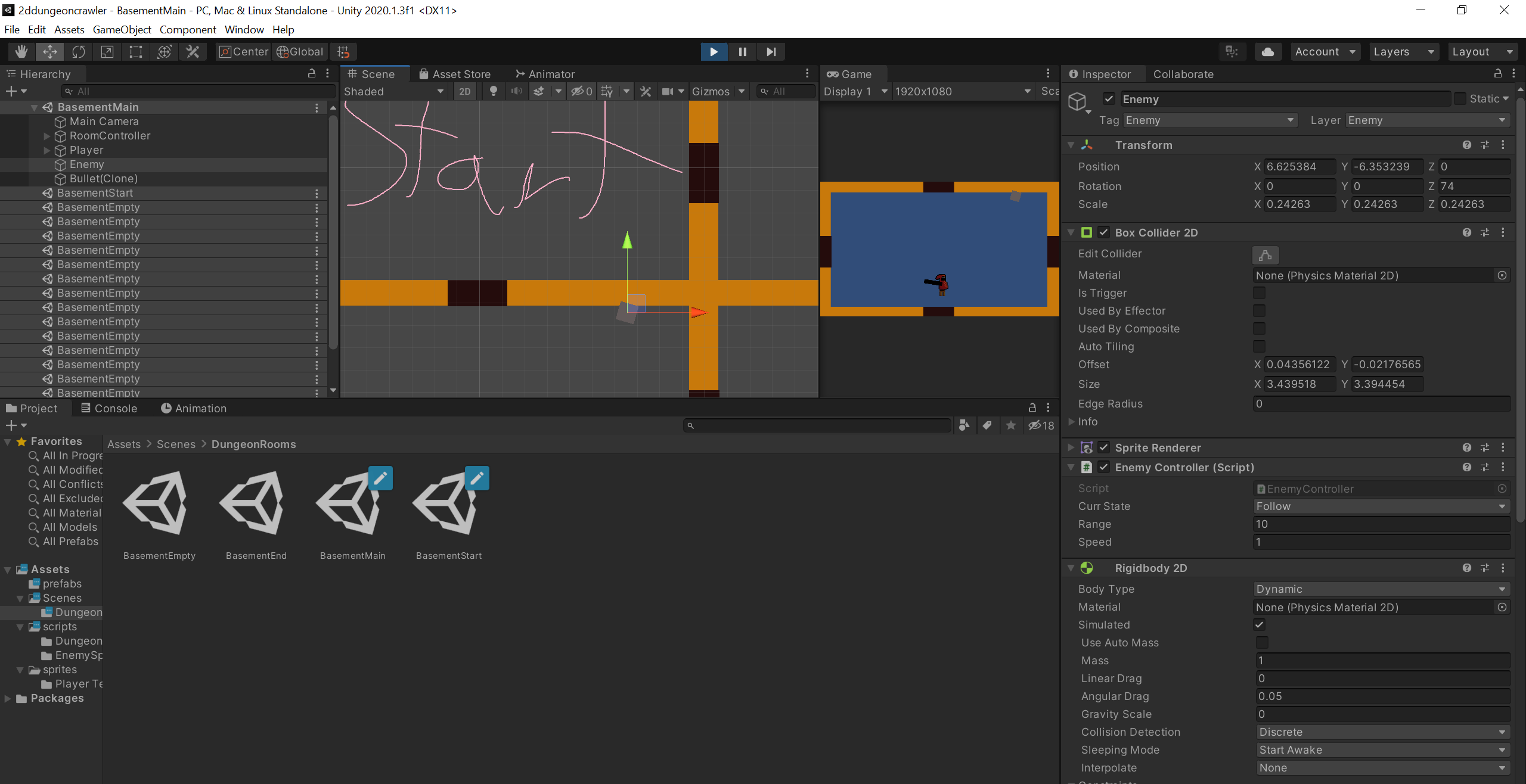
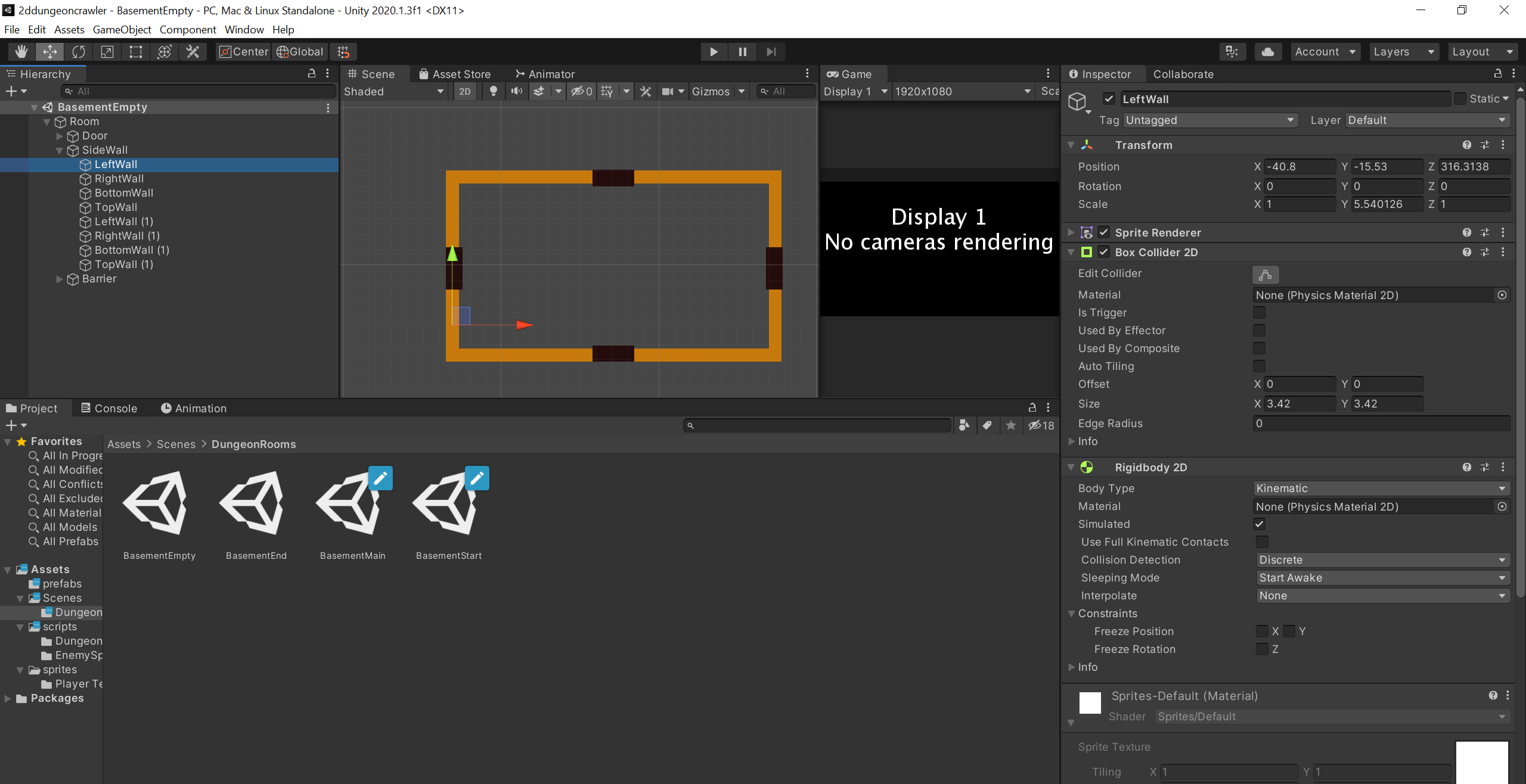
I am currently developing a 2D Dungeon Crawler game. I have a simple enemy AI for the dungeon, but when it is in 'Wander' mode, it is able to simply move through walls and into other rooms, even though they both have BoxCollider2D and Rigidbody2D. I am still new to Unity, so I'm not sure how to make sure this happens.

Here is my Inspector for walls: alt text
Here is my inspector for my enemy: alt text

I am also including my AI script in case it helps: using System.Collections; using System.Collections.Generic; using UnityEngine;

 public enum EnemyState
 {
     Wander,
     Follow,
     Die
 };
 
 public class EnemyController : MonoBehaviour
 {
 
     GameObject player;
     public EnemyState currState = EnemyState.Wander;
     public float range;
     public float speed;
     private bool chooseDir = false;
     private bool dead = false;
     private Vector3 randomDir;
 
     // Start is called before the first frame update
     void Start()
     {
         player = GameObject.FindGameObjectWithTag("Player");
     }
 
     // Update is called once per frame
     void Update()
     {
         switch (currState)
         {
             case (EnemyState.Wander):
                 Wander();
                 break;
             case (EnemyState.Follow):
                 Follow();
                 break;
             case (EnemyState.Die):
 
                 break;
         }
 
         if(IsPlayerInRange(range) && currState != EnemyState.Die)
         {
             currState = EnemyState.Follow;
         }
         else if(!IsPlayerInRange(range) && currState != EnemyState.Die)
         {
             currState = EnemyState.Wander;
         }
     }
 
     private bool IsPlayerInRange(float range)
     {
         return Vector3.Distance(transform.position, player.transform.position) <= range;
     }
 
     private IEnumerator ChooseDirection()
     {
         chooseDir = true;
         yield return new WaitForSeconds(Random.Range(2f, 8f));
         randomDir = new Vector3(0, 0, Random.Range(0, 360));
         Quaternion nextRotation = Quaternion.Euler(randomDir);
         transform.rotation = Quaternion.Lerp(transform.rotation, nextRotation, Random.Range(0.5f, 2.5f));
         chooseDir = false;
     }
 
     void Wander()
     {
         if (!chooseDir)
         {
             StartCoroutine(ChooseDirection());
         }
 
         transform.position += -transform.right * speed * Time.deltaTime;
         if (IsPlayerInRange(range))
         {
             currState = EnemyState.Follow;
         }
     }
 
     void Follow()
     {
         transform.position = Vector2.MoveTowards(transform.position, player.transform.position, speed * Time.deltaTime);
     }
 
     public void Death()
     {
         Destroy(gameObject);
     }
 }
 
walls.png (272.8 kB)
enemy.png (298.2 kB)
Comment
Add comment · Show 1
10 |3000 characters needed characters left characters exceeded
▼
  • Viewable by all users
  • Viewable by moderators
  • Viewable by moderators and the original poster
  • Advanced visibility
Viewable by all users
avatar image Llama_w_2Ls · Aug 28, 2020 at 11:31 PM 0
Share

Have you tried making your enemy ai's nav$$anonymous$$eshAgents? You can bake a floor mesh, which limits what areas they can walk in and define an obstacle avoidance radius, so they stay away from other colliders and other ai's within this range.

1 Reply

· Add your reply
  • Sort: 
avatar image
0

Answer by ShySam · Aug 28, 2020 at 11:37 PM

@M3ntalll did you try to check if there is a collision between the wall and AI collision in the collision matrix (the collision plan between different colliders in the project) you can reach it by going to [ Edit > Project Settings > Physics ] then scroll down to each ( Collision Matrix in the bottom) and see if there is any unchecked box . tell me if it worked for you :D

Comment
Add comment · Share
10 |3000 characters needed characters left characters exceeded
▼
  • Viewable by all users
  • Viewable by moderators
  • Viewable by moderators and the original poster
  • Advanced visibility
Viewable by all users

Your answer

Hint: You can notify a user about this post by typing @username

Up to 2 attachments (including images) can be used with a maximum of 524.3 kB each and 1.0 MB total.

Follow this Question

Answers Answers and Comments

143 People are following this question.

avatar image avatar image avatar image avatar image avatar image avatar image avatar image avatar image avatar image avatar image avatar image avatar image avatar image avatar image avatar image avatar image avatar image avatar image avatar image avatar image avatar image avatar image avatar image avatar image avatar image avatar image avatar image avatar image avatar image avatar image avatar image avatar image avatar image avatar image avatar image avatar image avatar image avatar image avatar image avatar image avatar image avatar image avatar image avatar image avatar image avatar image avatar image avatar image avatar image avatar image avatar image avatar image avatar image avatar image avatar image avatar image avatar image avatar image avatar image avatar image avatar image avatar image avatar image avatar image avatar image avatar image avatar image avatar image avatar image avatar image avatar image avatar image avatar image avatar image avatar image avatar image avatar image avatar image avatar image avatar image avatar image avatar image avatar image avatar image avatar image avatar image avatar image avatar image avatar image avatar image avatar image avatar image avatar image avatar image avatar image avatar image avatar image avatar image avatar image avatar image avatar image avatar image avatar image avatar image avatar image avatar image avatar image avatar image avatar image avatar image avatar image avatar image avatar image avatar image avatar image avatar image avatar image avatar image avatar image avatar image avatar image avatar image avatar image avatar image avatar image avatar image avatar image avatar image avatar image avatar image avatar image avatar image avatar image avatar image avatar image avatar image avatar image avatar image avatar image avatar image avatar image avatar image avatar image

Related Questions

Why do two colliders cross at high force? 0 Answers

[PUN2] Problem at pushing the other players 1 Answer

How to get co-ordinates of end point of Raycast2D ? 1 Answer

unity 2D physics on android devices 0 Answers

In unity 2D c# how to rotate an object like geometry dash? 1 Answer


Enterprise
Social Q&A

Social
Subscribe on YouTube social-youtube Follow on LinkedIn social-linkedin Follow on Twitter social-twitter Follow on Facebook social-facebook Follow on Instagram social-instagram

Footer

  • Purchase
    • Products
    • Subscription
    • Asset Store
    • Unity Gear
    • Resellers
  • Education
    • Students
    • Educators
    • Certification
    • Learn
    • Center of Excellence
  • Download
    • Unity
    • Beta Program
  • Unity Labs
    • Labs
    • Publications
  • Resources
    • Learn platform
    • Community
    • Documentation
    • Unity QA
    • FAQ
    • Services Status
    • Connect
  • About Unity
    • About Us
    • Blog
    • Events
    • Careers
    • Contact
    • Press
    • Partners
    • Affiliates
    • Security
Copyright © 2020 Unity Technologies
  • Legal
  • Privacy Policy
  • Cookies
  • Do Not Sell My Personal Information
  • Cookies Settings
"Unity", Unity logos, and other Unity trademarks are trademarks or registered trademarks of Unity Technologies or its affiliates in the U.S. and elsewhere (more info here). Other names or brands are trademarks of their respective owners.
  • Anonymous
  • Sign in
  • Create
  • Ask a question
  • Spaces
  • Default
  • Help Room
  • META
  • Moderators
  • Explore
  • Topics
  • Questions
  • Users
  • Badges