
Wayback Machinekoobas.hobune.stream
May JUN Jul
Previous capture 13 Next capture
2021 2022 2023
1 capture
13 Jun 22 - 13 Jun 22
sparklines
Close Help
  • Products
  • Solutions
  • Made with Unity
  • Learning
  • Support & Services
  • Community
  • Asset Store
  • Get Unity

UNITY ACCOUNT

You need a Unity Account to shop in the Online and Asset Stores, participate in the Unity Community and manage your license portfolio. Login Create account
  • Blog
  • Forums
  • Answers
  • Evangelists
  • User Groups
  • Beta Program
  • Advisory Panel

Navigation

  • Home
  • Products
  • Solutions
  • Made with Unity
  • Learning
  • Support & Services
  • Community
    • Blog
    • Forums
    • Answers
    • Evangelists
    • User Groups
    • Beta Program
    • Advisory Panel

Unity account

You need a Unity Account to shop in the Online and Asset Stores, participate in the Unity Community and manage your license portfolio. Login Create account

Language

  • Chinese
  • Spanish
  • Japanese
  • Korean
  • Portuguese
  • Ask a question
  • Spaces
    • Default
    • Help Room
    • META
    • Moderators
    • Topics
    • Questions
    • Users
    • Badges
  • Home /
avatar image
1
Question by Geo.Ego · Jul 15, 2013 at 04:28 PM · shadertexturelightingmaterial

Pinball playfield lighting

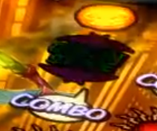
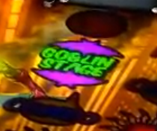
I'm wondering how to achieve the effect of having backlit translucent plastic. I'm specifically working on a pinball playfield, and I'm not sure how to get the extremely vibrant lights on the playfield to look right. I've attached on and off states from a light on a Pinball FX2 playfield as reference.

Name: playfieldLight_on.png Views: 16 Size: 36.8 KBName: playfieldLight_off.png Views: 6 Size: 37.6 KB

I had initially tried using a transparent shader on a plane, and simply illuminating the transparent area from underneath, but of course the light doesn't go through the plane, so I tried to fake it by putting another plane underneath so that the light was seen reflecting off of that through the transparency. It kind of works, but it doesn't give me the sharpness and vibrancy that the attached images have.
alt text

alt text

I also tried faking it by lighting it from above, but of course that doesn't work properly because the black outlines are equally illuminated, which sort of washes it out and ruins the effect.

I thought this would be pretty simple but now I'm stumped. I'm thinking I need a specific shader to get the proper effect, but I just don't know what to try at this point. Any help is greatly appreciated.

playfieldlight_off.png (38.5 kB)
playfieldlight_on.png (37.7 kB)
Comment
Add comment · Show 2
10 |3000 characters needed characters left characters exceeded
▼
  • Viewable by all users
  • Viewable by moderators
  • Viewable by moderators and the original poster
  • Advanced visibility
Viewable by all users
avatar image perchik · Jul 15, 2013 at 05:04 PM 1
Share

Have you tried forgoing lighting and using static images ins$$anonymous$$d? It seems that you might be able to switch out the unlit image for a lit image, and maybe turn on a point light above it if you want it to light up other objects

avatar image Geo.Ego · Jul 15, 2013 at 09:40 PM 0
Share

I did end up swapping out textures and using a point light above to handle a bit of light reflection on nearby objects. If you'd like to leave that as an answer, I'll be happy to mark it as accepted. Thanks!

1 Reply

· Add your reply
  • Sort: 
avatar image
1

Answer by markedagain · Jul 15, 2013 at 04:31 PM

have u tried some of the shaders from the wiki ?

im sure one of them will do the trick

http://wiki.unity3d.com/index.php/Shaders

Comment
Add comment · Share
10 |3000 characters needed characters left characters exceeded
▼
  • Viewable by all users
  • Viewable by moderators
  • Viewable by moderators and the original poster
  • Advanced visibility
Viewable by all users

Your answer

Hint: You can notify a user about this post by typing @username

Up to 2 attachments (including images) can be used with a maximum of 524.3 kB each and 1.0 MB total.

Follow this Question

Answers Answers and Comments

17 People are following this question.

avatar image avatar image avatar image avatar image avatar image avatar image avatar image avatar image avatar image avatar image avatar image avatar image avatar image avatar image avatar image avatar image avatar image

Related Questions

How can I prevent lights overlapping in intensity? 1 Answer

Light based texture change on material 0 Answers

Double sided shader lighting problem? 1 Answer

Shader with glow effect and gradient material 1 Answer

Cutout Material is not showing texture transparency? 0 Answers


Enterprise
Social Q&A

Social
Subscribe on YouTube social-youtube Follow on LinkedIn social-linkedin Follow on Twitter social-twitter Follow on Facebook social-facebook Follow on Instagram social-instagram

Footer

  • Purchase
    • Products
    • Subscription
    • Asset Store
    • Unity Gear
    • Resellers
  • Education
    • Students
    • Educators
    • Certification
    • Learn
    • Center of Excellence
  • Download
    • Unity
    • Beta Program
  • Unity Labs
    • Labs
    • Publications
  • Resources
    • Learn platform
    • Community
    • Documentation
    • Unity QA
    • FAQ
    • Services Status
    • Connect
  • About Unity
    • About Us
    • Blog
    • Events
    • Careers
    • Contact
    • Press
    • Partners
    • Affiliates
    • Security
Copyright © 2020 Unity Technologies
  • Legal
  • Privacy Policy
  • Cookies
  • Do Not Sell My Personal Information
  • Cookies Settings
"Unity", Unity logos, and other Unity trademarks are trademarks or registered trademarks of Unity Technologies or its affiliates in the U.S. and elsewhere (more info here). Other names or brands are trademarks of their respective owners.
  • Anonymous
  • Sign in
  • Create
  • Ask a question
  • Spaces
  • Default
  • Help Room
  • META
  • Moderators
  • Explore
  • Topics
  • Questions
  • Users
  • Badges
