
Wayback Machinekoobas.hobune.stream
May JUN Jul
Previous capture 13 Next capture
2021 2022 2023
1 capture
13 Jun 22 - 13 Jun 22
sparklines
Close Help
  • Products
  • Solutions
  • Made with Unity
  • Learning
  • Support & Services
  • Community
  • Asset Store
  • Get Unity

UNITY ACCOUNT

You need a Unity Account to shop in the Online and Asset Stores, participate in the Unity Community and manage your license portfolio. Login Create account
  • Blog
  • Forums
  • Answers
  • Evangelists
  • User Groups
  • Beta Program
  • Advisory Panel

Navigation

  • Home
  • Products
  • Solutions
  • Made with Unity
  • Learning
  • Support & Services
  • Community
    • Blog
    • Forums
    • Answers
    • Evangelists
    • User Groups
    • Beta Program
    • Advisory Panel

Unity account

You need a Unity Account to shop in the Online and Asset Stores, participate in the Unity Community and manage your license portfolio. Login Create account

Language

  • Chinese
  • Spanish
  • Japanese
  • Korean
  • Portuguese
  • Ask a question
  • Spaces
    • Default
    • Help Room
    • META
    • Moderators
    • Topics
    • Questions
    • Users
    • Badges
  • Home /
avatar image
1
Question by Arshia001 · Jan 06, 2014 at 10:18 AM · shadersurface shader

Multipass Surface Shader (or equivalent)?

Hi all.

I'm trying to create a real two-side shader. For that, I need to render two passes: one with front faces, one with back faces and flipped normals. The problem, is that I can't define a CGPROGRAM which does surface shading in a Pass. It seems CGPROGRAM's in passes can only do vertex/fragment shading. So how would I do this? I can't think of a way to combine the two passes into one, and I also can't figure out a way to do two surface shader passes. Any help would be highly appreciated.

Comment
Add comment
10 |3000 characters needed characters left characters exceeded
▼
  • Viewable by all users
  • Viewable by moderators
  • Viewable by moderators and the original poster
  • Advanced visibility
Viewable by all users

2 Replies

· Add your reply
  • Sort: 
avatar image
13
Best Answer

Answer by tanoshimi · Jan 06, 2014 at 07:45 PM

You can't explicitly define passes for surface shaders; Unity creates them automatically. But that doesn't mean you can't have multipass surface shaders - you just list the appropriate surface shader code one after another and, in the compiled output, Unity will create the corresponding passes, one after another.

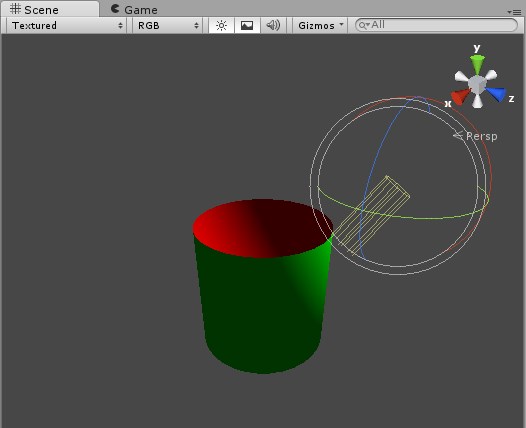
For example, a material using the following surface shader renders green front faces and red back faces:

 Shader "Custom/DoubleSided" {
     Properties {
         _MainTex ("Base (RGB)", 2D) = "white" {}
     }
     SubShader {
         Tags { "RenderType"="Opaque" }
         LOD 200

             // Render back faces first
         Cull Front
         CGPROGRAM
         #pragma surface surf Lambert vertex:vert
 
         sampler2D _MainTex;
 
         struct Input {
             float2 uv_MainTex;
         };
 
         // Flip normal for back faces
         void vert (inout appdata_full v) {
             v.normal *= -1;
           }

             // Red back faces
         void surf (Input IN, inout SurfaceOutput o) {
             half4 c = tex2D (_MainTex, IN.uv_MainTex);
             o.Albedo = fixed3(1,0,0);
             o.Alpha = c.a;
         }
         ENDCG
         
         // Now render front faces
         Cull Back
         CGPROGRAM
         #pragma surface surf Lambert
 
         sampler2D _MainTex;
 
         struct Input {
             float2 uv_MainTex;
         };

             // Green front faces
         void surf (Input IN, inout SurfaceOutput o) {
             half4 c = tex2D (_MainTex, IN.uv_MainTex);
             o.Albedo = fixed3(0,1,0);
             o.Alpha = c.a;
         }
         ENDCG
         
         
     } 
     FallBack "Diffuse"
 }

Applied to a cylinder mesh with the top face removed gives:
alt text


doublesided.jpg (22.9 kB)
Comment
Add comment · Show 4 · Share
10 |3000 characters needed characters left characters exceeded
▼
  • Viewable by all users
  • Viewable by moderators
  • Viewable by moderators and the original poster
  • Advanced visibility
Viewable by all users
avatar image Hoeloe · Jan 06, 2014 at 08:10 PM 0
Share

Huh. I did not know you could do that. There are benefits to having the different faces as separate shaders (it allows you to mix and match styles - e.g. have a specular shader on one side and a normal mapped shader on the other - without having to make a shader for each combination), but this is a rather neat way to do this.

avatar image Arshia001 · Jan 06, 2014 at 09:53 PM 0
Share

What the... I never even imagined it would work this way; actually, it's so simple that it's hurting my pride. Anyway, thanks a ton for this! $$anonymous$$eanwhile, I also found another way. You can write many shaders and combine them into one with usepass, but even that's not necessary anymore.

avatar image Hoeloe · Jan 06, 2014 at 10:36 PM 0
Share

I'd completely forgotten about usepass. Should be worth noting that usepass is not compatible with Unity free.

avatar image WillNode · Jun 07, 2015 at 01:03 PM 0
Share

why this is not included in documentation? I've looking this for hours, and came up with this one.

avatar image
-1

Answer by Hoeloe · Jan 06, 2014 at 10:57 AM

You can't. You need to use either a vertex shader or two separate shaders, and give the object two materials. I have a package on the asset store that does exactly this using the second of those methods: https://www.assetstore.unity3d.com/#/content/11351

Comment
Add comment · Share
10 |3000 characters needed characters left characters exceeded
▼
  • Viewable by all users
  • Viewable by moderators
  • Viewable by moderators and the original poster
  • Advanced visibility
Viewable by all users

Your answer

Hint: You can notify a user about this post by typing @username

Up to 2 attachments (including images) can be used with a maximum of 524.3 kB each and 1.0 MB total.

Follow this Question

Answers Answers and Comments

20 People are following this question.

avatar image avatar image avatar image avatar image avatar image avatar image avatar image avatar image avatar image avatar image avatar image avatar image avatar image avatar image avatar image avatar image avatar image avatar image avatar image avatar image

Related Questions

How do I make this shader additive blending? 0 Answers

Custom shader properties & "Mark as Normal Map" 0 Answers

Mysterious syntax error with finalcolor function 1 Answer

How can I get more realistic using waves with a surface shader? 0 Answers

exclude_path:deferred causes see through? 0 Answers


Enterprise
Social Q&A

Social
Subscribe on YouTube social-youtube Follow on LinkedIn social-linkedin Follow on Twitter social-twitter Follow on Facebook social-facebook Follow on Instagram social-instagram

Footer

  • Purchase
    • Products
    • Subscription
    • Asset Store
    • Unity Gear
    • Resellers
  • Education
    • Students
    • Educators
    • Certification
    • Learn
    • Center of Excellence
  • Download
    • Unity
    • Beta Program
  • Unity Labs
    • Labs
    • Publications
  • Resources
    • Learn platform
    • Community
    • Documentation
    • Unity QA
    • FAQ
    • Services Status
    • Connect
  • About Unity
    • About Us
    • Blog
    • Events
    • Careers
    • Contact
    • Press
    • Partners
    • Affiliates
    • Security
Copyright © 2020 Unity Technologies
  • Legal
  • Privacy Policy
  • Cookies
  • Do Not Sell My Personal Information
  • Cookies Settings
"Unity", Unity logos, and other Unity trademarks are trademarks or registered trademarks of Unity Technologies or its affiliates in the U.S. and elsewhere (more info here). Other names or brands are trademarks of their respective owners.
  • Anonymous
  • Sign in
  • Create
  • Ask a question
  • Spaces
  • Default
  • Help Room
  • META
  • Moderators
  • Explore
  • Topics
  • Questions
  • Users
  • Badges