
Wayback Machinekoobas.hobune.stream
May JUN Jul
Previous capture 13 Next capture
2021 2022 2023
1 capture
13 Jun 22 - 13 Jun 22
sparklines
Close Help
  • Products
  • Solutions
  • Made with Unity
  • Learning
  • Support & Services
  • Community
  • Asset Store
  • Get Unity

UNITY ACCOUNT

You need a Unity Account to shop in the Online and Asset Stores, participate in the Unity Community and manage your license portfolio. Login Create account
  • Blog
  • Forums
  • Answers
  • Evangelists
  • User Groups
  • Beta Program
  • Advisory Panel

Navigation

  • Home
  • Products
  • Solutions
  • Made with Unity
  • Learning
  • Support & Services
  • Community
    • Blog
    • Forums
    • Answers
    • Evangelists
    • User Groups
    • Beta Program
    • Advisory Panel

Unity account

You need a Unity Account to shop in the Online and Asset Stores, participate in the Unity Community and manage your license portfolio. Login Create account

Language

  • Chinese
  • Spanish
  • Japanese
  • Korean
  • Portuguese
  • Ask a question
  • Spaces
    • Default
    • Help Room
    • META
    • Moderators
    • Topics
    • Questions
    • Users
    • Badges
  • Home /
avatar image
1
Question by allcial · Jan 01, 2014 at 12:30 PM · 2dcollisionparticlesystem

how to use collision with particle system in 2d?

I want to use collision with particle system in 2D. but it didn't work out. I think that because there is no OnParticleCollision2D callback. Of course it works in 3D.

any one ever think about this? If so please please help me!!!

Comment
Add comment
10 |3000 characters needed characters left characters exceeded
▼
  • Viewable by all users
  • Viewable by moderators
  • Viewable by moderators and the original poster
  • Advanced visibility
Viewable by all users

4 Replies

· Add your reply
  • Sort: 
avatar image
4

Answer by Genei_180 · Jun 03, 2017 at 12:51 PM

This is not true anymore

You can use Particel System that Collide with 2D Sprites For that you need to go in the Particel tap to Collision and there Change the Collision Mode from 3D to 2D
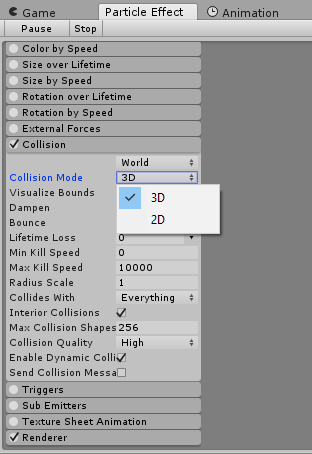
alt text

I Hope i Could help Someone Have a Nice Day and keep Coding :)


unity-personal-scene-01unity-survive-4-life-androi.png (21.7 kB)
Comment
Add comment · Show 1 · Share
10 |3000 characters needed characters left characters exceeded
▼
  • Viewable by all users
  • Viewable by moderators
  • Viewable by moderators and the original poster
  • Advanced visibility
Viewable by all users
avatar image glaksmono · Nov 21, 2020 at 04:28 PM 0
Share

I did this and for some reason it still doesn't work. Ideas?

avatar image
0

Answer by HappyMoo · Jan 01, 2014 at 02:26 PM

Particles don't collide with 2D Colliders. If you think about it, it would be hard to decide what should happen anyway, as 2D Colliders live on a constant z-plane and particles move in 3D, so they would rarely hit the exact edge of a 2D collider and more likely move in from or behind the collider.

If you really need this, you can still create BoxColliders etc. in a 2D Game.

Comment
Add comment · Share
10 |3000 characters needed characters left characters exceeded
▼
  • Viewable by all users
  • Viewable by moderators
  • Viewable by moderators and the original poster
  • Advanced visibility
Viewable by all users
avatar image
0

Answer by allcial · Jan 07, 2014 at 03:14 AM

thanks I gave up using particle collision in 2d lol

Comment
Add comment · Share
10 |3000 characters needed characters left characters exceeded
▼
  • Viewable by all users
  • Viewable by moderators
  • Viewable by moderators and the original poster
  • Advanced visibility
Viewable by all users
avatar image
0

Answer by celinedrules · Aug 31, 2020 at 01:09 AM

I know this is a little old but I did figure out a really simple way to do this.

In Unity on the particle system just make sure the Triggers section is checked and attach this script to the same GameObject

 using UnityEngine;
 
 public class Test : MonoBehaviour
 {
     // The particle System
     private ParticleSystem sys;
     // Array of alive particles
     private ParticleSystem.Particle[] aliveParticles;
     // The 2d collider that we want to collide with
     // the particle system
     private BoxCollider2D boxCollider;
     
     // Called when any particle meets the condition
     // of the trigger section of the particle system
     private void OnParticleTrigger()
     {
         // Check to see what needs to be initialized
         InitializeIfNeeded();
         
         // Get the particles that are currently alive
         // and store them in the array
         sys.GetParticles(aliveParticles);
 
         // Loop through the particles in the array
         foreach (ParticleSystem.Particle particle in aliveParticles)
         {
             // Check for collision
             if (boxCollider.bounds.Intersects(new Bounds(particle.position, particle.GetCurrentSize3D(sys))))
             {
                 Debug.Log("Success");
             }
         }
     }
 
     // Initialize the variables only once
     private void InitializeIfNeeded()
     {
         // Get the 2d trigger collider from the GameObject
         // This can be done in several different ways, I chose
         // to add a tag and find it that way
         if (boxCollider == null)
             boxCollider = GameObject.FindGameObjectWithTag("HurtBox").GetComponent<BoxCollider2D>();
         
         // Get the particle system we want to collide with and
         // add the 2d trigger collider to it
         if (sys == null)
         {
             sys = GetComponent<ParticleSystem>();
             sys.trigger.SetCollider(0, boxCollider);
         }
         
         // Initialize the array that holds the alive particles
         if (aliveParticles == null)
             aliveParticles = new ParticleSystem.Particle [sys.main.maxParticles];
     }
 }


Comment
Add comment · Share
10 |3000 characters needed characters left characters exceeded
▼
  • Viewable by all users
  • Viewable by moderators
  • Viewable by moderators and the original poster
  • Advanced visibility
Viewable by all users

Your answer

Hint: You can notify a user about this post by typing @username

Up to 2 attachments (including images) can be used with a maximum of 524.3 kB each and 1.0 MB total.

Follow this Question

Answers Answers and Comments

22 People are following this question.

avatar image avatar image avatar image avatar image avatar image avatar image avatar image avatar image avatar image avatar image avatar image avatar image avatar image avatar image avatar image avatar image avatar image avatar image avatar image avatar image avatar image avatar image

Related Questions

Particle System with multple collision behaviors for different layers? 0 Answers

Overlaping particle collision only registering as one collision 0 Answers

Object jumps through roof when holding "Up" button? 1 Answer

How do I make animation transitions a one-way street? 1 Answer

Limiting Physics to X and Y 5 Answers


Enterprise
Social Q&A

Social
Subscribe on YouTube social-youtube Follow on LinkedIn social-linkedin Follow on Twitter social-twitter Follow on Facebook social-facebook Follow on Instagram social-instagram

Footer

  • Purchase
    • Products
    • Subscription
    • Asset Store
    • Unity Gear
    • Resellers
  • Education
    • Students
    • Educators
    • Certification
    • Learn
    • Center of Excellence
  • Download
    • Unity
    • Beta Program
  • Unity Labs
    • Labs
    • Publications
  • Resources
    • Learn platform
    • Community
    • Documentation
    • Unity QA
    • FAQ
    • Services Status
    • Connect
  • About Unity
    • About Us
    • Blog
    • Events
    • Careers
    • Contact
    • Press
    • Partners
    • Affiliates
    • Security
Copyright © 2020 Unity Technologies
  • Legal
  • Privacy Policy
  • Cookies
  • Do Not Sell My Personal Information
  • Cookies Settings
"Unity", Unity logos, and other Unity trademarks are trademarks or registered trademarks of Unity Technologies or its affiliates in the U.S. and elsewhere (more info here). Other names or brands are trademarks of their respective owners.
  • Anonymous
  • Sign in
  • Create
  • Ask a question
  • Spaces
  • Default
  • Help Room
  • META
  • Moderators
  • Explore
  • Topics
  • Questions
  • Users
  • Badges
