
Wayback Machinekoobas.hobune.stream
May JUN Jul
Previous capture 13 Next capture
2021 2022 2023
1 capture
13 Jun 22 - 13 Jun 22
sparklines
Close Help
  • Products
  • Solutions
  • Made with Unity
  • Learning
  • Support & Services
  • Community
  • Asset Store
  • Get Unity

UNITY ACCOUNT

You need a Unity Account to shop in the Online and Asset Stores, participate in the Unity Community and manage your license portfolio. Login Create account
  • Blog
  • Forums
  • Answers
  • Evangelists
  • User Groups
  • Beta Program
  • Advisory Panel

Navigation

  • Home
  • Products
  • Solutions
  • Made with Unity
  • Learning
  • Support & Services
  • Community
    • Blog
    • Forums
    • Answers
    • Evangelists
    • User Groups
    • Beta Program
    • Advisory Panel

Unity account

You need a Unity Account to shop in the Online and Asset Stores, participate in the Unity Community and manage your license portfolio. Login Create account

Language

  • Chinese
  • Spanish
  • Japanese
  • Korean
  • Portuguese
  • Ask a question
  • Spaces
    • Default
    • Help Room
    • META
    • Moderators
    • Topics
    • Questions
    • Users
    • Badges
  • Home /
avatar image
0
Question by Wolf_Tech · Mar 08, 2014 at 07:32 AM · generatinggeneral programming

2d minecraft survival game

I am trying to make a 2d minecraft like survival game as a hobby. I am having a problem getting a grid and level generation to work. I have block selection, A flat level generation, a way to place blocks but not break them, and that's all I have so far.
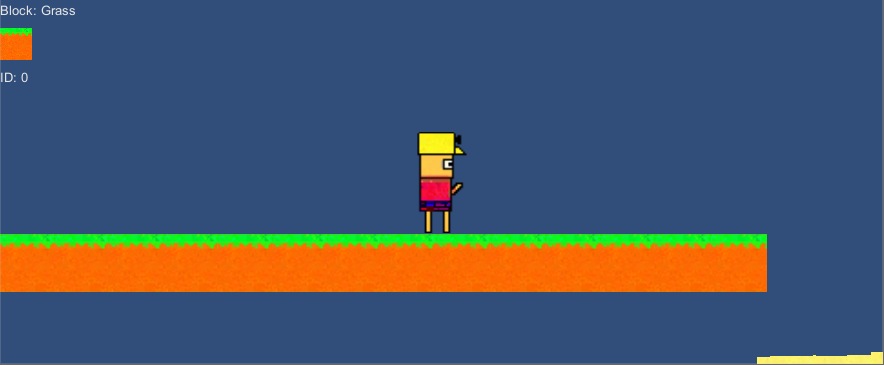
alt text

If you see the blocks are not placed in a grid instead they are everywhere: alt text
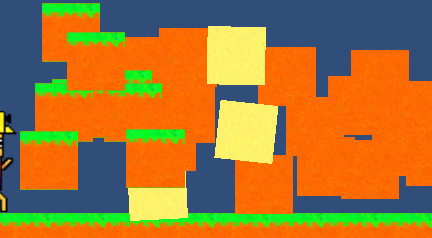
Do you guys know how I can get a grid going and how I can get it to delete blocks. So far blocks are placed at my mouse position using a raycast. All help is appreciated!

c690484b34a9ef986c0c78363e137b78.png (47.1 kB)
2b64f8b487d1e0de99750a26fa74c495.png (118.8 kB)
Comment
Add comment · Show 1
10 |3000 characters needed characters left characters exceeded
▼
  • Viewable by all users
  • Viewable by moderators
  • Viewable by moderators and the original poster
  • Advanced visibility
Viewable by all users
avatar image robertbu · Mar 08, 2014 at 07:38 AM 0
Share

If you show your placement code, someone is likely will help you figure out out to align the blocks. It would help to know the world size of your blocks. We ask that each question only have one issue, so I'd post breaking blocks as a separate issue. Note that for large-world, $$anonymous$$ecraft-type games, the 'blocks' are not handled as individual game objects. Search UA for '$$anonymous$$ecraft' or 'voxel' for more information.

1 Reply

· Add your reply
  • Sort: 
avatar image
1

Answer by Pecek · Mar 08, 2014 at 11:44 AM

You can create a "grid" by rounding the value where you place your block. For instance:

 if Physics.Raycast(ray, hit):
 go.transform.position = hit.point
 go.transform.position = Vector3(Mathf.Round(go.transform.position.x),Mathf.Round(go.transform.position.y),Mathf.Round(go.transform.position.z))

ps: yep, I'm using boo, don't judge me.

Comment
Add comment · Show 3 · Share
10 |3000 characters needed characters left characters exceeded
▼
  • Viewable by all users
  • Viewable by moderators
  • Viewable by moderators and the original poster
  • Advanced visibility
Viewable by all users
avatar image Flint Silver · Mar 08, 2014 at 03:13 PM 0
Share

you could use this too:

     int Heightgrid = 32;
     int Widthgrid = 32;
     
     gameObject.position = new Vector3($$anonymous$$athf.Round($$anonymous$$athf.Floor(gameObj.position.x / Widthgrid)* Widthgrid + Widthgrid/2.0f),
  $$anonymous$$athf.Round($$anonymous$$athf.Floor(gameObj.position.y / Heightgrid)* Heightgrid + Heightgrid/2.0f), gameObject.position.z);

With this code the objects will be aligned on a grid (I hope).

avatar image Wolf_Tech · Mar 08, 2014 at 07:36 PM 0
Share

Thank you, I am wondering how I would delete a block though. Everything is placed in a grid now but the sands physics fall out of the grid though because its a free block. So does anyone know how I could do sand and make the ability to break blocks

avatar image Wolf_Tech · Mar 09, 2014 at 03:49 AM 0
Share

Your comment helped me and I got deleting to work but now I am wondering how to not place blocks on top of each other. I am also wondering how to make a world generate with mountains and things. Also jumping, I tried checking for ground but he has infinite jump.

Your answer

Hint: You can notify a user about this post by typing @username

Up to 2 attachments (including images) can be used with a maximum of 524.3 kB each and 1.0 MB total.

Follow this Question

Answers Answers and Comments

22 People are following this question.

avatar image avatar image avatar image avatar image avatar image avatar image avatar image avatar image avatar image avatar image avatar image avatar image avatar image avatar image avatar image avatar image avatar image avatar image avatar image avatar image avatar image avatar image

Related Questions

GetPixel Not returning the same value after SetPixel. 1 Answer

Generating Many Objects at Once - Alternative Options? 0 Answers

Generating cars in a parking garage? 1 Answer

Terrain generation problem. 1 Answer

Generating 3D platform for Endless Game 0 Answers


Enterprise
Social Q&A

Social
Subscribe on YouTube social-youtube Follow on LinkedIn social-linkedin Follow on Twitter social-twitter Follow on Facebook social-facebook Follow on Instagram social-instagram

Footer

  • Purchase
    • Products
    • Subscription
    • Asset Store
    • Unity Gear
    • Resellers
  • Education
    • Students
    • Educators
    • Certification
    • Learn
    • Center of Excellence
  • Download
    • Unity
    • Beta Program
  • Unity Labs
    • Labs
    • Publications
  • Resources
    • Learn platform
    • Community
    • Documentation
    • Unity QA
    • FAQ
    • Services Status
    • Connect
  • About Unity
    • About Us
    • Blog
    • Events
    • Careers
    • Contact
    • Press
    • Partners
    • Affiliates
    • Security
Copyright © 2020 Unity Technologies
  • Legal
  • Privacy Policy
  • Cookies
  • Do Not Sell My Personal Information
  • Cookies Settings
"Unity", Unity logos, and other Unity trademarks are trademarks or registered trademarks of Unity Technologies or its affiliates in the U.S. and elsewhere (more info here). Other names or brands are trademarks of their respective owners.
  • Anonymous
  • Sign in
  • Create
  • Ask a question
  • Spaces
  • Default
  • Help Room
  • META
  • Moderators
  • Explore
  • Topics
  • Questions
  • Users
  • Badges
