 koobas.hobune.stream


LookAt to control view angle stuck at 180 degrees rotation
I´m trying to get a control scheme working for a 2D twin stick shooter on PC with an XBox controller, i.e. movement with left stick, aiming and looking at rotation with right stick and firing in looking at direction with a separate button. View is orthographic and looking down on player from the z-axis, so movement is on x and y.
The movement and shooting bit is fine, but the problem comes with the looking at rotation with right stick. This is the current code to control the right stick:
 var rh : float = Input.GetAxis("RightAnalog_horizontal") * Time.deltaTime;
 var rv : float = Input.GetAxis("RightAnalog_vertical") * Time.deltaTime;

    transform.LookAt(transform.position + Vector3 (rh, rv, 0), Vector3.up);
(which I picked up from here)
However, this results in the degree of rotation being stuck on 180 degrees, as in the following image with the green lines representing the viewing rotation:
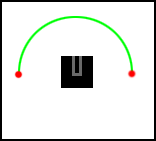
While of course it needs to be a free 360 degrees rotation. When it hits either extremes of this range (0 or 180 degrees, the red dots) it flips to the opposite extreme. Somewhere that transform.LookAt line isn't working for me, but I can't figure out for the life of me on how to fix it. I have looked at similar questions and threads, but I couldn't extract an answer from those unfortunately.
Perhaps the problem lies with the shooting script which aligns to the viewing rotation. Maybe it messes it up in some way, so here is that bit as well:
 var bullet : GameObject;
 var fireRate : float = .08;
 var nextShot : float = 0.0;

 function LateUpdate() {
         if (Input.GetButton("Fire1")) {
             Shoot();
         }
     }

 function Shoot() {
         if(Time.time >= nextShot){
         var newBullet : GameObject = Instantiate(bullet, transform.position + transform.up*1.2, transform.rotation);
         nextShot = Time.time + fireRate;
         Physics.IgnoreCollision(newBullet.collider, collider);
         }
     }
I hope that you can help and thank you so much for your time!
Ps. Note that I'm not that experienced with Unity and JavaScript (as you probably already figured out, I'm just a hobbyist taking some spare time to do this). If you could take that into regards when suggesting a solution it´d be much appreciated!

First thing to come to mind would be that you might have switched one of the axes, in LookAt (I know this would be a pit fall that I could have fell in). Give it a try if you haven't already.
 //Vector3 (rh, rv, 0) is x,y,z. so I'm thinking
 transform.LookAt(transform.position + Vector3 (rh, 0, rv), Vector3.up);
I hope this is what you need.
Enjoy.

Thank you Niklas. I had tried that indeed, and what it does as you'd expect is that the rotation is now placed on the x and z axis and from the camera's point of view the player is now rotating directly towards you, rather than on the x and y axis. But it doesn't have the problem of snapping and it does rotate for the full 360 degrees. So what I could, which I didn't think of before, is flip the camera 90 degrees on the x axis, so that now it is looking down on the player from the y axis and the rotation happens on the x and z axis. Although the control is now reversed, but that's easily changed in the input settings or adding a - to rh and rv.
Although I would prefer it if I could keep the camera looking onto the x and y axis from the z axis, it is a fix. It also doesn't explain why the rotation was cramped to 180 degrees before. But thanks for providing the push in the right direction!
And now to figure out to convert the firing so that it shoots correctly. Wish I had a symmetrical projectile, but of course it has to be rectangular so it'll take some messing about to keep the perspective right haha.
I got it working with the projectiles now as well by adding a few * (-1) here and there. But it's not really ideal, more of a workaround than a fix. $$anonymous$$ovement is also a bit messed up now.
If anyone knows how to salvage the original situation as described in the question it'd be awesome!



