
Wayback Machinekoobas.hobune.stream
May JUN Jul
Previous capture 12 Next capture
2021 2022 2023
1 capture
12 Jun 22 - 12 Jun 22
sparklines
Close Help
  • Products
  • Solutions
  • Made with Unity
  • Learning
  • Support & Services
  • Community
  • Asset Store
  • Get Unity

UNITY ACCOUNT

You need a Unity Account to shop in the Online and Asset Stores, participate in the Unity Community and manage your license portfolio. Login Create account
  • Blog
  • Forums
  • Answers
  • Evangelists
  • User Groups
  • Beta Program
  • Advisory Panel

Navigation

  • Home
  • Products
  • Solutions
  • Made with Unity
  • Learning
  • Support & Services
  • Community
    • Blog
    • Forums
    • Answers
    • Evangelists
    • User Groups
    • Beta Program
    • Advisory Panel

Unity account

You need a Unity Account to shop in the Online and Asset Stores, participate in the Unity Community and manage your license portfolio. Login Create account

Language

  • Chinese
  • Spanish
  • Japanese
  • Korean
  • Portuguese
  • Ask a question
  • Spaces
    • Default
    • Help Room
    • META
    • Moderators
    • Topics
    • Questions
    • Users
    • Badges
  • Home /
avatar image
0
Question by vittu1994 · Sep 11, 2015 at 01:00 PM · raycastsprite

Problem with assigning sprites via raycast

Hi im making a battleship game and im having problem with my selection marker for the bigger ships. I have picked up a battleship (4x,1y) which i can place out on the grid and it will attach to it and when i hover over the tiles it will select with a yellow colour.
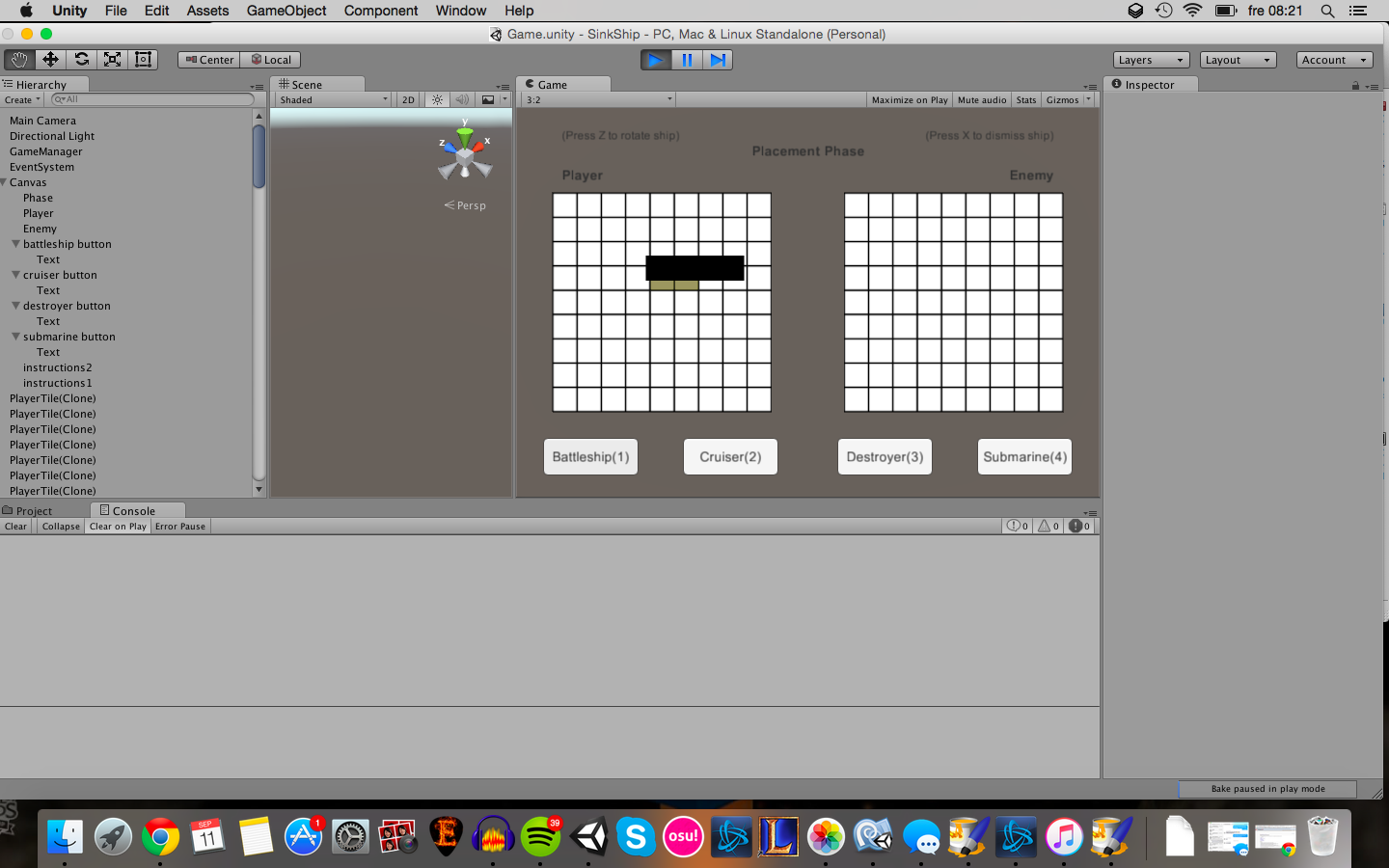
alt text

The thing is when i select a bigger ship the selection area should be of the same size (so if i pick up the cruiser of (3x,1y) i want the selection marker to increase with 2 tiles to the right of the original mouse position where there will always be selected. However i cant get any bigger than 2 selected tiles when i want to maximum 4.

Here is my raycast for tile selection for a battleship:

if(placementscript.undoBattleship)

{

gameObject.GetComponent().sprite = sprite1;

selected = true; RaycastHit TileHit1; RaycastHit TileHit2; RaycastHit TileHit3;

if(Physics.Raycast (transform.position, Vector3.right, out TileHit1, +1) && Physics.Raycast(transform.position, Vector3.right, out TileHit2,+2) && Physics.Raycast(transform.position, Vector3.right, out TileHit3,+3))

{

             if(TileHit1.collider.tag == "TilePlayer" && TileHit2.collider.tag == "TilePlayer" && TileHit3.collider.tag == "TilePlayer")

             {

                 neighbourTile1 = TileHit1.collider.gameObject;
                 neighbourTile2 = TileHit2.collider.gameObject;
                 neighbourTile3 = TileHit3.collider.gameObject;
                 
                 neighbourTile1.GetComponent<SpriteRenderer>().sprite = sprite1;
                 neighbourTile2.GetComponent<SpriteRenderer>().sprite = sprite1;
                 neighbourTile3.GetComponent<SpriteRenderer>().sprite = sprite1;
             }
         }
     }

it seems i can only acces the: neighbourTile1.GetComponent().sprite = sprite1; but the other 2 after doesnt seem to work or even wanna start. How can i go about making this work?

skarmavbild-2015-09-11-kl-082106.png (282.5 kB)
Comment
Add comment · Show 1
10 |3000 characters needed characters left characters exceeded
▼
  • Viewable by all users
  • Viewable by moderators
  • Viewable by moderators and the original poster
  • Advanced visibility
Viewable by all users
avatar image avioane · Mar 09, 2019 at 10:03 PM 0
Share

hey, did you end up finishing this game? I am trying to make a similar game and got stuck on how to center the battleships inside the squares.

1 Reply

· Add your reply
  • Sort: 
avatar image
0

Answer by Suddoha · Sep 11, 2015 at 01:28 PM

Your raycasts are a bit strange to me. You pass an int parameter which will either be interpreted as a layermask value or as a distance value. You also start all three raycasts from the same position (transform.position) and cast them to the right (which ever direction that may be in your setup).

With the raycast approach, you have to adjust the position from which they start for every tile.

However, i think this can be more easily and more efficiently solved with either a flat one-dimensional or a 2-dimensional array.

Comment
Add comment · Share
10 |3000 characters needed characters left characters exceeded
▼
  • Viewable by all users
  • Viewable by moderators
  • Viewable by moderators and the original poster
  • Advanced visibility
Viewable by all users

Your answer

Hint: You can notify a user about this post by typing @username

Up to 2 attachments (including images) can be used with a maximum of 524.3 kB each and 1.0 MB total.

Follow this Question

Answers Answers and Comments

4 People are following this question.

avatar image avatar image avatar image avatar image

Related Questions

ray from 2d image to 3d objects !!!!! 1 Answer

How to do a raycast between an UI Element and Sprite 2D? 0 Answers

Cutting a Sprite 0 Answers

Ray effect on sprite with obstacles 0 Answers

How to get pixel coordinates when mouse click on Sprite Renderer 0 Answers


Enterprise
Social Q&A

Social
Subscribe on YouTube social-youtube Follow on LinkedIn social-linkedin Follow on Twitter social-twitter Follow on Facebook social-facebook Follow on Instagram social-instagram

Footer

  • Purchase
    • Products
    • Subscription
    • Asset Store
    • Unity Gear
    • Resellers
  • Education
    • Students
    • Educators
    • Certification
    • Learn
    • Center of Excellence
  • Download
    • Unity
    • Beta Program
  • Unity Labs
    • Labs
    • Publications
  • Resources
    • Learn platform
    • Community
    • Documentation
    • Unity QA
    • FAQ
    • Services Status
    • Connect
  • About Unity
    • About Us
    • Blog
    • Events
    • Careers
    • Contact
    • Press
    • Partners
    • Affiliates
    • Security
Copyright © 2020 Unity Technologies
  • Legal
  • Privacy Policy
  • Cookies
  • Do Not Sell My Personal Information
  • Cookies Settings
"Unity", Unity logos, and other Unity trademarks are trademarks or registered trademarks of Unity Technologies or its affiliates in the U.S. and elsewhere (more info here). Other names or brands are trademarks of their respective owners.
  • Anonymous
  • Sign in
  • Create
  • Ask a question
  • Spaces
  • Default
  • Help Room
  • META
  • Moderators
  • Explore
  • Topics
  • Questions
  • Users
  • Badges
