
Wayback Machinekoobas.hobune.stream
May JUN Jul
Previous capture 13 Next capture
2021 2022 2023
1 capture
13 Jun 22 - 13 Jun 22
sparklines
Close Help
  • Products
  • Solutions
  • Made with Unity
  • Learning
  • Support & Services
  • Community
  • Asset Store
  • Get Unity

UNITY ACCOUNT

You need a Unity Account to shop in the Online and Asset Stores, participate in the Unity Community and manage your license portfolio. Login Create account
  • Blog
  • Forums
  • Answers
  • Evangelists
  • User Groups
  • Beta Program
  • Advisory Panel

Navigation

  • Home
  • Products
  • Solutions
  • Made with Unity
  • Learning
  • Support & Services
  • Community
    • Blog
    • Forums
    • Answers
    • Evangelists
    • User Groups
    • Beta Program
    • Advisory Panel

Unity account

You need a Unity Account to shop in the Online and Asset Stores, participate in the Unity Community and manage your license portfolio. Login Create account

Language

  • Chinese
  • Spanish
  • Japanese
  • Korean
  • Portuguese
  • Ask a question
  • Spaces
    • Default
    • Help Room
    • META
    • Moderators
    • Topics
    • Questions
    • Users
    • Badges
  • Home /
avatar image
0
Question by XavierDC · May 10, 2014 at 11:38 PM · effecthealth barhealth

Health Bar common effect

So this is kind of hard to explain, but it's a very common effect. Basically when a character takes damage the health bar length lowers and there is this other bar under it which fades into the position that the new health bar length is.

For example.. alt text
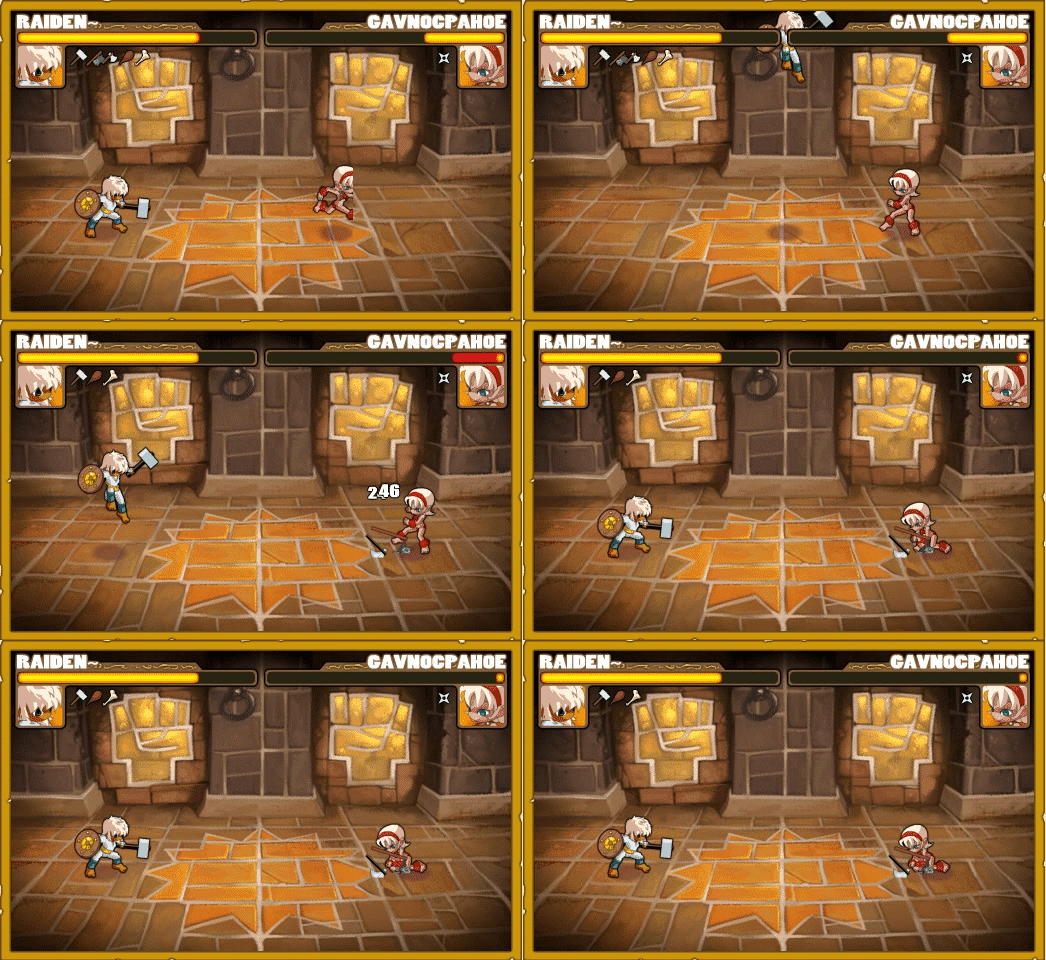
Unity doesn't allow me to create 2 GUI.Boxes in the same OnGUI function so how can I achieve this effect? Please help!

Comment
Add comment · Show 2
10 |3000 characters needed characters left characters exceeded
▼
  • Viewable by all users
  • Viewable by moderators
  • Viewable by moderators and the original poster
  • Advanced visibility
Viewable by all users
avatar image getyour411 · May 10, 2014 at 11:39 PM 0
Share

Unity definiely does allow that, so not sure what your issue is maybe post the relevant GUI.Box code

avatar image XavierDC · May 11, 2014 at 02:39 AM 0
Share

I was trying to call two GUI.Boxes in the same exact location, the first Box would go through just fine but the second one would call an error as follows

"Assets/Scripts/Health.js(29,17): BCE0023: No appropriate version of 'UnityEngine.GUI.Box' for the argument list '(UnityEngine.Rect)' was found."

I read somewhere that I should use GUI.DrawTexture but I'm still currently fiddling around with it, I'm close though!

2 Replies

· Add your reply
  • Sort: 
avatar image
0

Answer by Jeff-Kesselman · May 10, 2014 at 11:41 PM

You can do this by creating two GUITextures

The first is the empty bar. The second is the filling. Make the filling of a size to fill the bar, and then scale it at run time to make it smaller.

http://docs.unity3d.com/Documentation/Components/class-GuiTexture.html

Comment
Add comment · Share
10 |3000 characters needed characters left characters exceeded
▼
  • Viewable by all users
  • Viewable by moderators
  • Viewable by moderators and the original poster
  • Advanced visibility
Viewable by all users
avatar image
0

Answer by XavierDC · May 11, 2014 at 02:55 AM

I finally figured it out after reading through

http://forum.unity3d.com/threads/193247-Free-Health-Bar-script

my script now goes as follows for JS:


var curHP : int; var Health : int = 100; var maxHealth : int = 100; var healthLength : float; var healthunder : Texture; var healthover : Texture; var damping : float 10.0;

function Start () { healthLength = Screen.width/4; }

function OnGUI () { var previousAdjustValue : float = (curHP healthLength) / maxHealth; var percentage : float = (Health healthLength)/maxHealth;

 GUI.DrawTexture (Rect(10,10, (previousAdjustValue), 20), healthover);
 GUI.DrawTexture (Rect(10,10, (percentage), 20), healthunder);

}

function Update () {

 if (curHP > Health) {
     curHP -= ((maxHealth / Health) * (damping)) * Time.deltaTime;
 } else if (curHP < Health) {
     curHP = Health;
 }

     if (Health <= 0) {
 Death();
 Health = maxHealth;
 }

     if (Health > maxHealth) {
 Health = maxHealth;
 }
 
 if (maxHealth < 1) {
     maxHealth = 1;
 }
 
 AdjustCurrenthHealth(0);

}

function AdjustCurrenthHealth (adj : int) { Health += adj;

 healthLength = (Screen.width / 4) * (Health / maxFloat);

}

if anyone is having the same problem I hope this helps!

Comment
Add comment · Share
10 |3000 characters needed characters left characters exceeded
▼
  • Viewable by all users
  • Viewable by moderators
  • Viewable by moderators and the original poster
  • Advanced visibility
Viewable by all users

Your answer

Hint: You can notify a user about this post by typing @username

Up to 2 attachments (including images) can be used with a maximum of 524.3 kB each and 1.0 MB total.

Follow this Question

Answers Answers and Comments

21 People are following this question.

avatar image avatar image avatar image avatar image avatar image avatar image avatar image avatar image avatar image avatar image avatar image avatar image avatar image avatar image avatar image avatar image avatar image avatar image avatar image avatar image avatar image

Related Questions

Multiple Cars not working 1 Answer

c# not going to destination on 0 hp 1 Answer

this is part of my health script it gives me a error unknown identifier GameScore pls help thxxx 0 Answers

How can I change this script to use GUITexture instead of GUI number, for health display? 1 Answer

The name 'Joystick' does not denote a valid type ('not found') 2 Answers


Enterprise
Social Q&A

Social
Subscribe on YouTube social-youtube Follow on LinkedIn social-linkedin Follow on Twitter social-twitter Follow on Facebook social-facebook Follow on Instagram social-instagram

Footer

  • Purchase
    • Products
    • Subscription
    • Asset Store
    • Unity Gear
    • Resellers
  • Education
    • Students
    • Educators
    • Certification
    • Learn
    • Center of Excellence
  • Download
    • Unity
    • Beta Program
  • Unity Labs
    • Labs
    • Publications
  • Resources
    • Learn platform
    • Community
    • Documentation
    • Unity QA
    • FAQ
    • Services Status
    • Connect
  • About Unity
    • About Us
    • Blog
    • Events
    • Careers
    • Contact
    • Press
    • Partners
    • Affiliates
    • Security
Copyright © 2020 Unity Technologies
  • Legal
  • Privacy Policy
  • Cookies
  • Do Not Sell My Personal Information
  • Cookies Settings
"Unity", Unity logos, and other Unity trademarks are trademarks or registered trademarks of Unity Technologies or its affiliates in the U.S. and elsewhere (more info here). Other names or brands are trademarks of their respective owners.
  • Anonymous
  • Sign in
  • Create
  • Ask a question
  • Spaces
  • Default
  • Help Room
  • META
  • Moderators
  • Explore
  • Topics
  • Questions
  • Users
  • Badges
