
Wayback Machinekoobas.hobune.stream
May JUN Jul
Previous capture 13 Next capture
2021 2022 2023
1 capture
13 Jun 22 - 13 Jun 22
sparklines
Close Help
  • Products
  • Solutions
  • Made with Unity
  • Learning
  • Support & Services
  • Community
  • Asset Store
  • Get Unity

UNITY ACCOUNT

You need a Unity Account to shop in the Online and Asset Stores, participate in the Unity Community and manage your license portfolio. Login Create account
  • Blog
  • Forums
  • Answers
  • Evangelists
  • User Groups
  • Beta Program
  • Advisory Panel

Navigation

  • Home
  • Products
  • Solutions
  • Made with Unity
  • Learning
  • Support & Services
  • Community
    • Blog
    • Forums
    • Answers
    • Evangelists
    • User Groups
    • Beta Program
    • Advisory Panel

Unity account

You need a Unity Account to shop in the Online and Asset Stores, participate in the Unity Community and manage your license portfolio. Login Create account

Language

  • Chinese
  • Spanish
  • Japanese
  • Korean
  • Portuguese
  • Ask a question
  • Spaces
    • Default
    • Help Room
    • META
    • Moderators
    • Topics
    • Questions
    • Users
    • Badges
  • Home /
avatar image
1
Question by Andrew_Kenady · Nov 28, 2013 at 05:13 PM · camerashadertexturemask

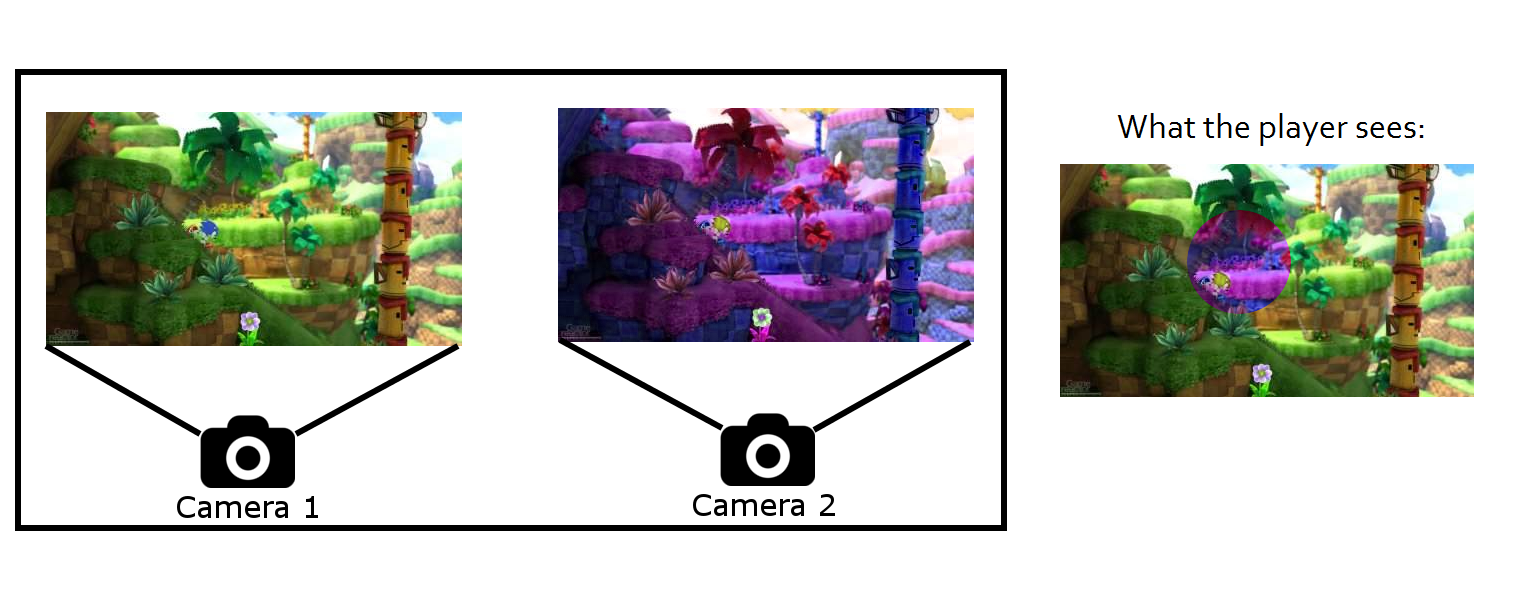
Is it possible to have 2 cameras, 1st with mask to reveal 2nd underneath?

Hello! I was wondering if it's possible with Unity to have 2 different cameras, both rendering a similar scene, and then mask the first camera with a texture to display the 2nd camera underneath.

Basically, I have a concept for a game where I'd ideally like to have spots on the camera pass by as the player travels through the world, and I'd like the world to be displayed differently in those spots. My idea for this was to have 2 nearly identical scenes with cameras, and then somehow mask the main camera displaying the background camera underneath with a slightly different scene.

With an ideal solution, I'd like to be able to modify the mask on the fly and perhaps animate the mask so I could have moving "holes" in the camera showing the alternate view. Is there a tutorial or example like what I'm describing anywhere to get me started?

Thanks!

Edit: By "scenes" I didn't mean actual Unity scenes, I meant it in the general sense. I'd like to have 2 different setups of the same game level in one unity scene, and then have the cameras sort of blend together in the way I described above.

Comment
Add comment · Show 5
10 |3000 characters needed characters left characters exceeded
▼
  • Viewable by all users
  • Viewable by moderators
  • Viewable by moderators and the original poster
  • Advanced visibility
Viewable by all users
avatar image Fornoreason1000 · Nov 28, 2013 at 05:18 PM 0
Share

you can't render two scene at once... but you can have two cameras, and you can add scenes together.

avatar image Andrew_Kenady · Nov 28, 2013 at 05:20 PM 0
Share

Sorry, I sort of worded that incorrectly. By scenes I didn't mean like actual Unity scenes, I meant different places in one scene. Different setups of the same game level.

avatar image Fornoreason1000 · Nov 28, 2013 at 05:31 PM 0
Share

blend together two scenes? does the camera fade into one another? is this mask mesh? a component? is it the culling mask of the camera?

avatar image Andrew_Kenady · Nov 28, 2013 at 05:49 PM 0
Share

$$anonymous$$aybe a picture will explain my question. Here's a roughly thrown together example of what I want to achieve: image
avatar image Fornoreason1000 · Nov 28, 2013 at 06:00 PM 0
Share

ok now i know. nice game btw... Ratchet and clank: Crack in Time did this once as well i think, i guess you seen the $$anonymous$$i map tutorials. you could place a script on the mask that randomizes its rotation, position and scale. giving it the illusion of animating/distortion. as for.. wait is that sonic? anyway.. to make it follow just get sonics position on camera 1's screen space, then convert to world space using camera 2, this would be the mask position for it to follow sonic/

1 Reply

· Add your reply
  • Sort: 
avatar image
1

Answer by karljj1 · Nov 28, 2013 at 07:11 PM

You could render the top view to a texture then combine it with a mask texture which would just be a circle (the area shown) and the rest full alpha. Then draw the combined texture as a GUI texture on the top. Probably best to push the drawing to a shader but as a quick test this should work.

Edit:

Also take a look at stencils. Could be a nice way to do it:

http://docs.unity3d.com/Documentation/Components/SL-Stencil.html

Comment
Add comment · Share
10 |3000 characters needed characters left characters exceeded
▼
  • Viewable by all users
  • Viewable by moderators
  • Viewable by moderators and the original poster
  • Advanced visibility
Viewable by all users

Your answer

Hint: You can notify a user about this post by typing @username

Up to 2 attachments (including images) can be used with a maximum of 524.3 kB each and 1.0 MB total.

Follow this Question

Answers Answers and Comments

18 People are following this question.

avatar image avatar image avatar image avatar image avatar image avatar image avatar image avatar image avatar image avatar image avatar image avatar image avatar image avatar image avatar image avatar image avatar image avatar image

Related Questions

Shader: Mask Without a Texture? 2 Answers

Uniform Texture, Rendering Problem 0 Answers

Why is my picture distorted? 0 Answers

Saving Texture at Run time and Reusing it 0 Answers

transparent shader objects disappear on certain camera angles 6 Answers


Enterprise
Social Q&A

Social
Subscribe on YouTube social-youtube Follow on LinkedIn social-linkedin Follow on Twitter social-twitter Follow on Facebook social-facebook Follow on Instagram social-instagram

Footer

  • Purchase
    • Products
    • Subscription
    • Asset Store
    • Unity Gear
    • Resellers
  • Education
    • Students
    • Educators
    • Certification
    • Learn
    • Center of Excellence
  • Download
    • Unity
    • Beta Program
  • Unity Labs
    • Labs
    • Publications
  • Resources
    • Learn platform
    • Community
    • Documentation
    • Unity QA
    • FAQ
    • Services Status
    • Connect
  • About Unity
    • About Us
    • Blog
    • Events
    • Careers
    • Contact
    • Press
    • Partners
    • Affiliates
    • Security
Copyright © 2020 Unity Technologies
  • Legal
  • Privacy Policy
  • Cookies
  • Do Not Sell My Personal Information
  • Cookies Settings
"Unity", Unity logos, and other Unity trademarks are trademarks or registered trademarks of Unity Technologies or its affiliates in the U.S. and elsewhere (more info here). Other names or brands are trademarks of their respective owners.
  • Anonymous
  • Sign in
  • Create
  • Ask a question
  • Spaces
  • Default
  • Help Room
  • META
  • Moderators
  • Explore
  • Topics
  • Questions
  • Users
  • Badges
