
Wayback Machinekoobas.hobune.stream
May JUN Jul
Previous capture 12 Next capture
2021 2022 2023
1 capture
12 Jun 22 - 12 Jun 22
sparklines
Close Help
  • Products
  • Solutions
  • Made with Unity
  • Learning
  • Support & Services
  • Community
  • Asset Store
  • Get Unity

UNITY ACCOUNT

You need a Unity Account to shop in the Online and Asset Stores, participate in the Unity Community and manage your license portfolio. Login Create account
  • Blog
  • Forums
  • Answers
  • Evangelists
  • User Groups
  • Beta Program
  • Advisory Panel

Navigation

  • Home
  • Products
  • Solutions
  • Made with Unity
  • Learning
  • Support & Services
  • Community
    • Blog
    • Forums
    • Answers
    • Evangelists
    • User Groups
    • Beta Program
    • Advisory Panel

Unity account

You need a Unity Account to shop in the Online and Asset Stores, participate in the Unity Community and manage your license portfolio. Login Create account

Language

  • Chinese
  • Spanish
  • Japanese
  • Korean
  • Portuguese
  • Ask a question
  • Spaces
    • Default
    • Help Room
    • META
    • Moderators
    • Topics
    • Questions
    • Users
    • Badges
  • Home /
avatar image
0
Question by Aeleck · Jan 24, 2016 at 05:51 PM · rotationgravitycamera-movement

Setting transform.up without losing lateral rotation based off gravity

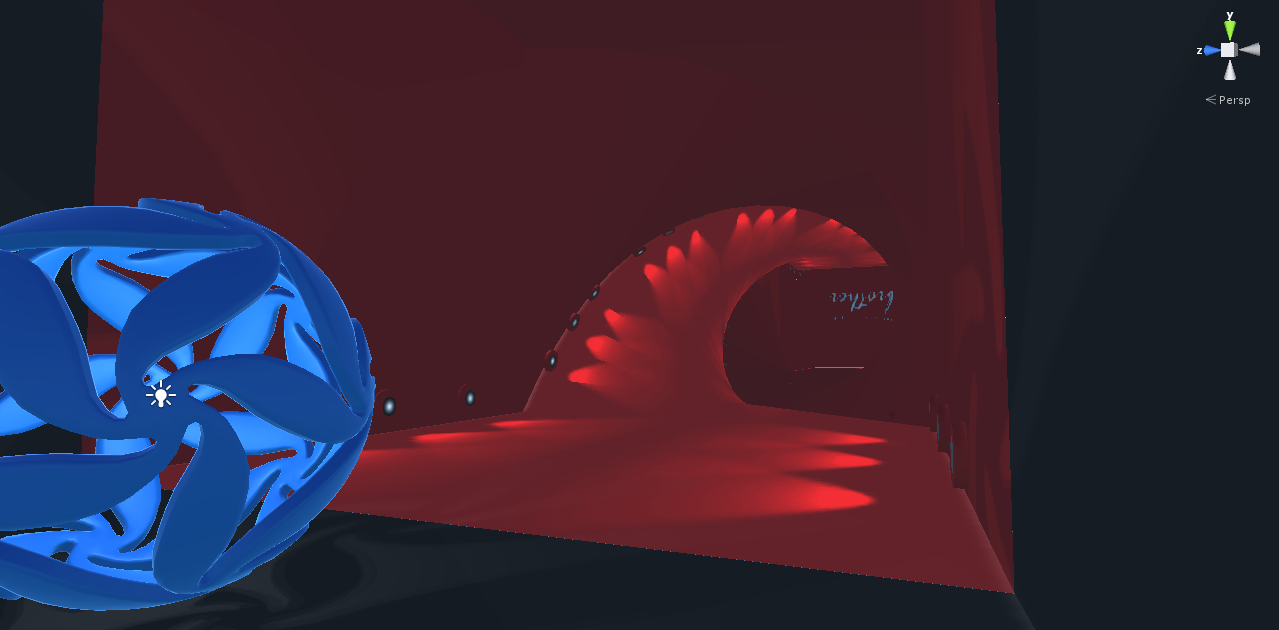
I've created a player script for a ball that well rolls around as the player. It ray casts below it, gets the normal of the surface hit, and changes gravity to the normal * -9.81 for "realistic gravity". I then have a separate GameObject that is always lerps its transform.up to the new gravity (normalized of course) and there is a child of the gravity indicator that is used for lateral look around and then the camera is a child of that, which controls vertical look movements. So it's all based off that gravity indicator parent currently. It all works except one part. alt text I noticed that especially when the indicator tries to be upside down it flips its X vector backwards. I understand that this is the behavior of the transform.up being set, it automatically adjusting itself to meet whatever vector was given, so I am trying to find a way to prevent this. My overall goal is to have a moveable camera that orientates to gravity and this is the closest I've gotten. I've searched some other ideas like using:
 Vector3 gravityAlongLocalZAxis = gravIndicator.transform.forward * 
                                  Vector3.Dot(augGravity, transform.forward);
 Vector3 gravityInLocalXYPlane = augGravity - gravityAlongLocalZAxis;
 gravIndicator.transform.LookAt (gravIndicator.transform.forward, -gravityInLocalXYPlane);

But that did something very strange and orientated the Z axis globally on the negative X axis and the YX plane vectors were rotating back and forth by 90 degrees. Any help is greatly appreciated!

ballwtunnel.png (213.5 kB)
Comment
Add comment · Show 1
10 |3000 characters needed characters left characters exceeded
▼
  • Viewable by all users
  • Viewable by moderators
  • Viewable by moderators and the original poster
  • Advanced visibility
Viewable by all users
avatar image Teravisor · Jan 25, 2016 at 12:49 PM 0
Share

Why not invert x when it's negative? Like transform.right.x<0?-transform.right:transform.right (this code inverts all axes, but, well, you can modify it to be -transform.right.x:transform.right.xdepending on what you want.)

0 Replies

· Add your reply
  • Sort: 

Your answer

Hint: You can notify a user about this post by typing @username

Up to 2 attachments (including images) can be used with a maximum of 524.3 kB each and 1.0 MB total.

Follow this Question

Answers Answers and Comments

42 People are following this question.

avatar image avatar image avatar image avatar image avatar image avatar image avatar image avatar image avatar image avatar image avatar image avatar image avatar image avatar image avatar image avatar image avatar image avatar image avatar image avatar image avatar image avatar image avatar image avatar image avatar image avatar image avatar image avatar image avatar image avatar image avatar image avatar image avatar image avatar image avatar image avatar image avatar image avatar image avatar image avatar image avatar image avatar image

Related Questions

Possible to create axis centered gravity? 1 Answer

How do I fix gravity going down(-y) not down form player rotation? I mean if player is rotated in any direction, gravity will go to that direction. 0 Answers

Camera following player gameObject,Camera follows player, with script attached. 1 Answer

Sprites always face the camera, Camera freely rotates 3 Answers

Gyroscope in Landscape mode snaps object to random rotation 0 Answers


Enterprise
Social Q&A

Social
Subscribe on YouTube social-youtube Follow on LinkedIn social-linkedin Follow on Twitter social-twitter Follow on Facebook social-facebook Follow on Instagram social-instagram

Footer

  • Purchase
    • Products
    • Subscription
    • Asset Store
    • Unity Gear
    • Resellers
  • Education
    • Students
    • Educators
    • Certification
    • Learn
    • Center of Excellence
  • Download
    • Unity
    • Beta Program
  • Unity Labs
    • Labs
    • Publications
  • Resources
    • Learn platform
    • Community
    • Documentation
    • Unity QA
    • FAQ
    • Services Status
    • Connect
  • About Unity
    • About Us
    • Blog
    • Events
    • Careers
    • Contact
    • Press
    • Partners
    • Affiliates
    • Security
Copyright © 2020 Unity Technologies
  • Legal
  • Privacy Policy
  • Cookies
  • Do Not Sell My Personal Information
  • Cookies Settings
"Unity", Unity logos, and other Unity trademarks are trademarks or registered trademarks of Unity Technologies or its affiliates in the U.S. and elsewhere (more info here). Other names or brands are trademarks of their respective owners.
  • Anonymous
  • Sign in
  • Create
  • Ask a question
  • Spaces
  • Default
  • Help Room
  • META
  • Moderators
  • Explore
  • Topics
  • Questions
  • Users
  • Badges
