 koobas.hobune.stream


[Solved] NPC kinda sorta slides under player
Ok, I'm realizing that my issue might actually encompass many things here. Have been working all night to try and figure it out without having to ask the community, and have made good progress, but seem to be stuck, and am humbly requesting help. Am working with a gravity script. (below, along with the AI script, which for cleanliness of this post will be in the comments) My first problem was the NPC was falling through the terrain. (hold on, put down the angry fingers that want to type "Google it!" I did, that issue is mostly solved.) I've come to an interesting issue now that that's fixed(ish.) Whenever the npc (which is an attacking enemy, btw) gets close to the player, it stops standing upright. It almost appears to go into a slow "baseball slide", getting a leg stuck partially in the terrain. If the player walks away, the NPC rights itself, and begins pursuing the player again. Any help is genuinely appreciated. Thanks, and God bless.


   var gravity = 1.0;
     var verticalSpeed= 1.0;
     private var collisionFlags : CollisionFlags;  // The last collision flags returned from controller.Move


     function Update() {

         ApplyGravity ();

         // Calculate actual motion
         var movement = Vector3 (0, verticalSpeed, 0) + Vector3.zero;
         movement *= Time.deltaTime;

         // Move the controller
         var controller : CharacterController = GetComponent(CharacterController);
         collisionFlags = controller.Move(movement);
     }


     function ApplyGravity ()
     {
             if (IsGrounded ())
                 verticalSpeed = -0.1;
             else
                 verticalSpeed -= gravity * Time.deltaTime;
     }


     function IsGrounded () {
         return (collisionFlags & CollisionFlags.CollidedBelow) != 1;
     }

First AI Script:
 var myTransform : Transform;
 var $$anonymous$$Distance = 5;
 var follow : boolean = true;
 var damage = 8;
 var stopDistance = 4;


 function Awake(){
 myTransform = transform;
 }

               function Start(){
               target = GameObject.FindWithTag("Player").transform;
               }


                    function Update () {
                    if(Vector3.Distance(myTransform.position, target.position) > stopDistance){
                    animation.Play("BDGuardWalk");
                    }
                    else{
                    if(Vector3.Distance(myTransform.position, target.position) <= stopDistance)
                    {
                    animation.Play("BDGuardAttack");
                    Halt();
                    }
                    }
                    }

 function OnTriggerEnter (col : Collider) {
 if(col.gameObject.tag == "Player") {
 Playerhealth.curHealth -= damage;
 }
 }

        function Halt(){
        if(Vector3.Distance(myTransform.position, target.position) < stopDistance)
        moveSpeed = 0;

        else{
        moveSpeed = 1;

        }
        }
Second AI Script
 var target : Transform;
 var moveSpeed = 1;
 var rotationSpeed = 2;
 var myTransform : Transform;
 var $$anonymous$$Distance = 30;
 var stopDistance = 4;

 function Awake()
 {
 myTransform = transform;
 }

 function Start()
 {

 target = GameObject.FindWithTag("Player").transform;

 }

 function Update () {


      if(Vector3.Distance(myTransform.position, target.position) < $$anonymous$$Distance)
 {


        myTransform.rotation = Quaternion.Slerp(myTransform.rotation,
        Quaternion.LookRotation(target.position - myTransform.position), rotationSpeed*Time.deltaTime);
        myTransform.position += myTransform.forward * moveSpeed * Time.deltaTime;
        Halt();
        }
        }

        function Halt()
        {
      if(Vector3.Distance(myTransform.position, target.position) < stopDistance)
       moveSpeed = 0;

             else{
                 moveSpeed = 1;

        }


 }

Quaternion.LookRotation(target.position - myTransform.position), rotationSpeed*Time.deltaTime
Ok so that makes the enemy look at the player. Problem is, when the enemy if far away from the player, it is looking at the center point of the player (it is still doing the problem, but at a much lesser scale), But when the enemy is close if the players center point is higher then the enemy, it will have to change its rotation to look up at the center point. It is easier to show you the problem through an image.
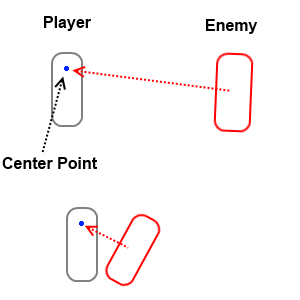
How you can fix this is either make the center point of the enemy the same height as the player, or make it so the enemy rotates, when looking at the player, only in the desired rotation. Hope this helped!
Zargo, that made perfect sense. Thank you for explaining it in a very easy to understand manner.
Solution 1 seems the simplest. $$anonymous$$erely scale the enemy. Of course, I had JUST scaled the enemy down, since he was ridiculously big before. Sigh.
Solution 2 seems best. Now have to learn how to do that, but this is a GREAT start. Thank you so much!
EDIT: Hmmm, I wonder if placing a gameobject lower on my player, parenting it, and setting THAT as the reference point might help...
EDIT 2:
Fascinating. It DOES help. However, if I set the transform to that reference point in the inspector, and then gametest, it automatically switches back to the parent object. (in this case, the player) I have to manually switch BAC$$anonymous$$ to the reference object during gametest, which of course A: isn't going to happen when someone is playing the game, and B: Can't be saved.
Edit 3, and solution:
Ok Zargo, you rock! The trick to not letting the script change to the parent object of my player reference point was simply to change which tag it was searching for. Since the script was searching for tag: "Player," it naturally switched to that. (and away from the Player Reference Point) Once I changed the tag searched for in the script to one matching the reference point, the entire issue resolved itself straight away. Thanking God! =)

Very glad I could help you out. I remember when I had this very same problem, hated it lol. Hope your game goes well.


