
Wayback Machinekoobas.hobune.stream
May JUN Jul
Previous capture 13 Next capture
2021 2022 2023
1 capture
13 Jun 22 - 13 Jun 22
sparklines
Close Help
  • Products
  • Solutions
  • Made with Unity
  • Learning
  • Support & Services
  • Community
  • Asset Store
  • Get Unity

UNITY ACCOUNT

You need a Unity Account to shop in the Online and Asset Stores, participate in the Unity Community and manage your license portfolio. Login Create account
  • Blog
  • Forums
  • Answers
  • Evangelists
  • User Groups
  • Beta Program
  • Advisory Panel

Navigation

  • Home
  • Products
  • Solutions
  • Made with Unity
  • Learning
  • Support & Services
  • Community
    • Blog
    • Forums
    • Answers
    • Evangelists
    • User Groups
    • Beta Program
    • Advisory Panel

Unity account

You need a Unity Account to shop in the Online and Asset Stores, participate in the Unity Community and manage your license portfolio. Login Create account

Language

  • Chinese
  • Spanish
  • Japanese
  • Korean
  • Portuguese
  • Ask a question
  • Spaces
    • Default
    • Help Room
    • META
    • Moderators
    • Topics
    • Questions
    • Users
    • Badges
  • Home /
avatar image
0
Question by killakiwi · Oct 20, 2014 at 02:58 PM · iosipadocclusion culling

Occlusion Culling on Prefabs Instantiated at Runtime

So I'm working on an iPad project where I have up to 500 identical prefabs (336 verts each) and I'm looking for ways to increase performance.

Current draw calls on average (400): I've had a look at draw call batching and it sounds like it is only really useful for meshes with less than 100 verts because a draw call batch is only up to 300 verts anyway. I could probably reduce my model to be below 300 but that would still mean I can only fit one mesh per batch, which is pointless right?

The two remaining options that I can see are Occlusion Culling and MeshCombining.

I've got Occlusion Culling working on non instantiated prefabs (prefabs that are already in the scene) but because all of the "box" prefabs in my project are created dynamically I ran into some problems. Is it possible to apply Occlusion Culling to lots of identical prefabs created at run time?

Mesh Combining seems promising. I only have 1 question here: When I combine all of my meshes, do they need to be children of the same gameobject? At the moment each "box" also has an additional "box shelf" mesh. Does this mean I need one gameobject to hold the combined "box" meshes and another to hold the "box shelf" meshes? This would be kind of a pain as my code uses the parent-child relationship in a lot of it's logic.
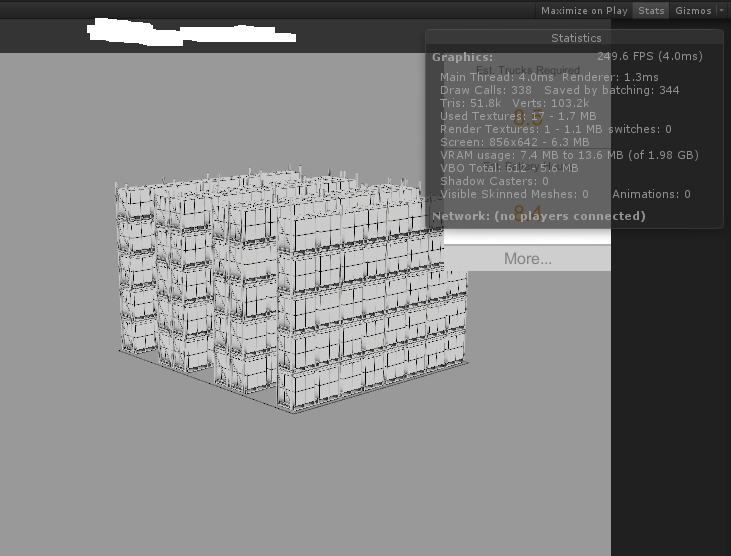
alt text Thanks for reading!

Lukas

renderstats.png (134.0 kB)
Comment
Add comment · Show 2
10 |3000 characters needed characters left characters exceeded
▼
  • Viewable by all users
  • Viewable by moderators
  • Viewable by moderators and the original poster
  • Advanced visibility
Viewable by all users
avatar image MrSoad · Oct 20, 2014 at 03:52 PM 0
Share

Ok here is some info that may help :

1) you can normally get away with upto 180 verts for batching to work, sometimes higher it has several aspects that affect it. Try to get you boxes down to within 180. You can split the mesh up into smaller chunks to achieve this.

2) I have no idea why occlusion culling is not working for the instantiated boxes. This is a camera setting for Unity Pro. Are you using pro, if not then that is why it is not working. You can sometimes simulate it with layer cull distance, but I don't think this will work for you.

3) As far as I know mesh combing is just that. Combing all your meshes in your 3D modeling package into one big mesh object. This sounds like it might not work for your setup. There was a combine children script, but I have not seen it for a while. If it does still exist then maybe it can do some magic for you...?

On the whole I would look at option 1...

avatar image killakiwi · Oct 21, 2014 at 10:05 AM 0
Share

Great thanks for the tips $$anonymous$$rSoad! I did number 1 and it improved frame rate a ton. I also did frustrum culling which helped as well, although I couldn't get proper culling working.

Cheers!

0 Replies

· Add your reply
  • Sort: 

Your answer

Hint: You can notify a user about this post by typing @username

Up to 2 attachments (including images) can be used with a maximum of 524.3 kB each and 1.0 MB total.

Follow this Question

Answers Answers and Comments

3 People are following this question.

avatar image avatar image avatar image

Related Questions

iPhone Controller Asset 0 Answers

Screen.sleepTimeout works when application runs in background on iOS (iPad) 0 Answers

Specifying a high quality background image for iPad 1 Answer

Keyboard triggered animation not showing on IOS device 0 Answers

App crash when using siri dictation to replace text on iOS 0 Answers


Enterprise
Social Q&A

Social
Subscribe on YouTube social-youtube Follow on LinkedIn social-linkedin Follow on Twitter social-twitter Follow on Facebook social-facebook Follow on Instagram social-instagram

Footer

  • Purchase
    • Products
    • Subscription
    • Asset Store
    • Unity Gear
    • Resellers
  • Education
    • Students
    • Educators
    • Certification
    • Learn
    • Center of Excellence
  • Download
    • Unity
    • Beta Program
  • Unity Labs
    • Labs
    • Publications
  • Resources
    • Learn platform
    • Community
    • Documentation
    • Unity QA
    • FAQ
    • Services Status
    • Connect
  • About Unity
    • About Us
    • Blog
    • Events
    • Careers
    • Contact
    • Press
    • Partners
    • Affiliates
    • Security
Copyright © 2020 Unity Technologies
  • Legal
  • Privacy Policy
  • Cookies
  • Do Not Sell My Personal Information
  • Cookies Settings
"Unity", Unity logos, and other Unity trademarks are trademarks or registered trademarks of Unity Technologies or its affiliates in the U.S. and elsewhere (more info here). Other names or brands are trademarks of their respective owners.
  • Anonymous
  • Sign in
  • Create
  • Ask a question
  • Spaces
  • Default
  • Help Room
  • META
  • Moderators
  • Explore
  • Topics
  • Questions
  • Users
  • Badges
