
Wayback Machinekoobas.hobune.stream
May JUN Jul
Previous capture 13 Next capture
2021 2022 2023
1 capture
13 Jun 22 - 13 Jun 22
sparklines
Close Help
  • Products
  • Solutions
  • Made with Unity
  • Learning
  • Support & Services
  • Community
  • Asset Store
  • Get Unity

UNITY ACCOUNT

You need a Unity Account to shop in the Online and Asset Stores, participate in the Unity Community and manage your license portfolio. Login Create account
  • Blog
  • Forums
  • Answers
  • Evangelists
  • User Groups
  • Beta Program
  • Advisory Panel

Navigation

  • Home
  • Products
  • Solutions
  • Made with Unity
  • Learning
  • Support & Services
  • Community
    • Blog
    • Forums
    • Answers
    • Evangelists
    • User Groups
    • Beta Program
    • Advisory Panel

Unity account

You need a Unity Account to shop in the Online and Asset Stores, participate in the Unity Community and manage your license portfolio. Login Create account

Language

  • Chinese
  • Spanish
  • Japanese
  • Korean
  • Portuguese
  • Ask a question
  • Spaces
    • Default
    • Help Room
    • META
    • Moderators
    • Topics
    • Questions
    • Users
    • Badges
  • Home /
avatar image
0
Question by rvdb86 · Oct 30, 2013 at 09:45 PM · physicsrigidbodyballflick

Flick ball in 3D

Hi, I am trying to create a mobile game where the user can shoot a ball at a target, by flicking the screen, in 3D.

So far I have managed to move the ball based on the users "flick" including the power of the flick, However the ball only moves up/down and sideways. I want the ball to move more "forward" than up.

In the picture included, the top diagram illustrates the current behaviour, and the bottom diagram illustrates what the movement I am trying to achieve: alt text
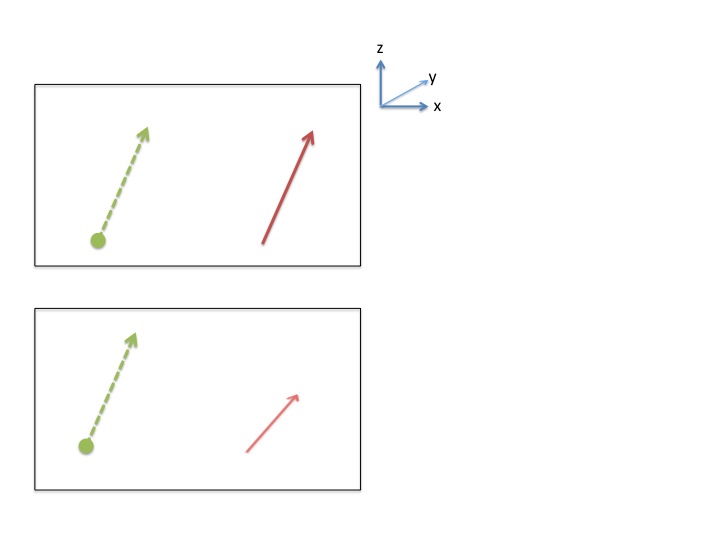
the green arrows in the diagram are the users input and the red arrows are the ball movement.

I have had to swap between the y and z axis because of other aspects of the game

This is the code I am using (from: ): using UnityEngine; using System.Collections;

 public class TouchMonitor : MonoBehaviour {
  
     public Rigidbody ball;
  
     private Vector3 touchStart; 
     private Vector3 touchEnd;
     private GameObject lineRenderer;    
  
     void Update () {
         if (Input.touchCount > 0)
         {
             Touch t = Input.touches[0];
             if (t.phase == TouchPhase.Began)
             {
                 touchStart = t.position;
             }
  
             if (t.phase == TouchPhase.Ended || t.phase == TouchPhase.Canceled)
             {
                 touchEnd = t.position;
                 DoInput();
             }
         }
  
         if (Input.GetButtonDown("Fire1"))
         {
             touchStart = Input.mousePosition;
         }
  
         if (Input.GetButtonUp("Fire1"))
         {
             touchEnd = Input.mousePosition;
             DoInput();
         }
     }
  
     void DoInput()
     {
         Vector3 p1 = new Vector3();
         Vector3 p2 = new Vector3();
         touchStart.z = Camera.main.nearClipPlane+.1f; //push it a little passed the clip plane for camera, just to make sure its visible on screen
         touchEnd.z = Camera.main.nearClipPlane+.1f;
         p1 = Camera.main.ScreenToWorldPoint(touchStart);
         p2 = Camera.main.ScreenToWorldPoint(touchEnd);
  
         CreateLine(p1,p2);
  
         Vector3 v = p2-p1;
         //v.Normalize();
         ball.AddForce(v*500, ForceMode.Impulse);
     }
  
     //creates an ugly purple line from pos1 to pos2 in worldspace
     void CreateLine(Vector3 p1, Vector3 p2)
     {
         Destroy(lineRenderer);
         lineRenderer = new GameObject();
         lineRenderer.name = "LineRenderer";
         LineRenderer lr = (LineRenderer)lineRenderer.AddComponent(typeof(LineRenderer));
         lr.SetVertexCount(2);
         lr.SetWidth(0.001f, 0.001f);
         lr.SetPosition(0, p1);
         lr.SetPosition(1, p2);
     }
 }

and to swap between the axis:

 using UnityEngine;
 using System.Collections;
 
 public class Gravity : MonoBehaviour {
 
     private Vector3 gravity; 
  
     // Use this for initialization
     void Start () {
           gravity = Physics.gravity;
     }
  
     // Update is called once per frame
     void Update () {
  
             gravity.x = 0;
             gravity.y = 0;
             gravity.z = -20;
             Debug.Log("Gravity Z");
       
         Physics.gravity = gravity;
     }
 }

This is my first attempt at creating a game and I am learning as I go along. Any suggestions would be greatly appreciated!

slide1.jpg (20.9 kB)
Comment
Add comment · Show 1
10 |3000 characters needed characters left characters exceeded
▼
  • Viewable by all users
  • Viewable by moderators
  • Viewable by moderators and the original poster
  • Advanced visibility
Viewable by all users
avatar image hgaur725 · Mar 31, 2014 at 09:22 AM 0
Share

hey did u completed this logic of swiping the ball in 3d.. plz do reply man need a help

0 Replies

· Add your reply
  • Sort: 

Your answer

Hint: You can notify a user about this post by typing @username

Up to 2 attachments (including images) can be used with a maximum of 524.3 kB each and 1.0 MB total.

Follow this Question

Answers Answers and Comments

16 People are following this question.

avatar image avatar image avatar image avatar image avatar image avatar image avatar image avatar image avatar image avatar image avatar image avatar image avatar image avatar image avatar image avatar image

Related Questions

Ball physics help 2 Answers

Player-controlled rigidbody ball sometimes slowing down for no reason 0 Answers

Moving a ball around a maze 3 Answers

Ball rolling on platform 0 Answers

Make a rolling ball always on ground without falling when reaching the edges of the map 1 Answer


Enterprise
Social Q&A

Social
Subscribe on YouTube social-youtube Follow on LinkedIn social-linkedin Follow on Twitter social-twitter Follow on Facebook social-facebook Follow on Instagram social-instagram

Footer

  • Purchase
    • Products
    • Subscription
    • Asset Store
    • Unity Gear
    • Resellers
  • Education
    • Students
    • Educators
    • Certification
    • Learn
    • Center of Excellence
  • Download
    • Unity
    • Beta Program
  • Unity Labs
    • Labs
    • Publications
  • Resources
    • Learn platform
    • Community
    • Documentation
    • Unity QA
    • FAQ
    • Services Status
    • Connect
  • About Unity
    • About Us
    • Blog
    • Events
    • Careers
    • Contact
    • Press
    • Partners
    • Affiliates
    • Security
Copyright © 2020 Unity Technologies
  • Legal
  • Privacy Policy
  • Cookies
  • Do Not Sell My Personal Information
  • Cookies Settings
"Unity", Unity logos, and other Unity trademarks are trademarks or registered trademarks of Unity Technologies or its affiliates in the U.S. and elsewhere (more info here). Other names or brands are trademarks of their respective owners.
  • Anonymous
  • Sign in
  • Create
  • Ask a question
  • Spaces
  • Default
  • Help Room
  • META
  • Moderators
  • Explore
  • Topics
  • Questions
  • Users
  • Badges
