 koobas.hobune.stream


Obtaining a perpendicular point?
Hi guys!
So I am trying to create a wall with procedural geometry. What I want Is the users to click on two points, and that rectangular 3d object to be created .
What this means, is that I get two Vector3 information, and that I need to get 8 points that change in relation to those initial two Vector 3 (along the x and z axis)
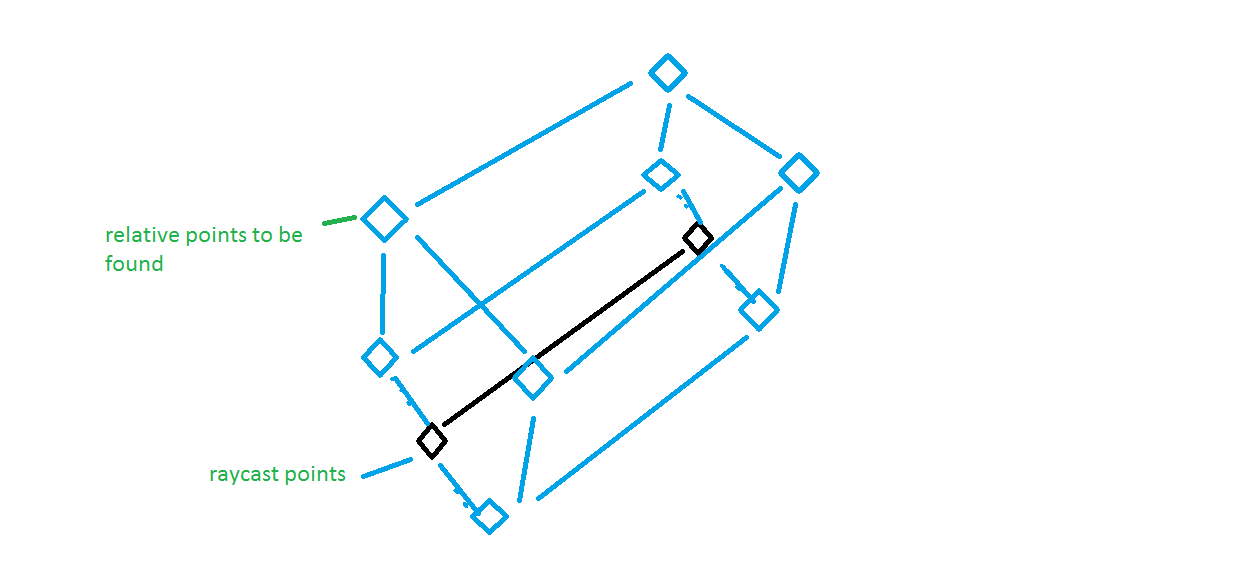
Scaling down the problem to a single point, I still cannot get my head around the problem with an easy solution. 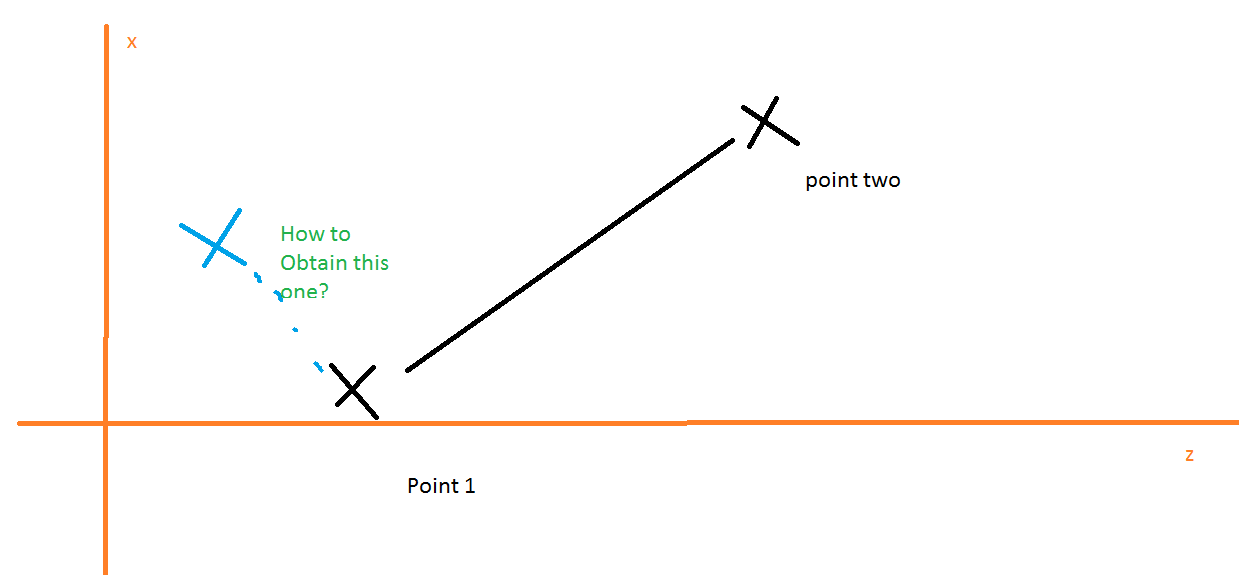
The only possible solution that i have come up with is rather complicated... It involves checking the relation between the values of x and z, between the two points in order to determine the value of the perpendicular point.
They would be a need of eight algorithms (for each case where the values are greater than or equal than...
***If the value of X of point B is larger than the vale of X in point A, }
***And
***if the value of Z is equal in point B and A
***Then, the perpendicular point one, in A, should be x+Some quantity.
I´m feeling that I´m complicating myself too much... is there a simpler solution?
Thanks!!
Here is the Code that I´m using to generate a cube, for reference.
 using UnityEngine;
 using System.Collections;
 using System.Collections.Generic;

 public class MeshClick : MonoBehaviour {
     public List<Vector3> newVertices = new List<Vector3>();
     public List<int> newTriangles = new List<int>();
     public List<Vector2> newUV = new List<Vector2>();
     private Mesh mesh;

     private Vector3 hitInfo;
     private bool hasHit = false;
     private float x;
     private float y;
     private float z;

     private Ray ray;
     public Camera cam;

     public float size = 2;


     private float tUnit = 0.25f;
     private Vector2 tStone = new Vector2 (0, 0);
     private Vector2 tGrass = new Vector2 (0, 1);

     void Update ()
     {

         if(Input.GetMouseButtonDown(0))
         {
             ray = cam.ScreenPointToRay(Input.mousePosition);

             RaycastHit hit = new RaycastHit();

             if (Physics.Raycast (ray, out hit))
             {

                 print("true" + hit.point);
             }
             //hitInfo = ray.GetPoint;

             mesh = GetComponent<MeshFilter> ().mesh;

             x = hit.point.x;
             y = hit.point.y;
             z = hit.point.z;

             //Front

             newVertices.Add( new Vector3 (x  , y  , z ));
             newVertices.Add( new Vector3 (x + size , y  , z ));
             newVertices.Add( new Vector3 (x + size , y-size  , z ));
             newVertices.Add( new Vector3 (x  , y-size  , z ));

             newTriangles.Add(0);
             newTriangles.Add(1);
             newTriangles.Add(3);
             newTriangles.Add(1);
             newTriangles.Add(2);
             newTriangles.Add(3);

             //Triangles();
             //AddTexture();


             //bottom
             newVertices.Add( new Vector3 (x  , y -size , z));
             newVertices.Add( new Vector3 (x + size , y -size , z));
             newVertices.Add( new Vector3 (x + size , y -size , z + size ));
             newVertices.Add( new Vector3 (x  , y -size , z + size ));
             //Triangles();

             newTriangles.Add(4);
             newTriangles.Add(5);
             newTriangles.Add(7);
             newTriangles.Add(5);
             newTriangles.Add(6);
             newTriangles.Add(7);

             //Left
             newVertices.Add( new Vector3 (x  , y - size , z + size));
             newVertices.Add( new Vector3 (x  , y  , z + size));
             newVertices.Add( new Vector3 (x  , y  , z ));
             newVertices.Add( new Vector3 (x  , y - size , z ));

             newTriangles.Add(8);
             newTriangles.Add(9);
             newTriangles.Add(11);
             newTriangles.Add(9);
             newTriangles.Add(10);
             newTriangles.Add(11);


             //right
             newVertices.Add( new Vector3 (x +size , y  , z + size));
             newVertices.Add( new Vector3 (x +size , y - size ,z + size));
             newVertices.Add( new Vector3 (x +size , y - size , z ));
             newVertices.Add( new Vector3 (x +size , y  , z ));


             newTriangles.Add(12);
             newTriangles.Add(13);
             newTriangles.Add(15);
             newTriangles.Add(13);
             newTriangles.Add(14);
             newTriangles.Add(15);

             //top
             newVertices.Add( new Vector3 (x  , y  ,z+size));
             newVertices.Add( new Vector3 (x+size  , y , z+size ));
             newVertices.Add( new Vector3 (x+size , y , z));
             newVertices.Add( new Vector3 (x  , y , z));

             newTriangles.Add(16);
             newTriangles.Add(17);
             newTriangles.Add(19);
             newTriangles.Add(17);
             newTriangles.Add(18);
             newTriangles.Add(19);

             //back
             newVertices.Add( new Vector3 (x +size , y-size  , z +size));
             newVertices.Add( new Vector3 (x +size , y , z + size));
             newVertices.Add( new Vector3 (x  , y , z + size ));
             newVertices.Add( new Vector3 (x  , y -size   , z + size));

             newTriangles.Add(20);
             newTriangles.Add(21);
             newTriangles.Add(23);
             newTriangles.Add(21);
             newTriangles.Add(22);
             newTriangles.Add(23);

             UpdateMesh ();

         }
     }

     void Triangles()
     {

     }

     void UpdateMesh ()
     {
         mesh.Clear ();
         mesh.vertices = newVertices.ToArray();
         mesh.triangles = newTriangles.ToArray();
         mesh.Optimize ();
         mesh.RecalculateNormals ();

     }

     void AddTexture()
     {
         newUV.Add(new Vector2 (tUnit * tStone.x, tUnit * tStone.y + tUnit));
         newUV.Add(new Vector2 (tUnit * tStone.x + tUnit, tUnit * tStone.y + tUnit));
         newUV.Add(new Vector2 (tUnit * tStone.x + tUnit, tUnit * tStone.y));
         newUV.Add(new Vector2 (tUnit * tStone.x, tUnit * tStone.y));

     }
 }

I would think if you cross product your vector with a vector from the ground, that should return the expected vector.




