
Wayback Machinekoobas.hobune.stream
May JUN Jul
Previous capture 11 Next capture
2021 2022 2023
1 capture
11 Jun 22 - 11 Jun 22
sparklines
Close Help
  • Products
  • Solutions
  • Made with Unity
  • Learning
  • Support & Services
  • Community
  • Asset Store
  • Get Unity

UNITY ACCOUNT

You need a Unity Account to shop in the Online and Asset Stores, participate in the Unity Community and manage your license portfolio. Login Create account
  • Blog
  • Forums
  • Answers
  • Evangelists
  • User Groups
  • Beta Program
  • Advisory Panel

Navigation

  • Home
  • Products
  • Solutions
  • Made with Unity
  • Learning
  • Support & Services
  • Community
    • Blog
    • Forums
    • Answers
    • Evangelists
    • User Groups
    • Beta Program
    • Advisory Panel

Unity account

You need a Unity Account to shop in the Online and Asset Stores, participate in the Unity Community and manage your license portfolio. Login Create account

Language

  • Chinese
  • Spanish
  • Japanese
  • Korean
  • Portuguese
  • Ask a question
  • Spaces
    • Default
    • Help Room
    • META
    • Moderators
    • Topics
    • Questions
    • Users
    • Badges
  • Home /
avatar image
1
Question by dibujaron · Jul 30, 2015 at 11:35 AM · cameraterrain

What are these shadow lines on my terrain and how do I remove them?

Hey there and thanks for stopping by,

I've been teaching myself Unity and I'm currently playing around with Voxel/Minecraft style terrain generation for fun and experience. Today I've been playing with lighting and I've noticed an interesting issue- dark shadow lines form on my terrain at a distance. I've looked at my lighting settings, directional light settings, and shader settings a million times and I can't figure out what might be causing them. Here's a gfy of the issue: http://gfycat.com/NegligibleVictoriousErmine

As you can see, as I get farther away, a shadow sort of moves down and covers the terrain, and then another one follows after it. I'm not moving the directional light or anything. What can I do to stop this from happening, or at least make it happen at a greater distance? It wouldn't be noticeable if it was a bit farther away.

Thank you very much! Hopefully you can help me where googling could not. The only other issue I encountered that seemed similar was out of date and didn't seem to get an adequate answer.

Comment
Add comment
10 |3000 characters needed characters left characters exceeded
▼
  • Viewable by all users
  • Viewable by moderators
  • Viewable by moderators and the original poster
  • Advanced visibility
Viewable by all users

2 Replies

· Add your reply
  • Sort: 
avatar image
0
Best Answer

Answer by dibujaron · Jul 30, 2015 at 11:38 PM

The issue was related to my mipmap settings! The mipmaps generated caused the slightly darker effect. Thanks so much to everyone who looked at this, I appreciate it!

Comment
Add comment · Share
10 |3000 characters needed characters left characters exceeded
▼
  • Viewable by all users
  • Viewable by moderators
  • Viewable by moderators and the original poster
  • Advanced visibility
Viewable by all users
avatar image
0

Answer by Nischo · Jul 30, 2015 at 12:04 PM

A shot in the dark:

It looks like that these "lines" of shadow are actually the cascades used in the shadow mapping that unity is using which is called Parallel Split Shadow Maps. My guess would be to increase either the shadow map resolution and or increase the amount of cascades. See these doc articles for further informations: this and that But remember increasing the cascades and texture resolution can have a significant impact on performance.

Comment
Add comment · Show 1 · Share
10 |3000 characters needed characters left characters exceeded
▼
  • Viewable by all users
  • Viewable by moderators
  • Viewable by moderators and the original poster
  • Advanced visibility
Viewable by all users
avatar image dibujaron · Jul 30, 2015 at 02:44 PM 0
Share

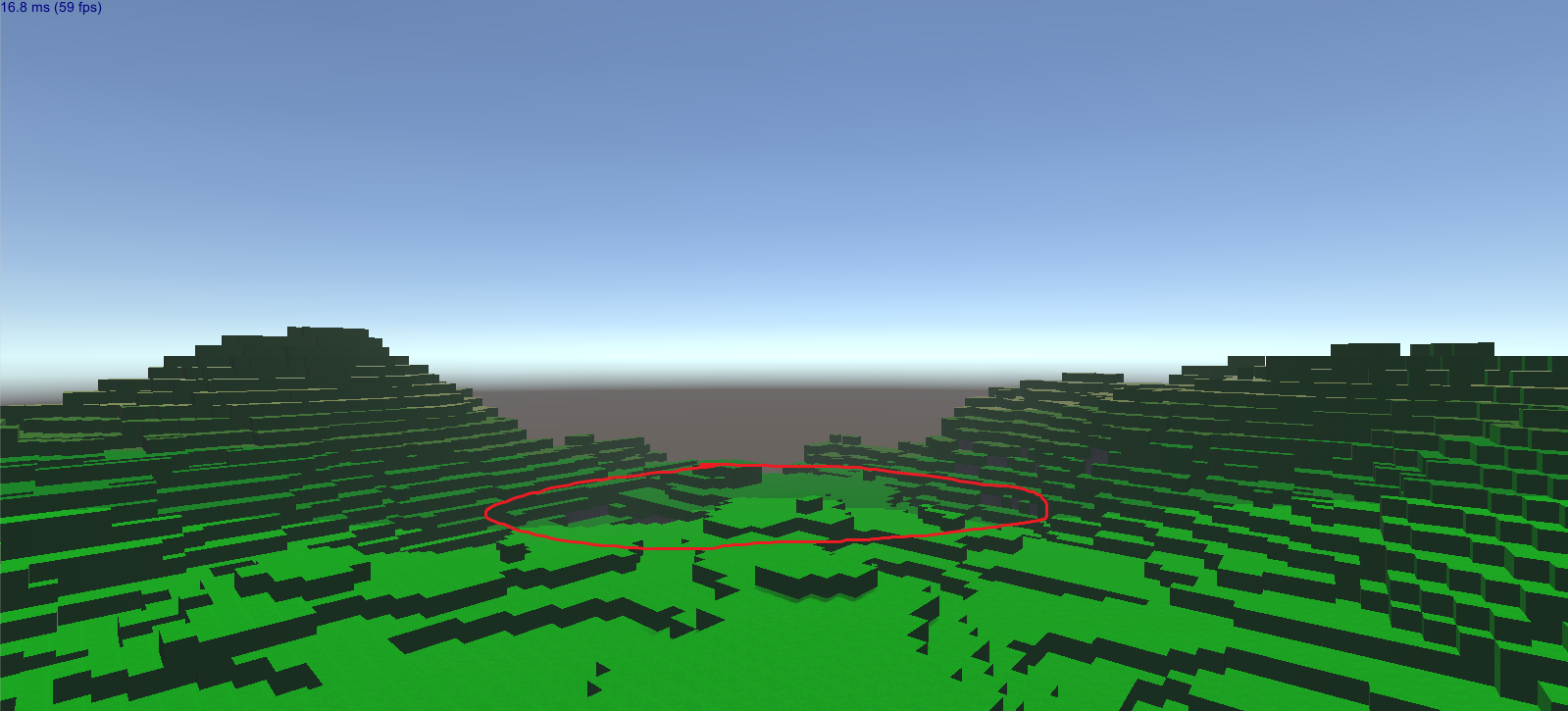
Thanks for trying, but no dice - no matter what cascade settings I tried (none, four, varying distances, varying percentages for each cascade) it still gives me this stupid line: alt text. It's not as easy to see in the picture as I would like, but it forms a circle around the player at a set distance, and terrain beyond it is always darker. Any other ideas as to what it could be?
Your answer

Hint: You can notify a user about this post by typing @username

Up to 2 attachments (including images) can be used with a maximum of 524.3 kB each and 1.0 MB total.

Follow this Question

Answers Answers and Comments

3 People are following this question.

avatar image avatar image avatar image

Related Questions

Why does my water display itself above my trees? 1 Answer

Make the terrain ignore Raycast if in between Camera and Player? 1 Answer

Inserting UnityScript Raycasting code into C# script ? 3 Answers

Whats wrong with the camera? 0 Answers

Camera Problem 0 Answers


Enterprise
Social Q&A

Social
Subscribe on YouTube social-youtube Follow on LinkedIn social-linkedin Follow on Twitter social-twitter Follow on Facebook social-facebook Follow on Instagram social-instagram

Footer

  • Purchase
    • Products
    • Subscription
    • Asset Store
    • Unity Gear
    • Resellers
  • Education
    • Students
    • Educators
    • Certification
    • Learn
    • Center of Excellence
  • Download
    • Unity
    • Beta Program
  • Unity Labs
    • Labs
    • Publications
  • Resources
    • Learn platform
    • Community
    • Documentation
    • Unity QA
    • FAQ
    • Services Status
    • Connect
  • About Unity
    • About Us
    • Blog
    • Events
    • Careers
    • Contact
    • Press
    • Partners
    • Affiliates
    • Security
Copyright © 2020 Unity Technologies
  • Legal
  • Privacy Policy
  • Cookies
  • Do Not Sell My Personal Information
  • Cookies Settings
"Unity", Unity logos, and other Unity trademarks are trademarks or registered trademarks of Unity Technologies or its affiliates in the U.S. and elsewhere (more info here). Other names or brands are trademarks of their respective owners.
  • Anonymous
  • Sign in
  • Create
  • Ask a question
  • Spaces
  • Default
  • Help Room
  • META
  • Moderators
  • Explore
  • Topics
  • Questions
  • Users
  • Badges
