
Wayback Machinekoobas.hobune.stream
May JUN Jul
Previous capture 13 Next capture
2021 2022 2023
1 capture
13 Jun 22 - 13 Jun 22
sparklines
Close Help
  • Products
  • Solutions
  • Made with Unity
  • Learning
  • Support & Services
  • Community
  • Asset Store
  • Get Unity

UNITY ACCOUNT

You need a Unity Account to shop in the Online and Asset Stores, participate in the Unity Community and manage your license portfolio. Login Create account
  • Blog
  • Forums
  • Answers
  • Evangelists
  • User Groups
  • Beta Program
  • Advisory Panel

Navigation

  • Home
  • Products
  • Solutions
  • Made with Unity
  • Learning
  • Support & Services
  • Community
    • Blog
    • Forums
    • Answers
    • Evangelists
    • User Groups
    • Beta Program
    • Advisory Panel

Unity account

You need a Unity Account to shop in the Online and Asset Stores, participate in the Unity Community and manage your license portfolio. Login Create account

Language

  • Chinese
  • Spanish
  • Japanese
  • Korean
  • Portuguese
  • Ask a question
  • Spaces
    • Default
    • Help Room
    • META
    • Moderators
    • Topics
    • Questions
    • Users
    • Badges
  • Home /
avatar image
0
Question by editorer · Jul 11, 2014 at 10:49 AM · c#guitexture

C# - Enabled GUITexture already, but I can still click it.

Hi there.

So here's my goal : Show players a menu with three buttons by clicking a MenuButton,and if the player click the "X" on top-right of the menu,the menu would be closed.

So I create a GUITexture as the "Open-Menu Button",and use "OnMouseUpAsButton() - if(GUI.button (new......))" to create other buttons. (Menu Button will be beneath the menu,and when the button is being clicked,it will turn to green.)
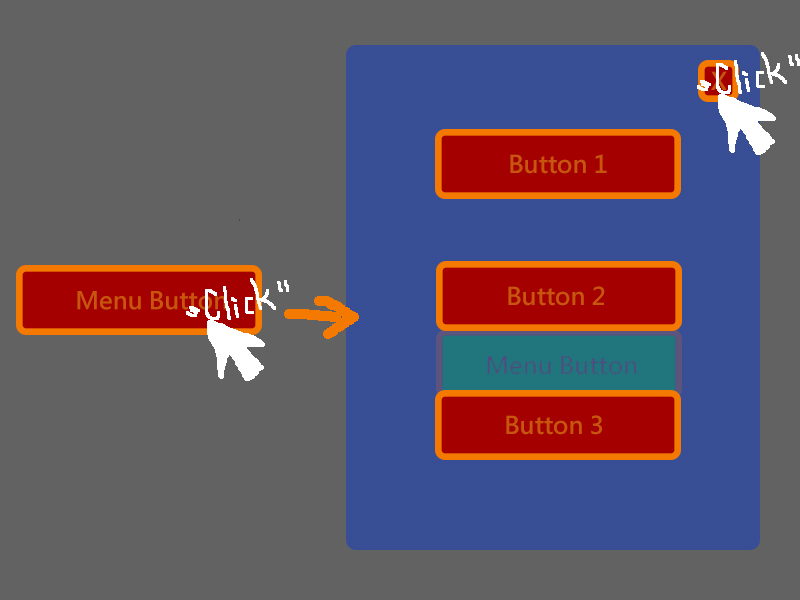
alt text

As you can see,although my cursor is on the "X" button,the "MenuButton" is still green,which means I'm still clicking it.

After testing for many times,I found that once the menu is opened,my cursor is just like freeze at the position where I clicked the MenuButton.I have to move my cursor away to make the MenuButton back to red. ( Normal situation,not clcking.)

I've tried "gameObject.guiTexture.enabled = false when clicking the button",but still in vain.

Because even though I enable the guiTexture of the MenuButton successfully,I can still hear the "Clicking Sound" attached to it.

Getting stuck here for about two hours but got nothing,need help here.

Here's my code ( ClickingSound is NOT included.)

(I add "Press Escape to close the menu" in and it worked,but mouse click still not.)

(OnMouseDown() can make this all work,but I'm wondering why OnMouseUpAsButton() can't.)

 using UnityEngine;
 using System.Collections;
 
 public class ButtonOption : MonoBehaviour    {
 
     public bool MenuIsActive = false;
     
     void OnMouseUpAsButton() 
     {
         MenuIsActive = true;
     }
     
     void OnGUI() 
     {
         if ( MenuIsActive == true )
         {
             GUI.Box (new Rect(500,280,400,400),"");
             GUI.Label ( new Rect(635, 315, 200, 200),"Options", BoldFont);
             
             if(GUI.Button(new Rect(865,290,26,26), "X") || (Input.GetKeyDown(KeyCode.Escape)) )
             {
                 MenuIsActive = false;
             }
             
             if(GUI.Button(new Rect(650,410,100,50),"Button 1"))
             {
                 //Do Something here.
             }
             
             if(GUI.Button(new Rect(650,500,100,50),"Button 2"))
             {
                 //Do Something here.
             }
             
             if(GUI.Button(new Rect(650,590,100,50),"Button 3"))
             {
                 //Do Something here.
             }
 
         }
                 
     }
     
 }


Comment
Add comment
10 |3000 characters needed characters left characters exceeded
▼
  • Viewable by all users
  • Viewable by moderators
  • Viewable by moderators and the original poster
  • Advanced visibility
Viewable by all users

2 Replies

· Add your reply
  • Sort: 
avatar image
0
Best Answer

Answer by Tehnique · Jul 11, 2014 at 11:13 AM

You should hide your MenuButton if the menu is open and show it again when the user clicks the "X".

Comment
Add comment · Show 3 · Share
10 |3000 characters needed characters left characters exceeded
▼
  • Viewable by all users
  • Viewable by moderators
  • Viewable by moderators and the original poster
  • Advanced visibility
Viewable by all users
avatar image editorer · Jul 11, 2014 at 11:24 AM 0
Share

Tried,but the same situation. When I clicked the "X" nothing happened. I guess it disappeared for a couple mileseconds and showed up again.

avatar image Tehnique · Jul 11, 2014 at 11:42 AM 0
Share

Ins$$anonymous$$d of

 gameObject.guiTexture.enabled = false

try to use

 gameObject.SetActive(false);


avatar image editorer · Jul 11, 2014 at 11:55 AM 0
Share

Thank you for helping.

I fix the problem via On$$anonymous$$ouseDown().

I don't know why but when I use gameObject.SetActive(false) it deactive all the buttons.

avatar image
0

Answer by kumarc123 · Jul 11, 2014 at 11:39 AM

Hi,

As per your code I observed that when mouse button is clicked, you are enabling UI. Each time you are clicking on the screen, it is always becoming true.

So you are always getting green background.

Remove that OnMouseUpAsButton method, and implement some other technique to disable green background when you click on "X' button.

Comment
Add comment · Show 1 · Share
10 |3000 characters needed characters left characters exceeded
▼
  • Viewable by all users
  • Viewable by moderators
  • Viewable by moderators and the original poster
  • Advanced visibility
Viewable by all users
avatar image editorer · Jul 11, 2014 at 11:55 AM 0
Share

Thank you for helping.

I fix the problem via On$$anonymous$$ouseDown().

Your answer

Hint: You can notify a user about this post by typing @username

Up to 2 attachments (including images) can be used with a maximum of 524.3 kB each and 1.0 MB total.

Follow this Question

Answers Answers and Comments

23 People are following this question.

avatar image avatar image avatar image avatar image avatar image avatar image avatar image avatar image avatar image avatar image avatar image avatar image avatar image avatar image avatar image avatar image avatar image avatar image avatar image avatar image avatar image avatar image avatar image

Related Questions

Multiple Cars not working 1 Answer

Distribute terrain in zones 3 Answers

Toggle Only Works Once 1 Answer

Best way to change alpha on per object basis. (c#) 0 Answers

Multi touch for character movement on android[solved] 1 Answer


Enterprise
Social Q&A

Social
Subscribe on YouTube social-youtube Follow on LinkedIn social-linkedin Follow on Twitter social-twitter Follow on Facebook social-facebook Follow on Instagram social-instagram

Footer

  • Purchase
    • Products
    • Subscription
    • Asset Store
    • Unity Gear
    • Resellers
  • Education
    • Students
    • Educators
    • Certification
    • Learn
    • Center of Excellence
  • Download
    • Unity
    • Beta Program
  • Unity Labs
    • Labs
    • Publications
  • Resources
    • Learn platform
    • Community
    • Documentation
    • Unity QA
    • FAQ
    • Services Status
    • Connect
  • About Unity
    • About Us
    • Blog
    • Events
    • Careers
    • Contact
    • Press
    • Partners
    • Affiliates
    • Security
Copyright © 2020 Unity Technologies
  • Legal
  • Privacy Policy
  • Cookies
  • Do Not Sell My Personal Information
  • Cookies Settings
"Unity", Unity logos, and other Unity trademarks are trademarks or registered trademarks of Unity Technologies or its affiliates in the U.S. and elsewhere (more info here). Other names or brands are trademarks of their respective owners.
  • Anonymous
  • Sign in
  • Create
  • Ask a question
  • Spaces
  • Default
  • Help Room
  • META
  • Moderators
  • Explore
  • Topics
  • Questions
  • Users
  • Badges