
Wayback Machinekoobas.hobune.stream
May JUN Jul
Previous capture 13 Next capture
2021 2022 2023
1 capture
13 Jun 22 - 13 Jun 22
sparklines
Close Help
  • Products
  • Solutions
  • Made with Unity
  • Learning
  • Support & Services
  • Community
  • Asset Store
  • Get Unity

UNITY ACCOUNT

You need a Unity Account to shop in the Online and Asset Stores, participate in the Unity Community and manage your license portfolio. Login Create account
  • Blog
  • Forums
  • Answers
  • Evangelists
  • User Groups
  • Beta Program
  • Advisory Panel

Navigation

  • Home
  • Products
  • Solutions
  • Made with Unity
  • Learning
  • Support & Services
  • Community
    • Blog
    • Forums
    • Answers
    • Evangelists
    • User Groups
    • Beta Program
    • Advisory Panel

Unity account

You need a Unity Account to shop in the Online and Asset Stores, participate in the Unity Community and manage your license portfolio. Login Create account

Language

  • Chinese
  • Spanish
  • Japanese
  • Korean
  • Portuguese
  • Ask a question
  • Spaces
    • Default
    • Help Room
    • META
    • Moderators
    • Topics
    • Questions
    • Users
    • Badges
  • Home /
avatar image
0
Question by bolibob2 · Nov 10, 2013 at 05:46 PM · renderingwaterglitchterrain bugtexture bugs

Water render glitch?

Hello everyone! just a small question: when i add water for my terrain, the texture spazzes out like this: ![![alt text][1]][1]
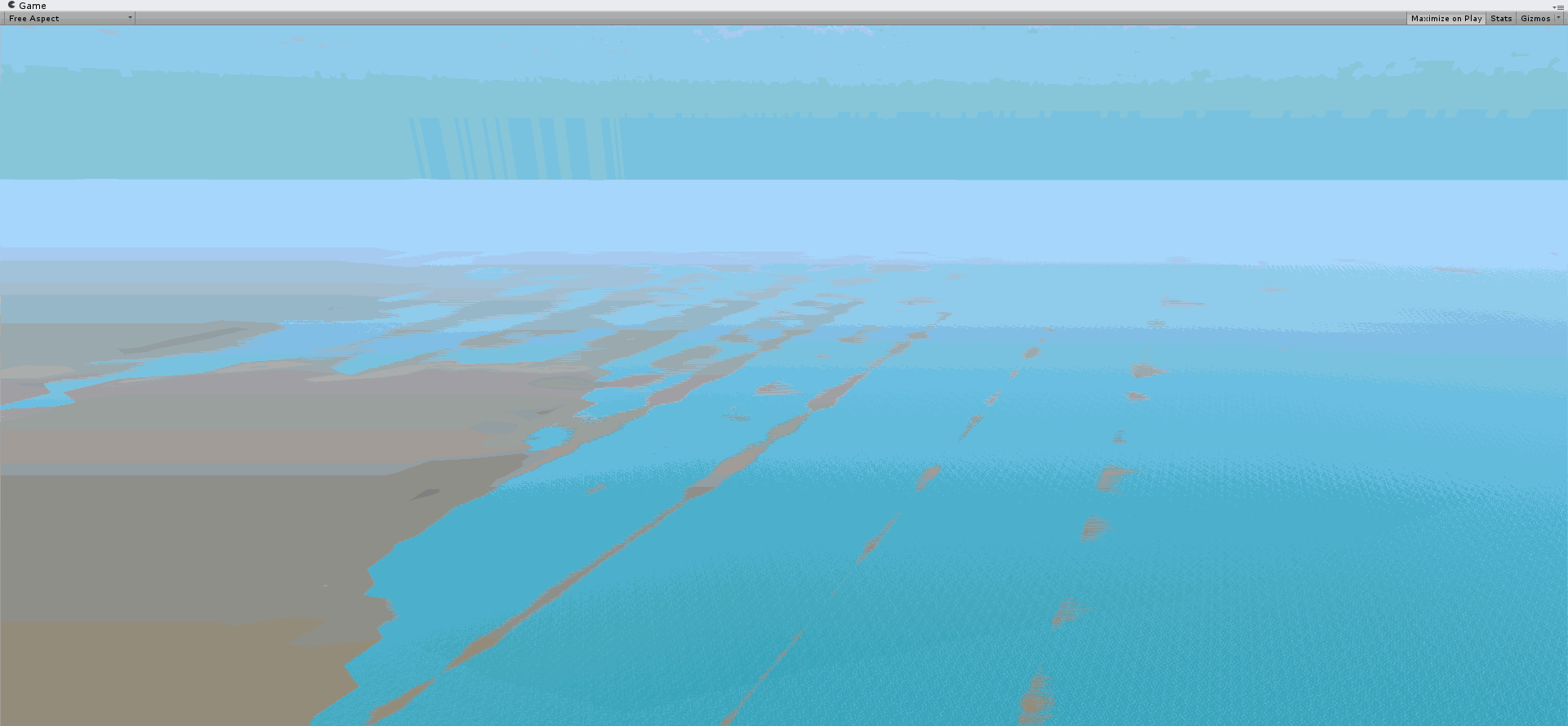
It looks like it's trying to display both textures at the same time, even though the water has no alpha value, and is a few metres above the terrain. the terrain under the water is flat, except for the landmass on the bottom left. how can i fix this render glitch? P.S. It happens with a normal stretched out cube too, as well as a small piece of water. Rsising the water doesn't help, aside from the fact that that it will flood the terrain on places it shouldn't this glitch happens pretty low too, and changing the near clipping plane makes it look like i can see trough things when i walk into them... Thanks in advance -bolibob2

waterglitch.gif (134.4 kB)
Comment
Add comment · Show 7
10 |3000 characters needed characters left characters exceeded
▼
  • Viewable by all users
  • Viewable by moderators
  • Viewable by moderators and the original poster
  • Advanced visibility
Viewable by all users
avatar image kilian277 · Nov 10, 2013 at 08:45 PM 0
Share

Z-fighting try highering your camera near plane and lowering far plane i think

avatar image JSierraAKAMC · Nov 10, 2013 at 09:26 PM 0
Share

Have you tried using a plane for the water?

avatar image bolibob2 · Nov 10, 2013 at 10:45 PM 0
Share

A plane does the exact same thing sadly :(

avatar image bolibob2 · Nov 10, 2013 at 10:55 PM 0
Share

@ kilian277 i increased the clipping plane, but now there's an ugly spot where terrain ect. doesnt get rendered when it's too close to me. decreasing the far plane does way less, i have to make it about ten times as small, which is something i try to avoid... is there no other way?

avatar image kilian277 · Nov 11, 2013 at 11:07 AM 0
Share

try to set the pixel error at the terrain options as low as possible

Show more comments

2 Replies

· Add your reply
  • Sort: 
avatar image
0

Answer by HuskyPanda213 · Nov 10, 2013 at 11:41 PM

Sometimes you either just need to change the Y position, or just zoom closer.

Comment
Add comment · Share
10 |3000 characters needed characters left characters exceeded
▼
  • Viewable by all users
  • Viewable by moderators
  • Viewable by moderators and the original poster
  • Advanced visibility
Viewable by all users
avatar image
0

Answer by FPSworrior · Nov 11, 2013 at 09:14 PM

Move the water just a bit lower than the terrain.

Comment
Add comment · Share
10 |3000 characters needed characters left characters exceeded
▼
  • Viewable by all users
  • Viewable by moderators
  • Viewable by moderators and the original poster
  • Advanced visibility
Viewable by all users

Your answer

Hint: You can notify a user about this post by typing @username

Up to 2 attachments (including images) can be used with a maximum of 524.3 kB each and 1.0 MB total.

Follow this Question

Answers Answers and Comments

21 People are following this question.

avatar image avatar image avatar image avatar image avatar image avatar image avatar image avatar image avatar image avatar image avatar image avatar image avatar image avatar image avatar image avatar image avatar image avatar image avatar image avatar image avatar image

Related Questions

URP 7.4.3 graphics glitchy on android build. 0 Answers

Strange graphics glitch? 1 Answer

waves/ water is very glitchy during rise/fall 0 Answers

A mesh behind other meshes appears above depending on viewing distance. 1 Answer

Android Graphic glitches 1 Answer


Enterprise
Social Q&A

Social
Subscribe on YouTube social-youtube Follow on LinkedIn social-linkedin Follow on Twitter social-twitter Follow on Facebook social-facebook Follow on Instagram social-instagram

Footer

  • Purchase
    • Products
    • Subscription
    • Asset Store
    • Unity Gear
    • Resellers
  • Education
    • Students
    • Educators
    • Certification
    • Learn
    • Center of Excellence
  • Download
    • Unity
    • Beta Program
  • Unity Labs
    • Labs
    • Publications
  • Resources
    • Learn platform
    • Community
    • Documentation
    • Unity QA
    • FAQ
    • Services Status
    • Connect
  • About Unity
    • About Us
    • Blog
    • Events
    • Careers
    • Contact
    • Press
    • Partners
    • Affiliates
    • Security
Copyright © 2020 Unity Technologies
  • Legal
  • Privacy Policy
  • Cookies
  • Do Not Sell My Personal Information
  • Cookies Settings
"Unity", Unity logos, and other Unity trademarks are trademarks or registered trademarks of Unity Technologies or its affiliates in the U.S. and elsewhere (more info here). Other names or brands are trademarks of their respective owners.
  • Anonymous
  • Sign in
  • Create
  • Ask a question
  • Spaces
  • Default
  • Help Room
  • META
  • Moderators
  • Explore
  • Topics
  • Questions
  • Users
  • Badges
